Settings
The Settings page is the central configuration hub for the Stripes system. Settings control how the entire application behaves, from audit requirements to email notifications, scan processing, and quality management across all organizational levels.
Overview
Settings can be configured at four levels, with each level overriding the ones above it.
- Default (System) - Global settings that apply everywhere unless overridden
- Client - Settings for a specific customer that override defaults
- Branch - Settings for a specific branch that override client/default settings
- Project - Settings for a specific project that override all other levels
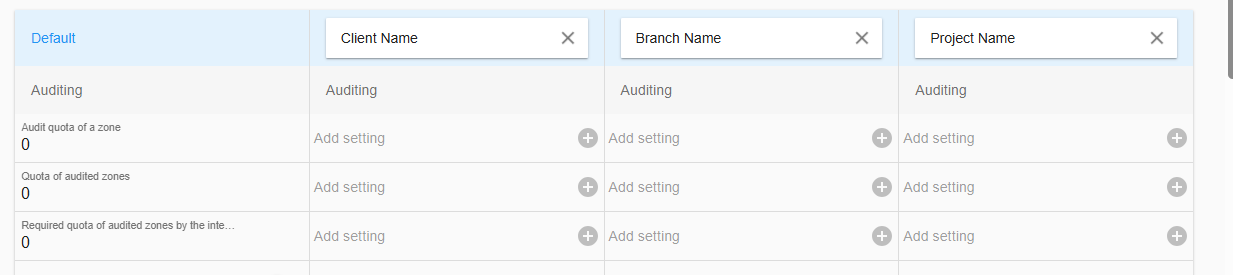
How to Use the Hierarchy
Always check which level you're editing (shown at the top of the settings page), each level overriding the ones above it.
Add or remove a setting
A setting with no values is recognized by the light grey font color. At the Default column it also shows the setting name. In all other levels it shows Add setting when no setting is available on this level.
To add a setting click into the setting frame or the  By adding a setting to a level the setting from the next available level above will be added and will be ready to edit. There are some exceptions which will be described at the belonging setting description.
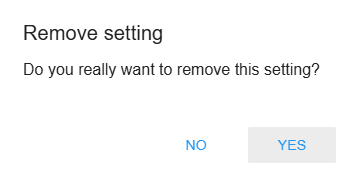
To remove a setting from a level, click  and confirm the popup.
Custom code editor
In case the setting includes custom code the setting gets the code sign 
The click on the setting will open the internal code editor. The code editor supports code fullscreen mode and code validations based on an internal code schema.
The Custom code can't be saved if critical code errors are discovered. Warnings are shown but the code can still be saved.
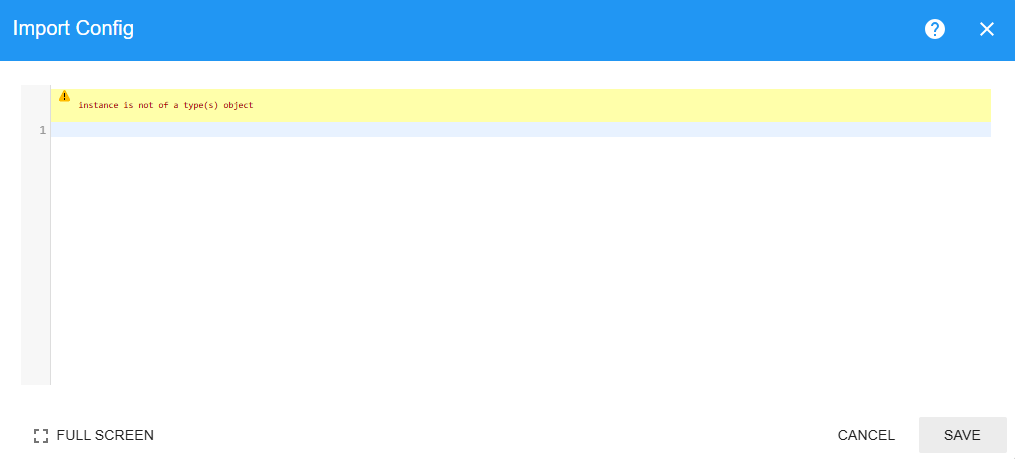
The  opens a guidance for all settings with code functionality.
Categories
Auditing
Settings that control audit quotas and verification requirements.
Audit quota
Control the minimum percentage of scan which needs to be verified during the verification.
- Type: Number (0-100)
- Default: 0
- Label: "Audit quota of a zone"
- Description: The percentage of scans in a zone that must be verified during the audit process.
- Example: If set to 10%, and a zone has 100 scans, at least 10 scans must be verified.
- Use Case: Ensure quality control without requiring 100% verification of every scan.
- Impact:
- Users cannot close a verify session until this quota is met
- Displayed in the verify interface showing current vs required quota
- Set to 0 to disable quota requirement
Zone audit quota
Control the percentage of zones that require verification on project closure.
- Type: Number (0-100)
- Default: 0
- Label: "Quota of audited zones"
- Description: The percentage of zones in a project that must be audited (verified) before the project can be closed.
- Example: If set to 10%, and a project has 500 zones, at least 50 zones must be verified.
- Use Case: Ensure statistical sampling of zones across the entire project.
- Impact:
- Project cannot be closed until this quota is met
- Error message shows how many more zones need verification
- Critical for project closure validation
Quality assurance quota
Control the percentage of Zones that require verification by the quality-assurance-manager on project closure
- Type: Number (0-100)
- Default: 0
- Label: "Required quota of audited zones by the quality-assurance-manager"
- Description: The percentage of zones that must be verified by a Quality Assurance Manager.
- Example: If set to 5%, QA Manager must verify 5% of all zones independently.
- Use Case: Ensure independent quality oversight by a dedicated auditor.
- Impact:
- Project cannot be closed until QA Manager meets their quota
- Only users with "quality-assurance-manager" role count toward this quota
- Separate from general Zone Quota requirement
Check all required scans
Control if all mandatory scans need to be verified on verify session submit
- Type: Boolean (true/false)
- Default: false
- Label: "All marked scans must be checked"
- Description: When enabled, ALL scans flagged with "needsVerification" must be verified.
- Use Case: Enforce mandatory verification of specific scans regardless of audit quota.
- Impact:
- Overrides Audit Quota for marked scans
- Verify session cannot close until all marked scans are checked
- Used for critical items requiring 100% verification
Check required scans on close
Control if all mandatory scans have to be verified on project closure
- Type: Boolean (true/false)
- Default: false
- Label: "All marked scans must be checked on project close"
- Description: Similar to Check all required scans, but only enforced when closing the project.
- Use Case: Allow flexibility during project but enforce complete verification at closure.
- Impact:
- Project cannot close if any marked scans remain unverified
- Less strict than Check all required scans during normal operations
Action required after unmerged change requests
Control if further actions than reviewing the change request are allowed after a not auto merged change request was submitted
- Type: Boolean (true/false)
- Default: false
- Label: "Action required after unmerged change requests"
- Description: Require a review of any change request with count changes before further zone sessions are allowed. Also checks during project closure if all change request have been reviewed
- Use Case: Require to review any single change request with count changes
- Impact: Project cannot close if any change requests with count changes have not been reviewed
External Auditor
Audit quota
Control the minimum percentage of scan which needs to be verified during the verification of an external auditor.
- Type: Number (0-100)
- Default: 0
- Label: "Audit quota of a zone"
- Description: The percentage of scans in a zone that must be verified during the audit process of the external auditor.
- Example: If set to 10%, and a zone has 100 scans, at least 10 scans must be verified.
- Use Case: Ensure quality control without requiring 100% verification of every scan.
- Impact:
- Users cannot close a change-request session until this quota is met
- Displayed in the verify interface showing current vs required quota
- Set to 0 to disable quota requirement
Check all required scans
Control if all mandatory scans need to be verified on change-request session submit
- Type: Boolean (true/false)
- Default: false
- Label: "All marked scans must be checked"
- Description: When enabled, ALL scans flagged with "needsVerification" must be verified.
- Use Case: Enforce mandatory verification of specific scans regardless of audit quota.
- Impact:
- Overrides Audit Quota for marked scans
- Verify session cannot close until all marked scans are checked
- Used for critical items requiring 100% verification
Audit Process
Settings that define how auditing is performed.
Verify function
The Verify-Function is a function to calculate any thresholds and mark positions as mandatory verifications during the verify process
- Type: JavaScript code (multi-line)
- Label: "Verify function"
- Description: JavaScript code that runs to determine which zones/scans need verification.
- Available Functions:
- Technical Documentation -> Verify Function
- Use Cases:
- Mark zones for verification
- Trigger verification based on count discrepancies
- Custom business logic
- Impact:
- Runs when zone status changes
- Determines which scans appear in verify interface
- Critical for audit workflow automation
Verify reasons
The Verify-Reason provides a selection of reasons for which a verification/change was done. The user has to select a reason from this list when a change is done during the verification process.
- Type: String (semicolon-separated)
- Label: "Verify reasons"
- Description: Predefined reasons users can select when verifying scans.
- Format: Separate multiple reasons with semicolons (;)
- Example: "Count mismatch;Wrong location;Damaged item;Missing barcode"
- Use Case: Standardize verification notes for reporting and analysis.
- Impact:
- Appears as dropdown in verify interface
- Helps categorize verification findings
- Improves audit trail quality
Transform scans
The Transform Scans function is a function to perform custom calculations for position price and pieces value which is used for the Live-Statistic values
- Type: JavaScript code (multi-line)
- Label: "Transform scans"
- Description: JavaScript code that automatically modifies scan data.
- Available Functions: Technical Documentation -> Transform Scans
- Use Cases:
- Calculate derived values
- Data normalization
- Impact:
- Runs when zone status changes
- Can modify the scan price and scan pieces property
- Use carefully to avoid data corruption
Sample Mode
The Sample Mode is a functionality which is used on the Android app to scan and search for any item in the project’s records during a stocktaking. See also Sample mode
- Type: YAML configuration
- Label: "Sample Mode"
- Description: Configuration for sample-based auditing modes.
- Available Functions: Schema Documentation
- Use Case: Configure different audit sampling strategies.
- Impact: Affects the fields which the scans can be searched by and which details are shown in the sample mode.
Field Validation
The field validation is a helper function for Client, Branch and Project creation. A RegEx validation can be defined for each field of the before mentioned categories.
- Type: YAML configuration
- Label: "Field Validation"
- Description: Configuration Client, Branch and Project naming validation.
- Available Functions: Schema Documentation
- Use Case: Configure different validations for Client, Branch and Project creation.
- Impact: Affects the Client, Branch and Project creation with all available fields. This also applies for the project import.
For more info about RegEx patterns and testing visit Learn RegEx
Communication
Settings for email notifications and exports.
Export to e-mail address
Define an e-mail address where every generated Export file will be sent to
- Type: String (email address)
- Default: "" (empty)
- Label: "Export email address"
- Description: Primary email address to send export files.
- Format: Valid email address
- Example: "inventory@company.com"
- Use Case: Automatically email project exports to stakeholders.
Export to e-mail address CC
Define an e-mail address where every generated Export file will be sent in CC to.
- Type: String (email address)
- Default: "" (empty)
- Label: "Export email address CC"
- Description: CC email address for export notifications.
- Format: Valid email address
- Example: "manager@company.com"
- Use Case: Keep additional stakeholders informed.
Email to send when project gets closed but not published
Enable/Disable the e-mail send function for projects getting closed but not moved to the published status within the trigger time. Only projects which getting closed after this function gets enabled are considered for the e-mail trigger.
- Type: Boolean (true/false)
- Default: false
- Label: "Send email"
- Description: Send notification email when project is closed but not published after the defined trigger time.
- Use Case: Alert team that project awaits final publishing step.
Email to send
Define the template for the the e-mail which will be sent
- Type: Email template (header, body, signature)
- Default: Three empty strings ["", "", ""]
- Label: "E-mail for export notification timeout"
- Description: Email template sent when export takes longer than expected.
- Format: Array of three strings:
- Header/Subject
- Body text
- Signature
- Example:
- Header: "Export Delayed - Project {projectName}"
- Body: "The export for project {projectName} is taking longer than expected..."
- Signature: "Stripes Inventory System"
- Available Placeholders:
\{projectName\}- Project name{\{projectCode\}}- Project code\{client\}- Client name\{branch\}- Branch name
Email to send from
Define the send e-mail address
- Type: String
- Default: "stripes <no-reply@stripesapp.net>"
- Label: "Default sender"
- Description: The "From" address for system emails.
- Format: "Display Name <email@address.com>"
- Example: "Inventory System <noreply@company.com>"
Email to send recipients
Define the list of the email’s recipients
- Type: String (comma-separated emails)
- Default: undefined
- Label: "Recipients"
- Description: Additional recipients for system notifications.
- Format: Comma-separated email addresses
- Example: "adminADcompany.com, managerADcompany.com"
- Save Behavior: Only saves when you navigate away (saveOnExit: true)
Trigger time
Define the time after which the e-mail will be sent if the project is not in the “Published” status after closing.
- Type: Number (minutes)
- Default: 10
- Min: 1
- Label: "Trigger time (min.)"
- Description: Minutes before sending export timeout notification.
- Example: 30 means send email if export runs longer than 30 minutes.
Configurations
Complex YAML/JSON configurations for advanced features.
Import config
The import config defines the import patterns and file validations, which will be available on the Import page
- Type: YAML configuration (multi-line)
- Label: "Import Config"
- Description: Configuration for file import rules and validation.
- Format: YAML
- Available Functions:
- Use Cases:
- Define import file patterns
- Validate file formats
- Map columns to fields
- Set import rules
- Impact: Controls what files can be imported and how they're processed
Adding a configuration on a subordinate level will be by default "empty". What's available under Import is a combination of all levels. A configuration is only overwritten if the same ID is used.
Export config
The export config defines the export files, which will be available on the Export page
- Type: YAML configuration (multi-line)
- Label: "Export Config"
- Description: Configuration for export formats and destinations.
- Format: YAML
- Available Functions:
- Use Cases:
- Define export file formats
- Configure export destinations
- Set export filters
- Customize export columns
Adding a configuration on a subordinate level will be by default "empty". What's available under Reports/Exports is a combination of all levels. A export is only overwritten if the same key is used.
Scan flow config
The scan flow config defines the scan interface and behavior on the mobile device and any flow to add scans.
- Type: YAML configuration (multi-line)
- Label: "Scan Flow Config"
- Description: CRITICAL configuration defining the entire scan interface and behavior.
- Format: YAML
- Available Functions: Schema Documentation
- Impact: Controls the entire scanning and verification process and user experience
- See also Scan screen
Position verification config
Setting to enable/disable the verify mode "Position Verification" which contains the scan list for verification
- Type: YAML configuration (multi-line)
- Label: "Position Verification Config"
- Description: Rules for verifying individual scan positions.
- Format: YAML
- Available Functions: Schema Documentation
- Impact: enable/disable the verify mode "Position Verification"
- Refer to Position Count
Zone verification config
Control the behavior of the Zone Count verify mode
- Type: YAML configuration (multi-line)
- Label: "Zone Count Verification Config"
- Description: Rules for verifying zone-level counts.
- Format: YAML
- Available Functions: Schema Documentation
- Use Cases:
- Validate total zone counts
- Compare against expected counts
- Set tolerance thresholds
- Refer to Zone Count
Invisible count verification config
Setting to enable/disable the verify mode "Invisible count verification" which contains the scan list for verification This verification mode is similar to the Position Verification but without showing the original count value.
The user hast two attempts to enter the correct count of this product. After the second attempt it shows all occurrence of this products with the count. The user can choose to keep the change or reset to the original count value
See also Invisible count
- Type: YAML configuration (multi-line)
- Label: "Invisible Count Verification Config"
- Description: Configuration for handling items not physically counted but present in database.
- Format: YAML
- Available Functions: Schema Documentation
- Impact: enable/disable the verify mode "Invisible count verification"
Zone linking config
Control the behavior of the Zone Count verify mode. The process is only available for the mobile app.
- Type: YAML configuration (multi-line)
- Label: "Zone Linking Config"
- Description: Configuration to add custom properties to related zones.
- Format: YAML
- Available Functions: Schema Documentation
- Use Cases:
- Define parent-child zone relationships
- Group zones for reporting
- Impact: Controls the entire zone linking process and user experience
- Refer to Zone Linking
Zone code config
Control the behavior for the scanner during the zone login during scanning or verification.
- Type: YAML configuration (multi-line)
- Label: "Zone Code Config"
- Description: CRITICAL configuration defining zone code format and generation rules.
- Format: YAML
- Available Functions: Schema Documentation
- Use Cases:
- Define zone naming conventions
- Validate zone codes
- Auto-generate zone ranges
- Force the scanner to wait for server validations
- Impact: Required for zone creation in the Zones page or during the Zone linking
- See also Zones and Zone Linking
Zone list Config
Control filters and translations for the planning page and project dashboard
- Type: YAML configuration (multi-line)
- Label: "Zonelist Config"
- Description: Configuration for zone list displays and filtering.
- Format: YAML
- Use Case: Customize how zones are listed and organized
Sandbox Variables
Sandbox variables are a set of key value pairs which can be defined and used in any sandbox javascript code.
- Type: Key-Value pairs
- Label: "Sandbox Variables"
- Description: Custom variables available in Verify function, Transform scans and export code.
- Format: JSON object with key-value pairs
- Use Case: Store reusable values for custom scripts
- Access: Variables available as
sandbox.variableName
Registration config
The registration config defines how registration imports are treated. The registration import is available on the Import page It handle both full time and temp users registration.
- Type: YAML configuration (multi-line)
- Label: "Registration Config"
- Description: Configuration for user registration templates and rules.
- Format: YAML
- Use Cases:
- Define registration templates
- Set default roles
- Configure registration validation
Finger scanner config
The finger scanner settings provide any type of string which will be displayed as QR code during the paring process of the finger scanner to preload settings for the finger scanner.
- Type: String
- Default: undefined
- Label: "Finger Scanner Config"
- Description: Configuration for fingerprint scanner integration.
- Format: String (format depends on scanner type)
- Use Case: Integrate biometric authentication for scanners
- Impact: See Finger Scanner
Image library
Image library are a set of key value pairs which can be defined and used in any sandbox code.
- Type: Key-Value pairs
- Label: "Image Library"
- Description: Custom image files available in export code
- Format: png files allowed
- Use Case: Store reusable images for custom scripts
- Access: Variables available with the helper function
findAssets()
QM Module
Quality Management module configuration.
QM Module
Control the availability from the UI and enable/disable the execution of the threshold calculations of QM Module.
- Type: Boolean (true/false)
- Default: false
- Label: "QM Module"
- Description: Enable/Disable the QM module
- Use Case: Do some threshold verifications to be performed independently from the main verification process
Scan QM config
Define threshold calculations for scan values, which appear in the QM Module for approval and work independently from all other verifications.
- Type: YAML configuration (multi-line)
- Label: "Scan Configuration"
- Description: Configuration for QM scan-level approval thresholds and rules.
- Format: YAML
- Available Functions:
- Use Cases:
- Define when scans need QM approval
- Set difference thresholds
- Configure notification levels (info, warning, notify)
- Impact: Determines which scans appear in QM Module for approval
Zone QM config
Define threshold calculations for zone values, which appear in the QM Module for approval and work independently from all other verifications.
- Type: YAML configuration (multi-line)
- Label: "Zone Configuration"
- Description: Configuration for QM zone-level approval thresholds and rules.
- Format: YAML
- Available Functions:
- Use Cases:
- Define when entire zones need QM approval
- Set zone-level thresholds
- Configure zone verification rules
- Impact: Determines which zones appear in QM Module for approval
Match Data
The match database is the sqlite Database file which contains the imported match data, and is used to validate scanned barcodes on the android device and add properties like description, price etc. See also the execution page Database
Match database name
Predefine the match database name used by the projects.
- Type: String with variables
- Default: "" (empty)
- Label: "Match database name"
- Validation: Regex pattern for valid path
- Description: Template for match database filename.
- Format: Can include variables like
$\{project.code\},${client.name} - Example:
match_$\{project.code\} - Use Case: Dynamic database naming based on project properties
- Impact: Controls database file naming for device downloads
Match database device path
Configure device-specific database locations
- Type: String with path variables
- Default: "" (empty)
- Label: "Match database device path"
- Validation: Regex pattern for valid path
- Description: Path on device where match database is stored.
- Format: Can include variables like
$\{device.code\} - Example:
/storage/$\{device.code\}/databases/ - Use Case: Configure device-specific database locations
- Impact: Used by devices to locate match data
The location path is relative to the Android Download folder.
Example: /storage/databases/ -> will expect the match database file on the android device under /Download/storage/databases/
Verify Match Data
Control the e-mail notification for not uploaded match data for a defined time range before the project starts.
- Type: Boolean (true/false)
- Default: false
- Label: "Verify Match Data"
- Description: Send notification email when project has no or obsolete match data at the defined time before the project start date trigger time.
- Use Case: Alert team that project awaits match data upload.
Match data verify e-mail format
Define the e-mail template which will be sent when match data is not available
- Type: Email template (header, body, signature)
- Default: Three empty strings ["", "", ""]
- Label: "E-mail for export notification timeout"
- Description: Email template sent when match data is not uploaded the set time before project start.
- Format: Array of three strings:
- Header/Subject
- Body text
- Signature
- Example:
- Header: "Match data not uploaded - Project {projectName}"
- Body: "The match data for project {projectName} is not uploaded"
- Signature: "Stripes Inventory System"
- Available Placeholders:
\{projectName\}- Project name{\{projectCode\}}- Project code\{client\}- Client name\{branch\}- Branch name
Recipients of the email to be sent
Define a list of recipients of the e-mail
- Type: String (comma-separated emails)
- Default: undefined
- Label: "Recipients"
- Description: Additional recipients for system notifications.
- Format: Comma-separated email addresses
- Example: "adminADcompany.com, managerADcompany.com"
- Save Behavior: Only saves when you navigate away (saveOnExit: true)
Trigger time
Define the trigger time before the system starts to send emails for missing match data.
- Type: Number (hours)
- Default: 1
- Min: 1
- Label: "Trigger time (hrs.)"
- Description: Hours before project start to send the email for missing match data.
- Example: 1 means send email if match data is 1 hour before the project start is not updated.
Main Process
Possible warehouse codes
Defines the possible warehouse codes for zone creation on the project preparation page zones
- Type: String (semicolon-separated)
- Default: "" (empty)
- Label: "Possible warehouse codes"
- Description: List of valid warehouse codes for validation.
- Format: semicolon-separated
- Example: "WH01;WH02;WH03"
- Use Case: Validate warehouse codes during data entry
- Impact: Used in scan validation and zone creation
Possible zone prefixes
Defines the possible zone prefixes for zone creation on the project preparation page zones
- Type: String (semicolon-separated)
- Default: "" (empty)
- Label: "Possible zone prefixes"
- Description: List of valid zone prefixes.
- Format: semicolon-separated
- Example: "A;B;C;D"
- Use Case: Restrict zone naming to predefined prefixes
- Impact: Used in zone code validation
Possible divisions
Defines the possible zone divisions for zone creation on the project preparation page zones
- Type: String (semicolon-separated)
- Default: "" (empty)
- Label: "Possible divisions"
- Description: List of valid division codes for handheld scanners.
- Format: semicolon-separated
- Example: "DIV1;DIV2;DIV3"
- Use Case: Restrict division entry on scanner devices
- Impact: Used in zone generation and validation
Extra zone flags
Defines the possible zone flags for zone creation on the project execution page Planning
- Type: YAML configuration (multi-line)
- Label: "Extra zone flags"
- Description: Custom flags that can be set on zones to mark special conditions.
- Format: YAML array of flag definitions
- Available Functions:
- Use Cases:
- Mark zones with special handling
- Visual indicators in planning view
- Filter zones by custom criteria
- Impact: Adds custom flags to zone interface
Checklist code
Define the PDF design for checklist generation. The checklist download is available form the Execution -> Planning or via Export config and Execution -> Reports/Export
- Type: JavaScript code (multi-line)
- Default: "" (empty)
- Label: "Code for generating checklists"
- Description: Custom JavaScript for PDF checklist generation.
- Format: javascript
- Available Functions:
- Use Cases:
- Custom PDF layout
- Add calculated fields
- Format checklist data
- Include/exclude specific information
- Impact: Customizes zone checklist PDF output
Reopen project
Controls whether and when projects can be reopened. This setting can be skipped by super-admin. See also Close/Reopen/Restore Project
- Type: Option (dropdown)
- Options:
- "always_allow" - Any project can be reopened at any time
- "allow_closed" - Only closed (not published) projects can be reopened
- "do_not_allow" - Projects cannot be reopened once closed
- Default: "do_not_allow"
- Label: "Reopen project"
- Description: Controls whether and when projects can be reopened.
- Use Cases:
- Strict audit trail: do_not_allow
- Flexibility for corrections: allow_closed
- Full flexibility: always_allow
- Impact: Critical for project lifecycle management and audit compliance
Include temp users on live statistics
Include/exclude temp workers from Total Stripes Time on the live statistics.
- Type: Boolean (true/false)
- Default: false
- Label: "Include Temp Users On Live Statistics"
- Description: Whether temporary users appear in live project statistics.
- Use Case: Include/exclude temp workers from
Total Stripes Timeon the live statistics - Impact: Affects live statistic calculations of
Total Stripes Time,Pieces per handEstimated Pieces per h
Scan Process
Login to zone with function button
Control if the zone login is allowed by selecting a zone from the suggested zones list.
- Type: Boolean (true/false)
- Default: false
- Label: "Log in to zone with function button"
- Description: Enable quick zone login using scanner function button.
- Use Case: Streamline scanner workflow for experienced users
- Impact: Changes zone login behavior
- See also Zone Check In
Troubleshooting
If you encounter issues with settings:
- Validate Syntax: Use online YAML/JSON validators
- Review Hierarchy: Ensure you're editing the correct level
- Test Configuration: Try on test project first
- Backup Before Changes: Export current settings before major changes
- Contact Administrator: Provide specific error messages and what you changed
Common Issues
Settings not taking effect
- Wrong hierarchy level selected
- Setting overridden at lower level
Custom JavaScript not working
- Syntax errors
- Incorrect function names
- Variable scope issues
Also check technical documentation
Project won't close
- Quotas not met (AuditQuota, ZoneQuota, QualityAssuranceQuota)
- Same user scanned and verified zones
- CheckAllRequired violations
- QM notifications pending
Scans interface broken
- Invalid ScanFlowConfig
"Invalid JSON" or "Invalid YAML" Error
- Syntax errors in YAML/JSON
- Missing quotes or commas
- Incorrect indentation