Planning
The Planning page is the central hub for project management, zone oversight, and team coordination. It provides comprehensive tools for monitoring zone status, managing work sessions, coordinating team members, and performing bulk operations.
Overview
The Planning page serves as the operational center for:
- Zone Management - Monitor and control individual zones
- Team Coordination - Track and manage registered users
- Bulk Operations - Perform actions on multiple zones
- Session Management - Monitor and control work sessions
- Quality Control - Manage flags, blocking, and verification
The Planning page shows the the quick filter and pagination on the top and on the right side the extended filters, option for multiple zone selection and registered users. Zones are shown in the main grid.
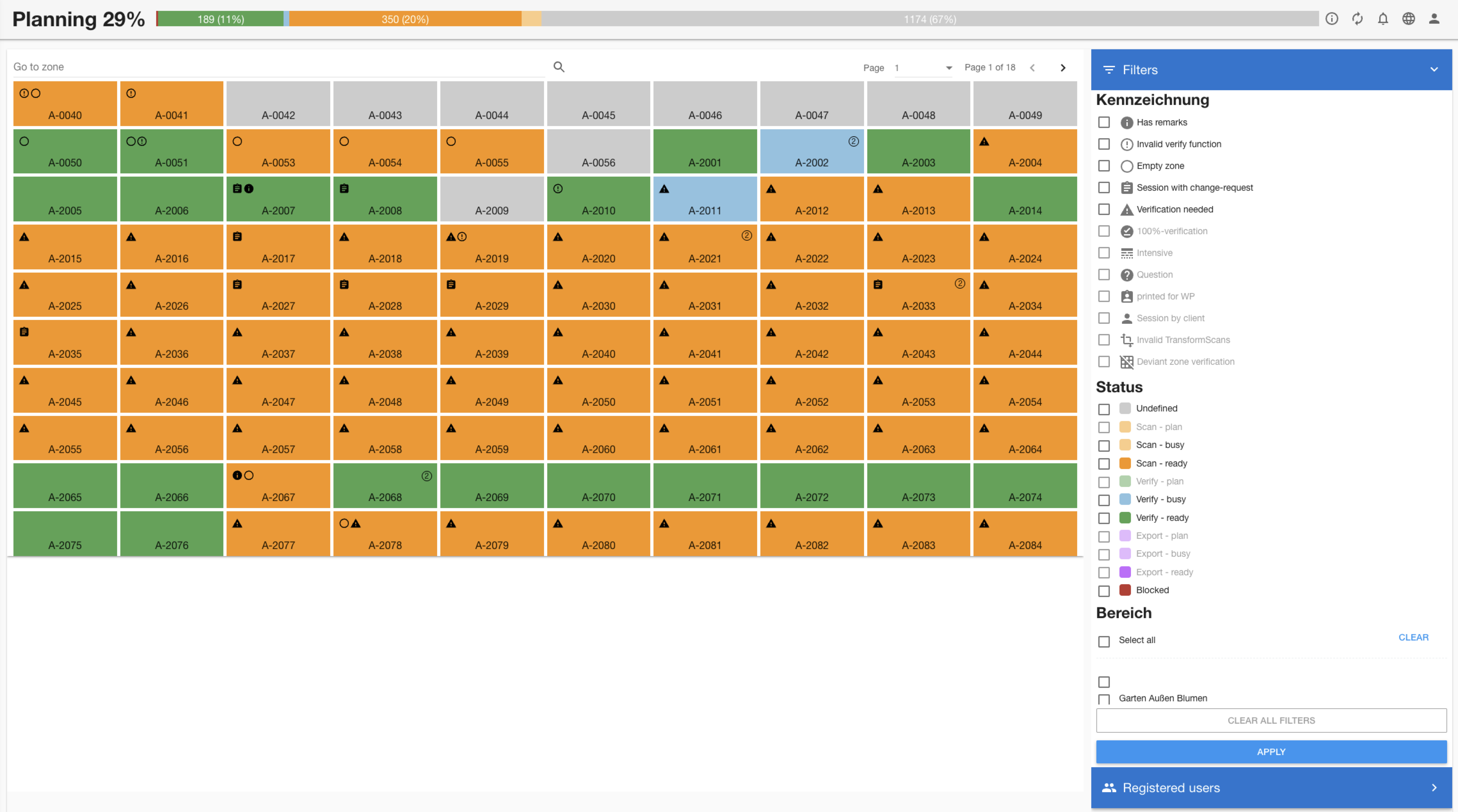
The zone cards are interactive and will enable the session management and zone actions.
Mobile Layout
On the mobile layout the main actions filters, option for multiple zone selection and registered users will be on the bottom.
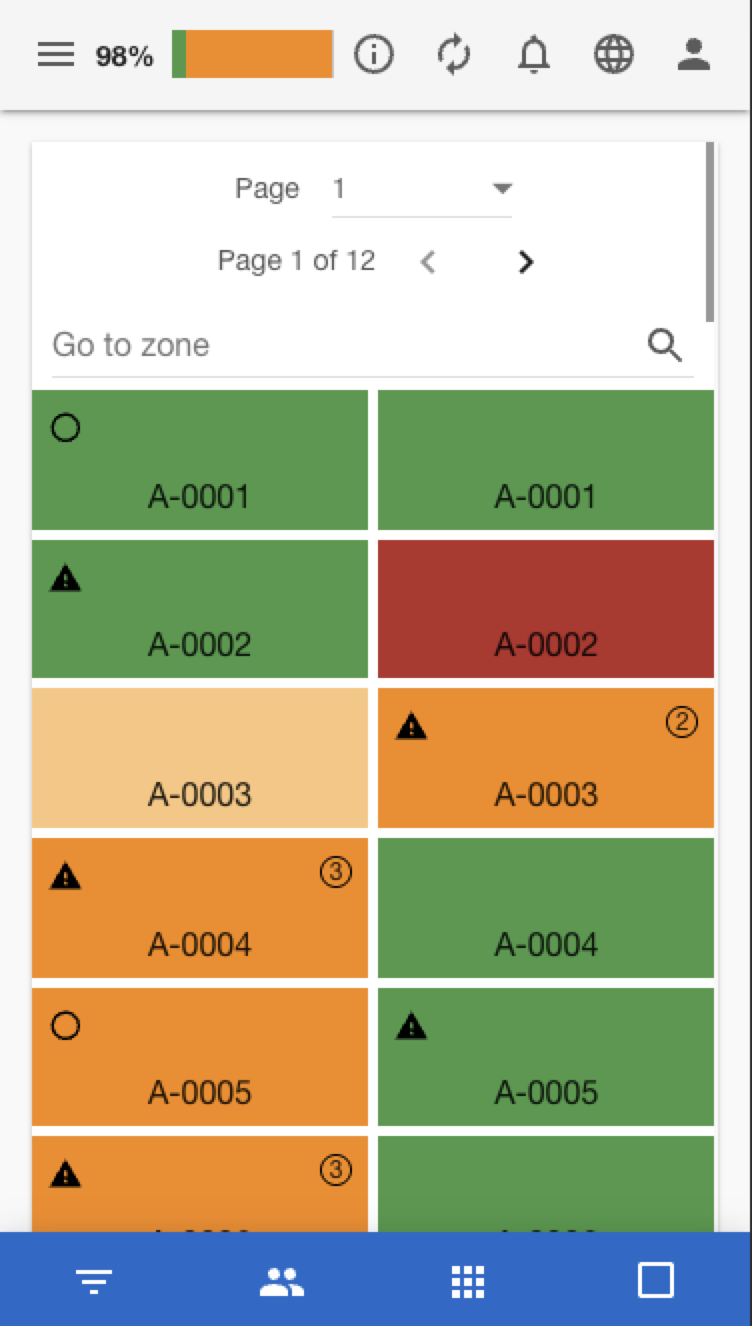
Button Functions:
- Filter
 Open filter panel overlay
 - Users
 Show registered users panel
 - Apps
 Return to main planning view
 - Multi-Actions
 Toggle multi-selection mode
Mobile Adaptations:
- Full-screen panels - Filters and users take full screen
- Touch-friendly zones - Larger touch targets
- Swipe navigation - Navigate between panels
- Simplified layouts - Essential information only
- Quick actions - Direct access to common operations
Zone Grid Display
Zone Status Colors:
| Status | Color | Meaning |
|---|---|---|
| Undefined |  | Ready for scanning |
| Scan - plan |  | Ready for scanning |
| Scan - busy |  | Currently being scanned |
| Scan - ready |  | Scan completed |
| Verify - plan |  | Ready for verification |
| Verify - busy |  | Currently being verified |
| Verify - ready |  | Verification complete |
| Export - plan |  | Ready for export |
| Export - busy |  | Verification complete |
| Export - ready |  | Exported |
| Blocked |  | Cannot proceed |
Real-Time Features
Live Updates
- Zone status changes reflected immediately
- Session updates show real-time progress
- User availability updates as sessions change
- Filter results update with data changes
Session Management
- Active session tracking - Monitor ongoing work
- Session conflict detection - Prevent overlapping work
- Automatic cleanup - Handle abandoned sessions
- Progress monitoring - Track completion status
Access Requirements
Basic Access:
- Active Project - Must be assigned to a current project
- Project Registration - Must be registered in the project
Feature-Specific Permissions:
| Feature | Description |
|---|---|
| Zone Session Management | Create/modify work sessions |
| Zone Blocking | Block/unblock zones |
| Zone Flags | Manage zone flags |
| Download checklists | Generate, view and download checklists for one or multiple projects |
| User Registration | View registered users panel |
Features
Quick Search Functionality:
- Real-time filtering as you type -> supports also partial matches
- Zone code search - Find by identifier (Zone Code)
Pagination Controls:
- Page navigation page size default: 100
- Total count indicator
- Next/Previous navigation
- Direct page jumping
Extended Filters
The filters works as "or" except the flags filter. The flags filter is applied as "and".
If a filter is not selectable it indicates that no zone matching this filter is available.
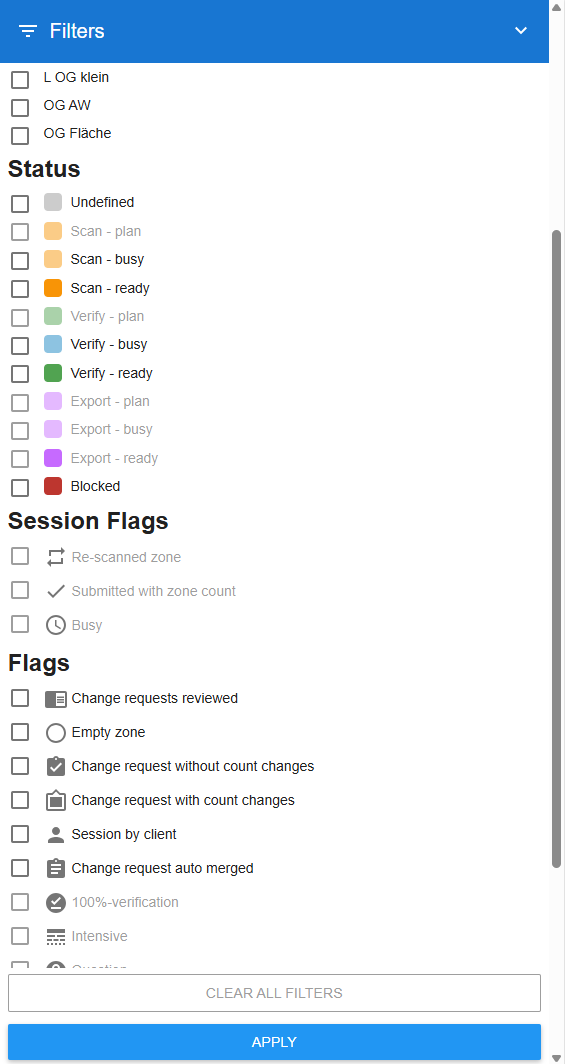
After applying the filter it indicates that filters are active.

All filter categories can be controlled by the Zone List Config in Settings.
Bulk operations
The selection of multiple zones is only enabled when the current user is registered on the project.
Selection Features:
- Click zones to add/remove from selection
- Selection counter showing number of selected zones
- Individual removal from selected zones list
- Visual indicators on selected zones
Available Actions:
| Action | Icon | Description |
|---|---|---|
| Download checklists |  | Generate checklists for all selected zones and download as Zip file |
| Block/Unblock zones |  | Block/unblock multiple zones |
| Set zones to scanned |  | Mark all zones as scanned |
| Set zones to verified |  | Mark all zones as verified |
Smart Action Availability:
- Context-aware enabling - Actions only available when applicable
- Status validation - Prevents invalid state transitions
- Permission checking - Respects user permissions
- Batch processing - Handles large selections efficiently
Registered Users
Filter Options:
| Filter | Description | Use Case |
|---|---|---|
| All Users | Show all registered users | General overview |
| 1 Open Session | Users with exactly one active session | Available for assignment |
| 2+ Open Sessions | Users with multiple active sessions | Potential conflicts |
User Information:
- Full name and username display
- Current session status
- Availability indicators
- Role and permissions context
Zone Grid Display
Zone Flags Management
| Flag | Icon | Description |
|---|---|---|
| Re-scanned zone |  | Verify session is a re-scan session during the zone count verification |
| Submitted with zone count verification | %20with%20Zone%20Count.svg) | Verify session is a Zone-count verification |
| Busy |  | Session is in busy mode (this is the case while the verify-function and transfromscans-function is running) |
| Change request reviewed |  | Zone has reviewed change-request |
| Empty zone |  | Zone contains no scan data |
| Change request without count changes |  | Zone has change-request without count changes |
| Change request with count changes |  | Zone has change-request with count changes which are not reviewed by the team-manager |
| Session by client |  | Work session created by external client |
| Session with auto merged change-request |  | A user with the project role "Quality Assurance Manager" has submitted a change request on this zone. This request is auto merged. |
| 100%-verification |  | Marks zone for complete verification |
| Has remarks |  | Zone has associated remarks added by a user |
| Invalid TransformScans |  | Transformation Scans process failed |
| Invalid verify function |  | Zone verification function has errors |
| Verification needed |  | Zone requires verification |
| Deviant zone verification |  | Zone verification differs from what was expected - related to Verify Zone Count type of verification |
| Intensive |  | This is custom flag defined through the Zone List Config in Settings |
| Question |  | This is custom flag defined through the Zone List Config in Settings |
Zone Information and Action Panel
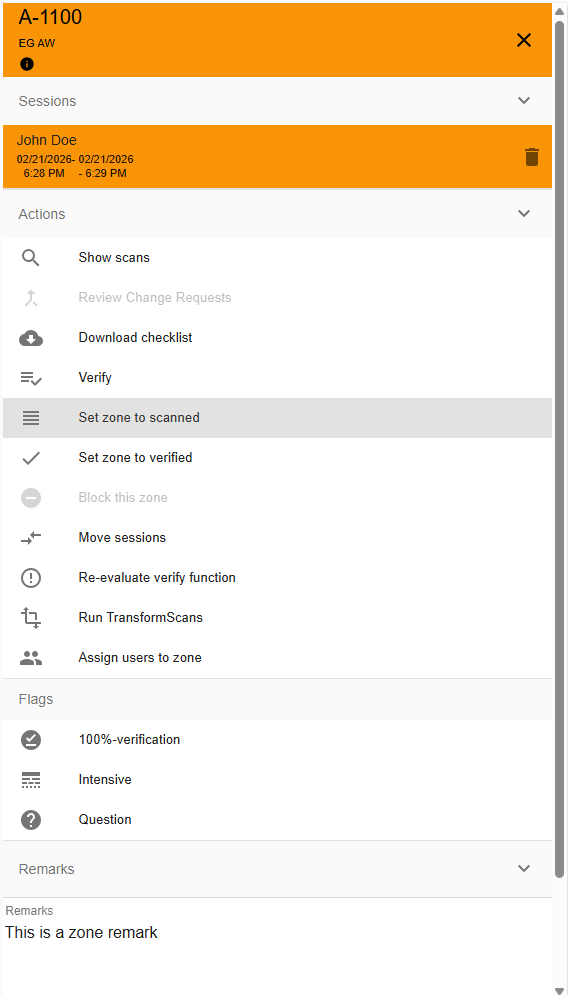
Information Displayed
- Zone code and description
- Current status and history
- Associated work sessions
- Zone properties (division, flags, etc.)
- Progress and completion details
Available Actions
| Action | Icon | Description |
|---|---|---|
| Show scans | | Redirection to the detailed list of the scans of this zone |
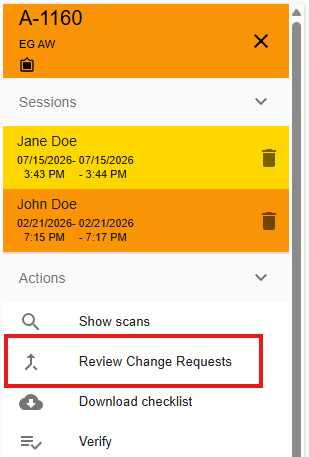
| Review Change Request |  | Start the merge process for change-requests with count changes (only available when registered on the project, zone not reviewed change-request with count changes and it hasn't been scanned by the current user) |
| Download checklist | | Generate the PDF list based on the defined configuration |
| Verify |  | Start the verification process (only available when registered on the project, zone is in Scan - ready status and it hasn't been scanned by the current user) |
| Set zone to scanned | | Set the zone as scanned (only available when registered on the project and the zone is not blocked) |
| Set zone to verified | | Set the zone as verified (only available when registered on the project, zone is in Scan - ready status and it hasn't been scanned by the current user) |
| Block/Unblock Zone | | Prevent further work or resume work capabaility on this zone |
| Move Sessions |  | Transfer this zone's sessions to another zone |
| Re-evaluate verify function |  | Execute the code for the verify function as it was defined in the configuration (only available for global roles Super Admin, Admin, Team Admin (of the same team) and User Admin (of the same team) and project role Team Manager (when registered on the project) |
| Run TransformScans |  | Execute the code for transforming the scans as it was defined in the configuration (only available for Super Admin) |
| Assign users to zone |  | Assign users to the selected zone from the available list |
Review Change Request
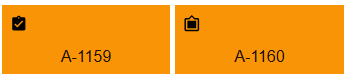
When a customer acting as an external-auditor and performs a verify session on a zone and submit the changes, the change is not immediately applied to the inventory data, but stored as a change request. The zone flags indicates if the change request has count changes or not
Change request flags
| Flag | Icon | Description |
|---|---|---|
| Change request reviewed | | Zone has reviewed change-request |
| Change request without count changes | | Zone has change-request without count changes |
| Change request with count changes | | Zone has not reviewed change-request with count changes |
| Merge change request | | Merge session |
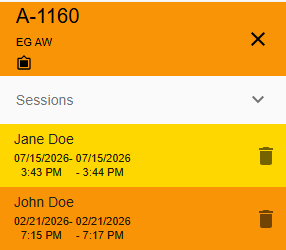
As a Team-Manager or Area-Manager the change-request can be reviewed and positions be merged or rejected.
The merge process is only available when the zone doesn’t have any merged change requests. . Since the merge is considered as a verification its not allowed to create a merge session from a user which already performed a scan session on this zone.
Process
- Select the zone with open change request
- Start the review change request process from the zone actions
-
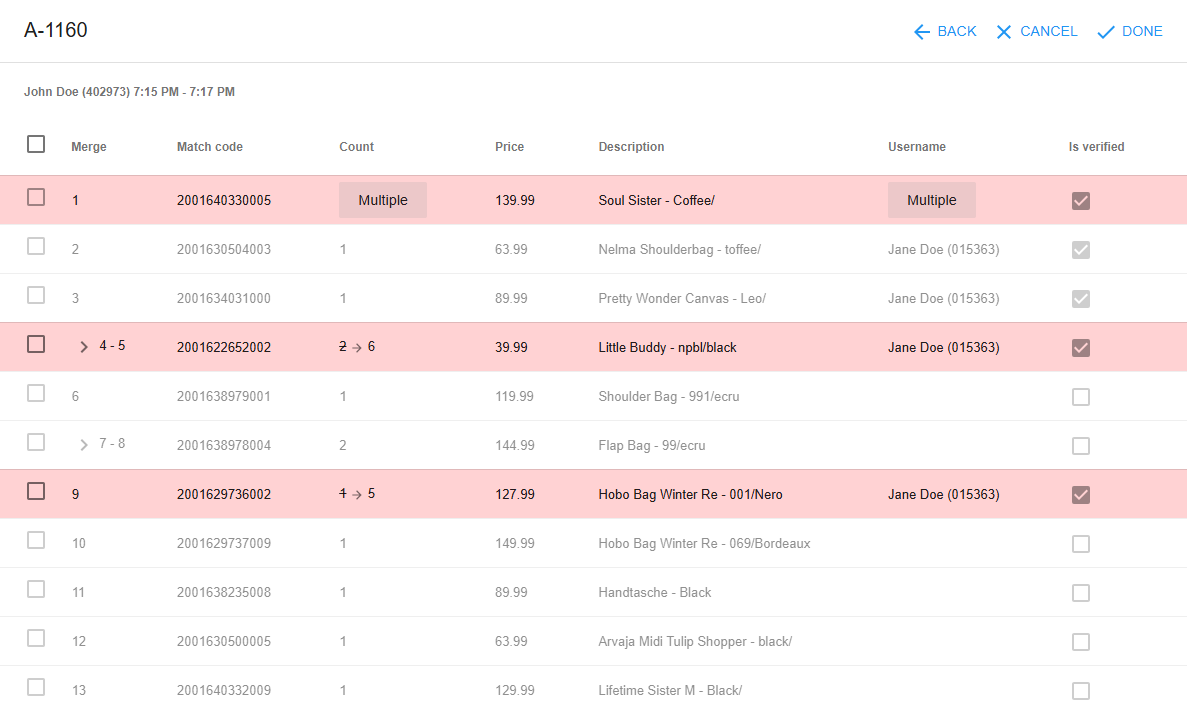
Accept changes by adding the check mark on the front of each changed position. A change gets rejected by leaving the check mark empty.
If the position has multiple changes it will be indicated by the "Multiple" button at the count column. The user has to select one of the requested count changes.
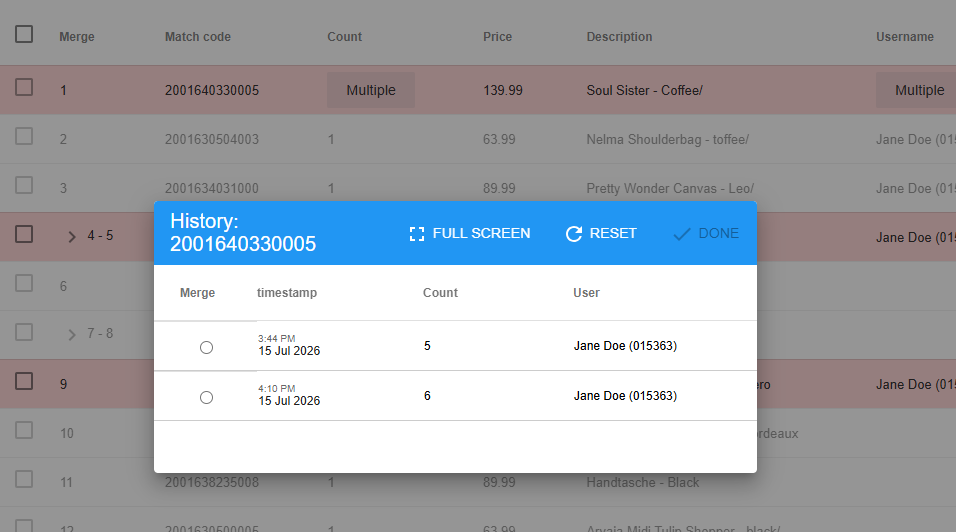
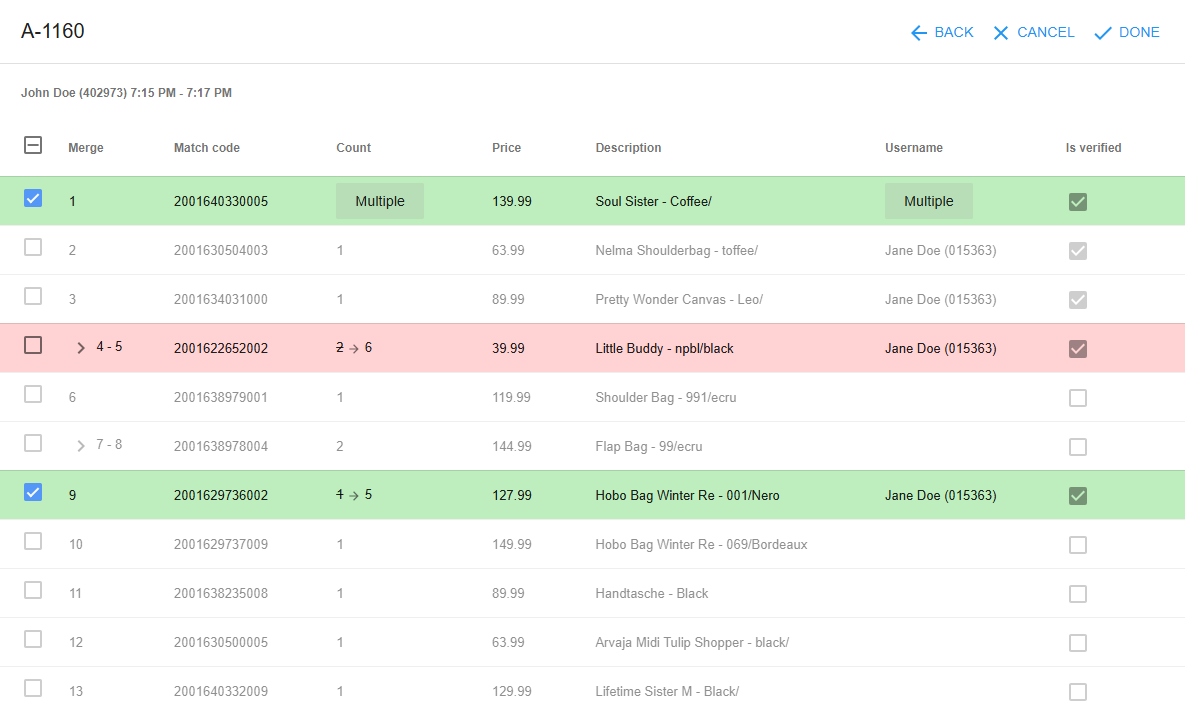
As soon the review is submitted with the Done button at the top, a merge session is created and the new values are applied to the inventory data.
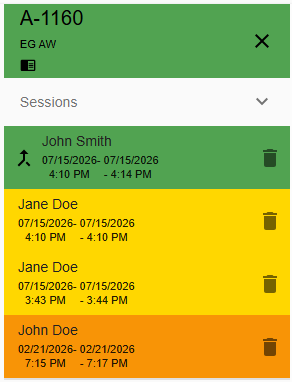
The Zone will be indicated with the Change request reviewed icon . Also the session gets the merge session icon
Verify a zone
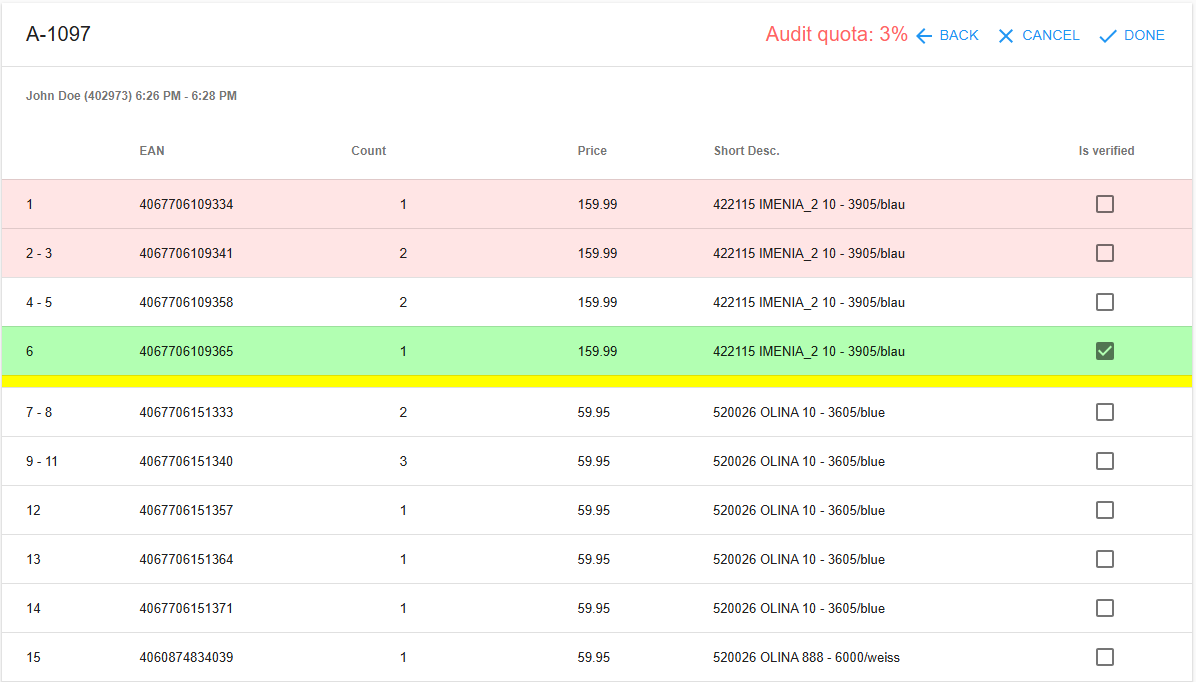
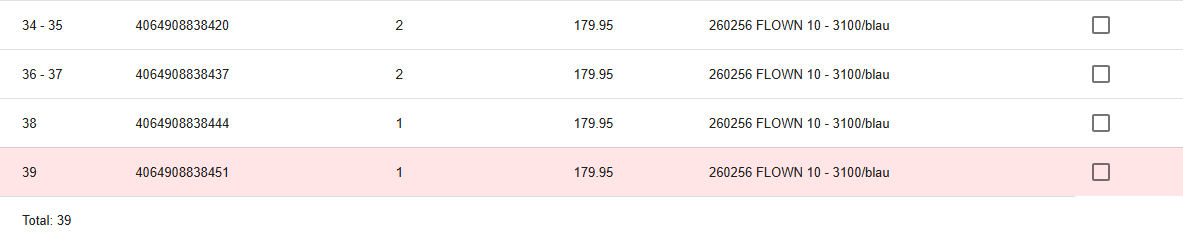
The Verify mode show a list of all scans of a zone to get verified. The columns and headers of the scan table are configurable by the Scan flow configuration. The Mandatory verifications (positions with red background) are calculated by the verify function
Hader Controls
| Description | |
|---|---|
| Audit quota | Show the percentage of verified positions. Turns to green when the audit quota is fulfilled |
| Back | Return to the planning page. Keeping the verify session open. All done changes will be discarded |
| Cancel | Cancel the verify session and return to the planning page. All done changes will be discarded |
| Done | Submit the changes and finish the verify session. The Audit requirements needs to be fulfilled. Otherwise submitting the verify session will be denied. See Audit Settings |
Color Legend
| Color | Description |
|---|---|
| Read | Mandatory verification position |
| Green | Verified position |
| Yellow | Shelf marker |
Actions
- Verify a position
- To verify the position click at the check box at the "is verified" column
- Change a scan value
- To change the count or any other value of the scan click on the count. Every editable field will be underlined

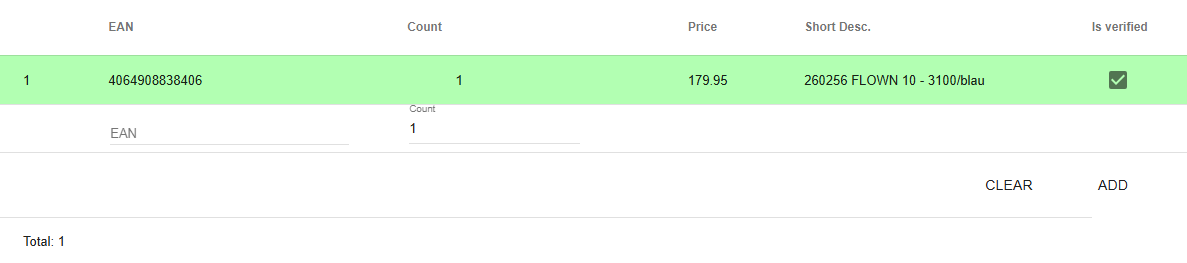
- Add new scans
- At the bottom is the section to add new scans

- Enter the barcode
- Select a match

- enter the count
- Click on "ADD"
Move Sessions
It's possible to move sessions from one to another zone.
- Select a Zone
- Select the action "Move sessions"
- Select the zone the sessions should be moved to
"Move sessions" will always move all sessions from one to another zone. It's not possible to only move a selection of sessions
Assign a user to a zone
The Team-Manager or Area-Manger can assign a user to a zone. This will block the zone for any further actions of other user and will show the assigned zone on the user Android device. To assign a user to a zone follow the process:
- Select a Zone
- Select the action "Assign users to zone"
- Select a user from the registered user
- Select the type of assignment -> Scan or Verify (only available if the zone is not in "undefined" status)
Troubleshooting
Planning page not accessible?
- Verify you're assigned to an active project
- Check if you are registered on the project
- Ensure project is not closed
- Contact team admin/manager for access
Zones not showing?
- Check filter settings - may be too restrictive
- Verify project has zones created
- Clear all filters and try again
- Refresh page if data seems stale
Users panel empty?
- Verify you have the appropriate permission
- Check if users are registered in current project
- Ensure project has active team members
- Contact administrator for user management
Multi-actions not working?
- Check you have the appropriate permission
- Verify you're registered in the project
- Ensure project is active
- Select zones before attempting actions
Can't modify flags?
- Verify you have the appropriate permission
- Check if zone is in modifiable state
- Ensure zone is not blocked
- Confirm flag configuration exists
PDF generation failing?
- Check you have the appropriate permission
- Verify zone has necessary data
- Ensure PDF templates are configured through Settings
- Try individual PDF before bulk generation
Mobile interface issues?
- Use bottom navigation bar for panel switching
- Tap zones firmly for selection
- Use swipe gestures for navigation
- Rotate device if layout appears cramped