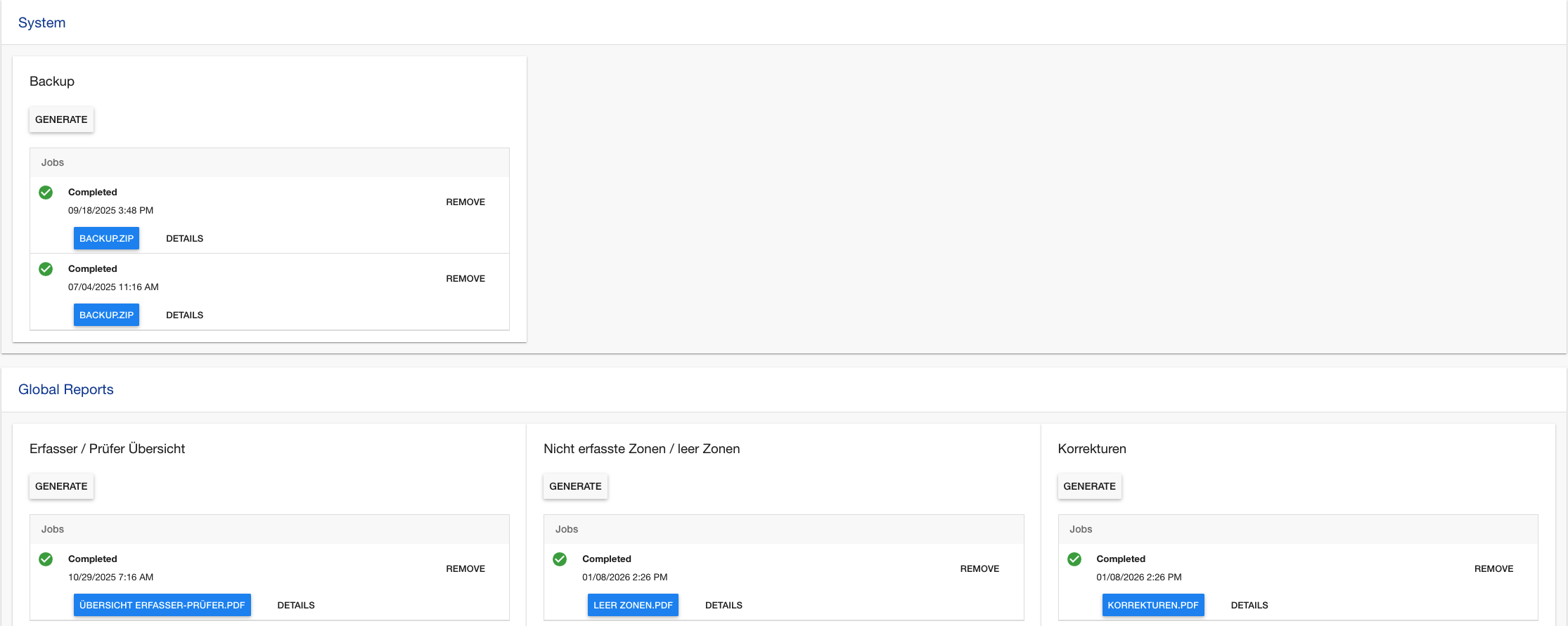
Reports / Exports
π― Overviewβ
The Reports & Exports Page serves as the central hub for generating, managing, and downloading various project reports and data exports. This interface provides a comprehensive job management system where users can initiate export operations, monitor progress in real-time, and access generated files. The system supports configurable export types, backup operations, and project publishing workflows.
π Access Requirementsβ
π₯ Required Roles & Permissionsβ
- View Exports:
exports.viewpermission - Start Exports:
exports.startpermission - Cancel Exports:
exports.cancelpermission - Remove Exports:
exports.removepermission - Reset Export Sessions:
exports.reset-export-sessionspermission
π Permission Scopeβ
- Project-Based: Access limited to exports within user's assigned projects
- Role-Based Operations: Different actions available based on user permissions
- Project State Dependency: Some exports require project to be in "closed" or "published" state
π» Interface Layoutβ
π Main Export Overviewβ
βββββββββββββββββββββββββββββββββββββββββββββββββββββββββββββββ
β π [Publish Project Files] ββ Project Management β
βββββββββββββββββββββββββββββββββββββββββββββββββββββββββββββββ€
β π§ System β
β βββββββββββββββββββββββββββββββββββββββββββββββββββββββββββ β
β β πΎ Backup β β
β β [Generate] ββ Start backup job β β
β β π Jobs: β³ Running (45%) | β
Completed | β Failed β β
β βββββββββββββββββββββββββββββββββββββββββββββββββββββββββββ β
βββββββββββββββββββββββββββββββββββββββββββββββββββββββββββββββ€
β π Data Exports β
β βββββββββββ¬ββββββββββ¬ββββββββββ β
β β π Scans β π₯ Users β π’ Zones β β
β β[Generate]β[Generate]β[Generate]β β
β ββ³ Runningββ
Ready ββ Failed β β
β βββββββββββ΄ββββββββββ΄ββββββββββ β
βββββββββββββββββββββββββββββββββββββββββββββββββββββββββββββββ€
β π Financial Reports β
β βββββββββββββββββββ¬ββββββββββββββββββ β
β β π° Cost Report β π Statistics β β
β β [Generate] β [Generate] β β
β β β
Completed β β³ Running (78%) β β
β βββββββββββββββββββ΄ββββββββββββββββββ β
βββββββββββββββββββββββββββββββββββββββββββββββββββββββββββββββ
ποΈ Job Management Interfaceβ
π Jobs
βββ β³ Running Job
β βββ π Status: Running (75%)
β βββ π
Started: Nov 3, 2025 14:30
β βββ ββββββββββ Progress Bar
β βββ [Cancel] [Details]
βββ β
Completed Job
β βββ β
Status: Completed β οΈ (with warnings)
β βββ π
Finished: Nov 3, 2025 14:25
β βββ π Files: [report.xlsx] [summary.pdf]
β βββ [Remove] [Details] [Reset Sessions]
βββ β Failed Job
βββ β Status: Failed
βββ π
Failed: Nov 3, 2025 14:20
βββ β οΈ Error: Database connection timeout
βββ [Remove] [Details]
β Key Featuresβ
π Export Types & Categoriesβ
-
System Operations:
- πΎ Project Backup: Complete project data backup
- π Project Publishing: Publish project files to production
-
Data Exports (configurable via ExportConfig):
- π Scan Data: Complete scanning records with metadata
- π₯ User Data: User accounts and activity reports
- π’ Zone Information: Zone configurations and statistics
- π Session Data: Zone session records and analytics
-
Financial Reports:
- π° Cost Analysis: Project cost breakdowns
- π Statistical Reports: Performance and efficiency metrics
π Job Management Systemβ
- Real-time Progress: Live progress bars and status updates
- Job Queuing: Prevents duplicate jobs for same export type
- Status Tracking: Comprehensive job lifecycle monitoring
- Error Handling: Detailed error reporting and recovery options
π File Managementβ
- Automatic Downloads: Direct download links for generated files
- File Organization: Files grouped by job and export type
- Multiple Formats: Support for Excel, PDF, CSV, and other formats
- Retention Management: Automatic cleanup of old export files
π Usage Guideβ
π Starting an Exportβ
- Navigate to Reports & Exports page
- Select Export Type from available categories
- Configure Variables (if required):
π Export Variables Modal
βββββββββββββββββββββββββββββββββββββββ
β Date Range: [2024-01-01] to [Today] β
β Include Deleted: β Yes β
β Format: [Excel βΌ] β
β [Cancel] [Generate Export] β
βββββββββββββββββββββββββββββββββββββββ - Click Generate to start the export job
- Monitor Progress in real-time
π Monitoring Export Jobsβ
-
Progress Indicators:
- β³ Running: Shows percentage complete
- β Completed: Ready for download
- β οΈ Completed with Warnings: Check details
- β Failed: Review error messages
- π« Cancelled: Manually stopped
-
Job Actions:
- Cancel: Stop running jobs
- Remove: Delete completed/failed jobs
- Details: View logs and error information
- Reset Sessions: Reset export-related zone sessions
π Downloading Reportsβ
- Wait for Completion: Job status shows β Completed
- Click File Links: Download generated files directly
- Multiple Files: Some exports generate multiple formats
- File Naming: Files include timestamp and export type
π§ Managing Export Sessionsβ
- Export Sessions: Special zone sessions created during exports
- Session Reset: Use "Reset Export Sessions" for cleanup
- Session Tracking: Monitor which zones were exported
- Dependency Management: Handle parent-child job relationships
β οΈ Troubleshootingβ
π« Common Issuesβ
β "Project must be closed" Error
- β Close Project: Change project status to "closed"
- β Check Status: Verify project state in project settings
- β Contact Admin: Request project closure if needed
β "Export job already running" Warning
- β Wait for Completion: Only one job per type allowed
- β Cancel Existing: Cancel running job if needed
- β Check Queue: Monitor job queue status
β "Permission denied" Error
- β Check Roles: Verify required export permissions
- β Project Access: Confirm membership in target project
- β Contact Admin: Request appropriate role assignment
β "Export failed" Status
- β Check Details: Review error logs via Details button
- β Data Validation: Ensure project data integrity
- β Resource Check: Verify server resources availability
- β Retry Export: Attempt export again after issue resolution
β "Files not downloading"
- β Browser Settings: Check download permissions
- β File Existence: Verify file was actually generated
- β Network Issues: Check internet connectivity
- β Server Access: Confirm file server accessibility
π± Mobile/Responsive Considerationsβ
- Touch Interactions: All buttons optimized for touch
- Progress Visibility: Progress bars scale to screen size
- File Downloads: Mobile browsers handle downloads appropriately
- Modal Dialogs: Full-screen on small devices
π Performance Tipsβ
- Batch Exports: Avoid running multiple large exports simultaneously
- Off-Peak Hours: Schedule large exports during low usage
- Data Filtering: Use date ranges to limit export size
- Regular Cleanup: Remove old export jobs to maintain performance
π οΈ Technical Detailsβ
π Export Configuration Structureβ
// ExportConfig Structure
{
"exportType1": {
"title": "Scan Data Export",
"group": "Data Exports",
"allowWhenProjectNotClosed": false,
"isHidden": false,
"exportVariables": [
{
"key": "dateRange",
"title": "Date Range",
"value": ["last30days", "last7days", "custom"]
},
{
"key": "format",
"title": "Export Format",
"value": "excel"
}
]
}
}
π§ Job Lifecycle Statesβ
// Job Status Flow
waiting β ready β running β completed/failed/cancelled
// Job Data Structure
{
_id: "job123",
type: "export",
status: "running",
progress: { percent: 75 },
data: {
projectId: "project456",
exportType: "scans",
exportVariables: { dateRange: "last30days" },
userId: "user789",
exportZoneSessionsResetted: false,
dependentJobIds: ["childjob1", "childjob2"]
},
created: new Date(),
log: [
{ level: "info", message: "Export started" },
{ level: "warning", message: "Some records skipped" }
]
}
π File Storage Systemβ
// Export File Structure
{
_id: "file123",
name: "scans_export_20241103_143052.xlsx",
meta: {
projectId: "project456",
type: "scans",
jobId: "job123",
createdAt: new Date(),
fileSize: 2048576,
downloadCount: 3
}
}
π Security Featuresβ
- Role-based Access: All operations require specific permissions
- Project Isolation: Users can only access their project exports
- File Access Control: Download links are user-specific and time-limited
- Audit Trail: Complete logging of all export operations
- Input Validation: All export parameters validated before processing
π Performance Optimizationsβ
- Job Queuing: Prevents resource conflicts with single-type job limits
- Background Processing: Long-running exports don't block UI
- Progress Streaming: Real-time progress updates via reactive subscriptions
- File Compression: Large exports automatically compressed
- Cleanup Automation: Automatic removal of old files and jobs
π Integration Pointsβ
- Project State: Exports respect project lifecycle states
- Zone Sessions: Creates temporary sessions for data extraction
- User Permissions: Dynamic permission checking for all operations
- File Storage: Integration with GridFS or external storage systems
- Job Processing: Uses Meteor Job Collection for reliable background processing
π Export Variable Typesβ
// Variable Configuration Types
{
"string": "Simple text input",
"array": "Dropdown with predefined options",
"date": "Date picker component",
"boolean": "Checkbox input",
"number": "Numeric input with validation"
}
This documentation covers the comprehensive export and reporting system. For specific export configurations or advanced job management, consult with your system administrator.