Invisible Count

Description

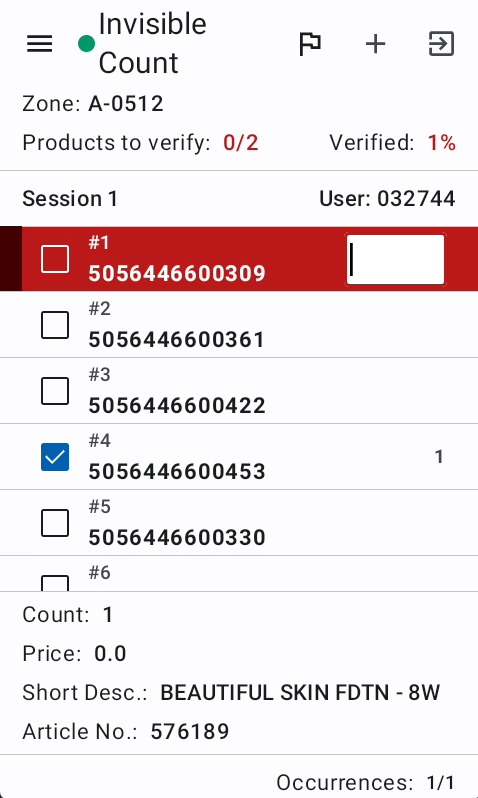
The Invisible Count screen is a specialized verification mode where verifiers count items without seeing the original scanned counts. This prevents bias and ensures accurate recounting. The verifier enters their count for each group, and the system compares it against the total original scans. The screen uses the same base structure as Position Count Verify but hides counts and enforces strict validation logic with limited retry attempts.

Shared Features with Position Count Verify

Invisible Count shares the following with Position Count Verify:

  • Scan Groups Fetching: Uses the same GetScanGroups mechanism (see Position Count Verify documentation).
  • VerifySelections: Same navigation state persistence system.
  • Auditing System: Same quota enforcement and audit status tracking.
  • Group Navigation: Same search, selection, and marker functionality.
  • UI Structure: Uses the same VerifyScreen and VerifyViewModel base.

Key Differences from Position Count Verify

Hidden Counts

  • Original scan counts are hidden from the verifier.
  • Individual scan counts within groups are not visible.
  • Total group counts are not displayed until after verification.
  • This prevents the verifier from being influenced by the original count.

Strict Validation Logic

Unlike Position Count Verify's flexible count editing, Invisible Count enforces exact matching with limited attempts.

Invisible Count-Specific Logic

PerformInvisibleCount - Core Validation Process

This is the main verification function that processes the verifier's entered count:

  1. Parse Input Count: Converts the entered count string to BigDecimal.
  2. Get Original Total: Calculates the sum of all original counts in the group (getOriginalCount()).
  3. Validate Format and Rules:
    • Checks regex validation rules from the Count scan flow step.
    • Validates numeric format.
    • If validations fail and ignoreValidations is false, returns ValidationsFailed.
  4. Compare Counts: Checks if entered count exactly matches the original total.
  5. Track Attempts:
    • If counts don't match, increments verificationAttempts on all scans in the group.
    • If verificationAttempts reaches 2 or more, throws CountAttemptsExceededException.
    • If first attempt failed, throws InvalidCountException.
  6. Update Scans on Success:
    • Uses updateCount() to distribute the entered count across scans.
    • Marks all scans as verified.
    • Updates dateModified timestamp.
  7. Return Result: Either Success or ValidationsFailed.

ScanDomainEntity - Verification Attempts Tracking

Each scan tracks verification attempts:

data class ScanDomainEntity(
// ...existing fields...
val verificationAttempts: Int, // Tracks how many times incorrect count was entered
)

Key Methods:

  • restoreVerificationAttempts(): Resets attempts to 0 (used when accepting or keeping counts).
  • After 2 failed attempts, the system locks the group and shows CountAttemptsExceededException.

updateCount() - Count Distribution Logic

When a new count is entered, the system distributes it across individual scans in the group:

Case 1: Count Increased (entered > original)

  • Adds the difference to the last scan in the group.
  • All other scans keep their original counts.
  • Example: 3 scans of [2, 2, 1] and verifier enters 7 → becomes [2, 2, 3] (adds 2 to last).

Case 2: Count Decreased (entered < original)

  • Subtracts from scans in reverse order (last to first).
  • Each scan is reduced but never below 0.
  • Example: 3 scans of [2, 2, 3] and verifier enters 4 → becomes [0, 2, 2] (removes 3 from last, then 0 from others).

Case 3: Count Unchanged (entered == original)

  • Removes any count changes, restoring original values.

All count modifications are stored in the changes map, preserving original values in properties.

KeepOriginalCount - Accept Original

When the verifier chooses to keep the original count instead of entering their own:

  1. Restore Original Counts: Calls setOriginalCount() to clear any changes from the changes map.
  2. Mark as Verified: Sets isVerified = true on all scans.
  3. Update Timestamp: Sets dateModified to current time.
  4. Reset Attempts: Calls restoreVerificationAttempts() to clear any previous failed attempts.
  5. Save to Database: Persists all scans in the group.

This allows verifiers to accept the original count without entering it, useful when they're confident the original scan was accurate.

AcceptEnteredCount - Force Accept After Mismatch

When counts don't match and the verifier wants to accept their entered count despite the difference:

  1. Apply Entered Count: Uses updateCount() with the verifier's entered count (even though it differs from original).
  2. Mark as Verified: Sets isVerified = true (bypassing the match requirement).
  3. Update Timestamp: Sets dateModified to current time.
  4. Reset Attempts: Clears verificationAttempts since the issue is resolved.
  5. Save to Database: Persists the modified scans.

This is used after InvalidCountException when the verifier is confident their count is correct and the original scan was wrong.

CancelEnteredCount - Discard Changes

When the verifier wants to abandon their entered count and try again:

  1. Restore Original Counts: Calls setOriginalCount() to remove changes.
  2. Reset Attempts: Clears verificationAttempts counter.
  3. Keep Verification Status: Does NOT change isVerified flag (commented out in code).
  4. Save to Database: Persists the reverted scans.

This allows starting fresh without penalty, giving another chance at entering the correct count.

Invisible Count Workflow

Typical Verification Flow

  1. Verifier navigates to a scan group (original count is hidden).
  2. Verifier physically counts the items.
  3. Verifier enters their count.
  4. PerformInvisibleCount executes:
    • Match: Count is correct → Group marked verified, moves to next.
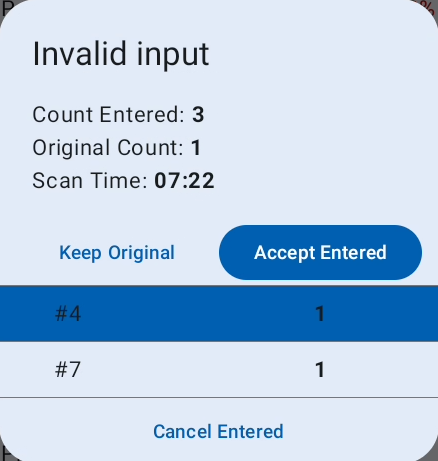
    • First Mismatch: Shows InvalidCountException with options:
      • Try again (CancelEnteredCount).
      • Accept entered count (AcceptEnteredCount).
      • Keep original count (KeepOriginalCount).
    • Second Mismatch: Shows CountAttemptsExceededException, must choose:
      • Accept entered count (AcceptEnteredCount).
      • Keep original count (KeepOriginalCount).

Verification Attempts States

  • 0 attempts: Fresh group, no validation performed yet.
  • 1 attempt: First count entry failed, one more try allowed.
  • 2+ attempts: Maximum reached, must accept one of the counts (no more retries).

Fields

  • Count (when entering): The verifier's counted quantity for the selected group (original count is hidden).

Error Messages

  • InvalidCountException: The entered count does not match the original total (first attempt).
  • CountAttemptsExceededException: Two incorrect counts entered, must accept entered or keep original.
  • Count must be a number: The count value contains non-numeric characters.
  • [Custom Validation Message]: Count field-specific error from regex validation rules.
  • QuotaNotAchieved: The percentage of verified groups is below the required audit quota.
  • NotAllMandatoryVerified: All mandatory items must be verified before checkout.
  • StepNotFoundException: The Count scan flow step is missing from configuration.