Home
Home
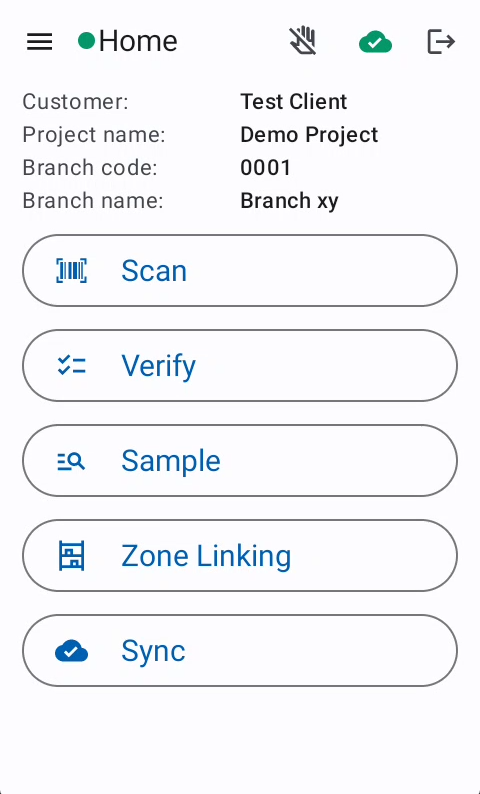
The Home Screen provides the quick overview about the current Project and give access to the most important functions
Overview
Features
Top bar
The top bar includes some navigation and status information.
- Side Menu

- Connection status -> The App contact the server very 10 seconds
 -> Successful server response
 -> Unsuccessful server response
- Name of the current screen
- Connection status of the finger scanner
 /
/ 
- Session sync status
 -> All session are synced with the server
 -> There are unsynced sessions. Check Sync Page
- Log out

Side menu
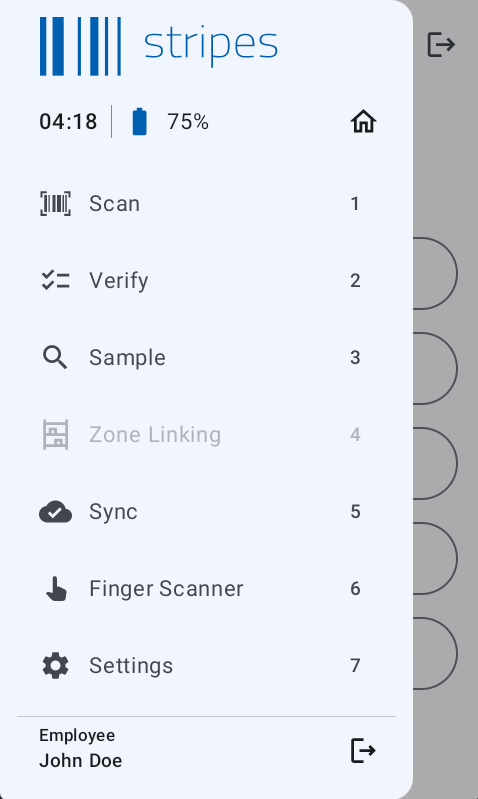
The side menu provides access to all App functionalities.
tip
While the side menu is open the menu items can be selected by pressing the related hardware key
Shortcuts
| Hardware key | Action |
|---|---|
| FN + 1 | Disable/Enable the touch |
| FN + 2 | Open Wifi settings |
| FN + 3 | Open Mobile settings |
| FN + 5 | Decrease brightness |
| FN + 6 | Increase brightness |
| FN + F6 | Open Calculator |
| FN + F8 | Open Side-menu |
Troubleshooting
Common Issues
Zone Linking not available
- Contact the team-manager to assign you to the project as Area-Manager or Team-Manager