Zones
π― Overviewβ
The Zones Page serves as the comprehensive zone management interface for organizing and controlling warehouse locations within projects. This sophisticated system provides complete zone lifecycle management, from creation and configuration through status monitoring and operational control. The zones system enables efficient inventory tracking, scanning operations, and warehouse organization with hierarchical structure and real-time status monitoring.
The Zones Module operates with integrated components for complete warehouse management:
- ποΈ Zone Creation & Management: Create single zones or bulk ranges with standardized naming conventions
- π― Status & Workflow Control: Monitor zone progression through scanning, verification, and export phases
- π© Flag & Alert System: Track zone conditions, quality issues, and operational requirements
- π Visual Zone Grid: Color-coded zone visualization with status indicators and session tracking
π Access Requirementsβ
π₯ Required Roles & Permissionsβ
- View Zones:
zones.viewpermission (basic zone visibility) - Create Zones:
zones.upsertpermission (zone creation and modification) - Delete Zones:
zones.removepermission (zone deletion capabilities) - Block/Unblock Zones:
zones.blockpermission (operational control) - Zone Flags:
zones.flagspermission (flag management) - Zone Remarks:
zones.remarkspermission (annotation capabilities) - Transform Scans:
zones.transformScanspermission (data processing) - Verify Functions:
zones.reevaluateVerifyFunctionpermission (quality control)
π Permission Scopeβ
- Project-Based: Zone operations limited to user's assigned projects
- Role-Based Access: Different permissions for different operational roles
- Status-Based Restrictions: Some operations restricted based on zone status
- Project State Validation: Operations blocked in closed, published, or archived projects
π» Zones Page Interface Layoutβ
πΊοΈ Main Zone Grid Interfaceβ
The Zones page displays a grid view of all zones in the current project with their status indicators and action buttons.
Header Controls:
- Filter button: Filter zones by various criteria
- Manage button: Access zone management options
Zone Grid: The grid displays zones in a table format showing:
- Zone identifiers (e.g., A001, A002, A003)
- Status indicators with color coding
- Action buttons and indicators for each zone
Status Legend:
- π’ Scan Ready: Zone is ready for scanning operations
- π‘ Scan Busy: Zone is currently being scanned
- π΄ Verify Busy: Zone is being verified
- βͺ Undefined: Zone status is not defined
- π Verify Ready: Zone is ready for verification
- π΅ Export Ready: Zone is ready for export
- β« Blocked: Zone is blocked from operations
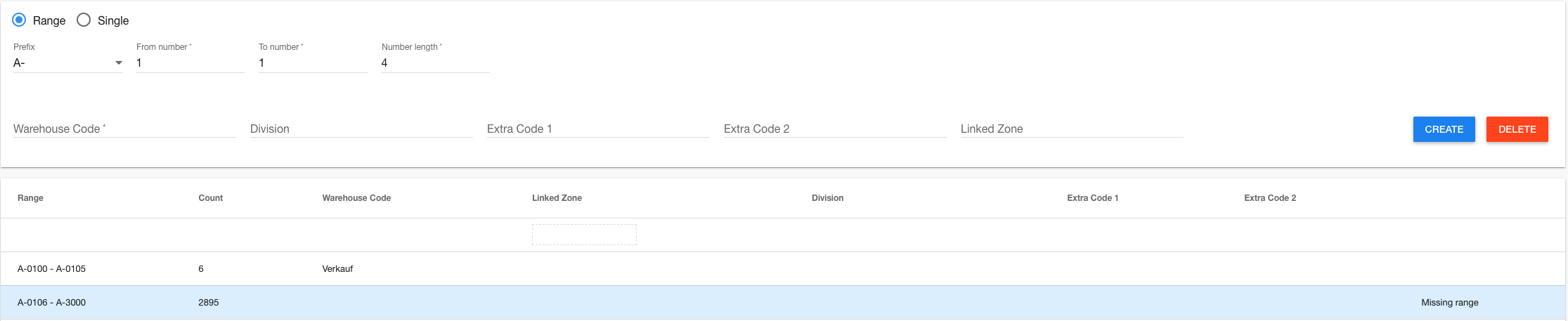
ποΈ Zone Creation Interfaceβ
β Zone Management
βββββββββββββββββββββββββββββββββββββββββββββββββββββββββββββββ
β π Creation Mode: β
β β Single Zone β Range Mode β
βββββββββββββββββββββββββββββββββββββββββββββββββββββββββββββββ€
β π·οΈ Range Configuration: β
β Prefix: [A βΌ] β From: [001] β To: [100] β Length: [3] β
β Warehouse: [WH-01βΌ] β Division: [MainβΌ] β Extra1: [ ] β
β Extra2: [ ] β Linked Zone: [ ] β
βββββββββββββββββββββββββββββββββββββββββββββββββββββββββββββββ€
β [Create Zones] [Delete Range] β
βββββββββββββββββββββββββββββββββββββββββββββββββββββββββββββββ€
β π Existing Ranges: β
β Range βCountβWarehouseβDivisionβExtra1βStatus β
β A001-A100 β 100 β WH-01 β Main β β Active β
β B001-B050 β 50 β WH-02 β Pick β QC β Active β
β C001-C025 β 25 β WH-01 β Pack β β Deleted β
βββββββββββββββββββββββββββββββββββββββββββββββββββββββββββββββ
π Zone Filters Interfaceβ
π Zone Filters
βββββββββββββββββββββββββββββββββββββββββββββββββββββββββββββββ
β π Status Filters: β
β β Scan Plan β Scan Busy β Scan Ready β
β β Verify Plan β Verify Busy β Verify Ready β
β β Export Plan β Export Busy β Export Ready β
β β Undefined β Blocked β
βββββββββββββββββββββββββββββββββββββββββββββββββββββββββββββββ€
β π© Flag Filters: β
β β β οΈ Verification Needed β π Has Remarks β
β β π 100%-verification β π¦ Empty Zone β
β β π€ Session by Client β π Change Request β
β β β Invalid TransformScans β π« Invalid Verify Function β
βββββββββββββββββββββββββββββββββββββββββββββββββββββββββββββββ€
β π’ Location Filters: β
β β Warehouse A β Warehouse B β Warehouse C β
β β Division 1 β Division 2 β Division 3 β
β β Extra Code 1 β Extra Code 2 β
βββββββββββββββββββββββββββββββββββββββββββββββββββββββββββββββ
ποΈ Zone Creation & Management Componentβ
The Zone Creation & Management section provides comprehensive tools for establishing and maintaining warehouse zone structure.
β Zone Creation Featuresβ
- Single Zone Mode: Create individual zones with custom codes and metadata
- Range Mode: Bulk create sequential zones with prefix, numbering, and padding
- Validation System: RegEx-based code validation ensuring naming consistency
- Metadata Assignment: Warehouse codes, divisions, extra codes, and linked zones
- Conflict Prevention: Duplicate detection and validation before creation
π·οΈ Zone Configuration Optionsβ
- π Zone Code: Alphanumeric identifier following project naming conventions
- π’ Warehouse Code: Organizational warehouse identifier for location tracking
- π Division: Operational division assignment (Main, Pick, Pack, etc.)
- π Extra Codes: Additional classification fields for custom categorization
- π Linked Zone: Cross-reference to related zones or client zone mappings
- π― Prefix Management: Standardized prefixes from configurable dropdown options
π Zone Range Managementβ
- Range Definition: Set prefix, start number, end number, and digit padding
- Bulk Operations: Create or delete up to 1000 zones simultaneously
- Configuration Inheritance: Apply consistent metadata across entire ranges
- Range Visualization: Tabular view of existing ranges with status indicators
- Selective Modification: Edit individual zones within existing ranges
π― Status & Workflow Control Componentβ
The Status & Workflow Control section manages zone progression through operational phases and workflow states.
β Zone Status Managementβ
- π΅ Undefined: Initial state before operational assignment
- π’ Scan Plan: Scheduled for scanning operations
- π‘ Scan Busy: Currently undergoing scanning process
- π’ Scan Ready: Scanning completed, ready for verification
- π Verify Plan: Scheduled for verification operations
- π΄ Verify Busy: Currently undergoing verification process
- π Verify Ready: Verification completed, ready for export
- π΅ Export Plan: Scheduled for data export operations
- π΅ Export Busy: Currently processing export operations
- π΅ Export Ready: Export completed, operations finalized
- β« Blocked: Manually blocked from operations
π Workflow Progressionβ
- Zone Creation: New zones start in "Undefined" status
- Scan Assignment: Zones progress to scan planning phase
- Scanning Operations: Active scanning updates status to busy/ready
- Verification Phase: Quality control and verification operations
- Export Processing: Final data export and completion
- Manual Controls: Block/unblock zones for operational control
β‘ Status Control Operationsβ
- Block Zone: Manually prevent zone operations (undefined zones only)
- Unblock Zone: Remove manual blocks and restore operational status
- Status Transitions: Automatic progression based on operational completion
- Workflow Validation: Ensure proper sequence and operational readiness
π© Flag & Alert System Componentβ
The Flag & Alert System provides comprehensive monitoring and notification capabilities for zone conditions and operational requirements.
β Zone Flag Categoriesβ
- β οΈ Verification Needed: Zone requires verification attention
- π 100%-verification: Complete verification requirement flag
- π Has Remarks: Zone contains operational notes or comments
- π¦ Empty Zone: Zone identified as empty during operations
- π€ Session by Client: Zone has client-initiated scanning sessions
- π Session with Change Request: Active change requests for zone
- β Invalid TransformScans: Data transformation errors detected
- π« Invalid Verify Function: Verification function configuration issues
- π― Deviant Zone Verification: Non-standard verification requirements
π§ Flag Management Operationsβ
- Add Flags: Manually assign flags to zones based on operational needs
- Remove Flags: Clear resolved flags and conditions
- Automatic Flagging: System-generated flags based on scan results and conditions
- Flag Filtering: Filter zone view by specific flag types
- Custom Flags: Support for project-specific custom flag definitions
π Remarks Systemβ
- Zone Annotations: Add detailed operational notes and comments
- Remark Flags: Automatic flagging of zones with remarks
- Searchable Comments: Full-text search capabilities for remarks
- Operational Context: Link remarks to specific operational phases
π Visual Zone Grid Componentβ
The Visual Zone Grid provides intuitive color-coded visualization of zone status and operational conditions.
β Grid Visualization Featuresβ
- Color-Coded Status: Immediate visual status recognition
- Zone Code Display: Clear zone identifier presentation
- Flag Indicators: Visual symbols for zone flags and conditions
- Session Counters: Numeric indicators for multiple scanning sessions
- Interactive Selection: Click zones for detailed operations
- Loading States: Progressive loading indicators for large zone sets
π¨ Status Color Codingβ
- π’ Green: Ready states (Scan Ready, operational readiness)
- π‘ Yellow: Active states (Scan Busy, in-progress operations)
- π΄ Red: Critical states (Verify Busy, attention required)
- βͺ White: Neutral states (Undefined, awaiting assignment)
- π Orange: Transition states (Verify Ready, pending next phase)
- π΅ Blue: Export states (Export operations and completion)
- β« Black: Blocked states (Manual blocks, operational restrictions)
π± Responsive Grid Layoutβ
- Adaptive Sizing: Grid adjusts to screen size and zone count
- Pagination Support: Efficient handling of large zone datasets
- Touch-Friendly: Mobile-optimized interaction capabilities
- Zoom Controls: Scale grid for optimal viewing
β Core Zones System Featuresβ
π Permission Integrationβ
- Role-Based Operations: Different permissions for different zone operations
- Project Scope Enforcement: Restrict operations to authorized projects
- Status-Based Restrictions: Limit operations based on current zone status
- Hierarchical Access: Respect organizational permission hierarchies
π Zone Metadata Managementβ
- Structured Data: Organized warehouse codes, divisions, and extra codes
- Configuration Validation: Ensure compliance with project naming conventions
- Linked Zone Support: Cross-reference capabilities for complex warehouse layouts
- Client Zone Mapping: Support for client-specific zone identifiers
π Advanced Filtering Systemβ
- Multi-Criteria Filtering: Combine status, flags, and metadata filters
- Real-time Updates: Instant filter application and result updates
- Filter Persistence: Maintain filter states during session
- Export Capabilities: Generate filtered zone reports and lists
π Zones Page Usage Guideβ
π Getting Started with Zone Managementβ
- Navigate to Zones page via main navigation menu
- Review Current Zones: Check existing zone layout and status distribution
- Apply Filters: Use filter controls to focus on specific zone categories
- Select Operation: Choose between viewing, creating, or managing zones
- Monitor Permissions: Verify your access level for planned operations
ποΈ Creating Individual Zonesβ
-
Select Single Mode:
π Choose "Single Zone" creation mode
π·οΈ Enter zone code following naming conventions
π’ Select warehouse code from dropdown
π Choose division and extra codes as needed -
Configure Zone Details:
π Set linked zone if cross-referencing required
β Validate zone code against project RegEx
π Review metadata for completeness
π Click "Create" to finalize zone
π Bulk Zone Range Creationβ
-
Select Range Mode:
ποΈ Choose "Range Mode" for bulk creation
π·οΈ Select prefix from configured options
π’ Set start number, end number, and padding length
π Review total zone count (max 1000) -
Configure Range Metadata:
π’ Select warehouse code for entire range
π Choose division assignment
π Set extra codes for categorization
π Configure linked zone if applicable -
Execute Range Creation:
β Verify range configuration is correct
π Click "Create Zones" button
β³ Monitor progress for large ranges
π Review created zones in grid view
π― Managing Zone Status and Operationsβ
-
Zone Status Control:
πΊοΈ Click individual zones in grid view
β« Use "Block" to prevent operations
π Use "Unblock" to restore operations
π Monitor automatic status transitions -
Flag Management:
π© Add flags for operational conditions
β Remove flags when conditions resolved
π Use flags for filtering and reporting
π Add remarks for detailed annotations
π Using Zone Filters and Searchβ
-
Apply Status Filters:
π Select specific status types to display
β Use checkboxes to include/exclude statuses
π Clear filters to show all zones
π Monitor filtered zone counts -
Flag-Based Filtering:
π© Select flag types for filtering
β οΈ Focus on zones requiring attention
π Filter zones with remarks
π Combine multiple flag filters -
Location-Based Filtering:
π’ Filter by warehouse codes
π Select specific divisions
π Use extra codes for categorization
πΊοΈ Review filtered zone grid
ποΈ Zone Deletion and Range Managementβ
-
Single Zone Deletion:
π Switch to "Single Zone" mode
π·οΈ Enter zone code to delete
ποΈ Click "Delete" button
β οΈ Confirm deletion in dialog -
Range Deletion:
π Configure range parameters to delete
ποΈ Click "Delete Range" button
β οΈ Confirm range deletion
π Verify zones marked as deleted
π Understanding Zone Visual Indicatorsβ
- Zone Code: Primary identifier for zone location
- Background Color: Current operational status
- Flag Icons: Operational conditions and requirements
- Session Counter: Number of active scanning sessions
- Loading Animation: Progressive loading for large zone sets
β οΈ Zones Page Troubleshootingβ
π« Common Zone Management Issuesβ
β "Code does not match RegEx" Error
- β Naming Convention: Verify zone code follows project naming standards
- β RegEx Configuration: Check project zone code configuration settings
- β Format Validation: Ensure proper prefix, numbering, and length format
- β Admin Consultation: Contact administrator for RegEx pattern clarification
β "Create too many zones" Error
- β Range Limitation: Maximum 1000 zones per range operation
- β Split Ranges: Divide large ranges into multiple smaller operations
- β Progressive Creation: Create zones in batches for large warehouses
- β Performance Consideration: Large ranges may impact system performance
β "Zone has sessions" Deletion Error
- β Active Sessions: Complete or cancel active scanning sessions
- β Session History: Check zone session history for dependencies
- β Data Integrity: Ensure scan data is properly exported before deletion
- β Alternative Approach: Consider blocking zone instead of deletion
β "Project closed" Operation Error
- β Project Status: Verify project is in active operational state
- β State Validation: Check project is not closed, published, or archived
- β Permission Timing: Operations blocked in finalized projects
- β Admin Contact: Request project state change if operations needed
β "Invalid zone status" for Block/Unblock
- β Status Requirement: Only undefined or blocked zones can be toggled
- β Operational State: Complete current operations before blocking
- β Workflow Position: Ensure zone is not in active operational phase
- β Status Reset: Wait for operations to complete naturally
π Zone Grid Performance Issuesβ
- Large Zone Sets: Use filters to reduce displayed zone count
- Loading Delays: Progressive loading for datasets over 1000 zones
- Browser Performance: Chrome/Firefox recommended for large zone grids
- Memory Optimization: Clear filters periodically to refresh display
π Zone Status Synchronizationβ
- Real-time Updates: Zone status updates automatically during operations
- Refresh Delays: Manual page refresh if status appears stale
- Subscription Status: Check connection indicator for real-time updates
- Cache Issues: Clear browser cache if persistent display issues
π οΈ Zones System Technical Detailsβ
ποΈ Zone Architectureβ
// Zone System Structure
{
zoneManagement: {
creation: "single_and_range_modes",
validation: "regex_based_naming",
metadata: "structured_warehouse_data",
operations: "status_workflow_control"
},
visualization: {
gridLayout: "color_coded_status",
flagIndicators: "icon_overlay_system",
sessionCounters: "numeric_indicators",
responsiveDesign: "mobile_optimized"
},
filterSystem: {
multiCriteria: true,
realTimeUpdates: true,
persistentState: true,
exportCapabilities: true
}
}
πΊοΈ Zone Record Structureβ
// Zone Database Record
{
_id: "zone123",
projectId: "project456",
code: "A001",
warehouseCode: "WH-01",
division: "Main",
extra1: "QC",
extra2: "Priority",
clientZoneCode: "CLIENT-A001",
status: "scan.ready",
flags: [
"verification-needed",
"has-remarks"
],
remarks: "Special handling required",
deleted: false,
qmChecked: true,
scanSessions: 2,
lastModified: new Date(),
createdAt: new Date(),
metadata: {
range: {
prefix: "A",
number: 1,
length: 3
},
coordinates: {
x: 1,
y: 1,
level: 0
}
}
}
π― Status Workflow Logicβ
// Zone Status Progression
const ZoneStatusWorkflow = {
"undefined": ["scan.plan", "blocked"],
"scan.plan": ["scan.busy"],
"scan.busy": ["scan.ready"],
"scan.ready": ["verify.plan"],
"verify.plan": ["verify.busy"],
"verify.busy": ["verify.ready"],
"verify.ready": ["export.plan"],
"export.plan": ["export.busy"],
"export.busy": ["export.ready"],
"export.ready": ["completed"],
"blocked": ["undefined"]
};
const validateStatusTransition = (currentStatus, newStatus) => {
const allowedTransitions = ZoneStatusWorkflow[currentStatus] || [];
return allowedTransitions.includes(newStatus);
};
π Zone Creation Logicβ
// Range Creation Algorithm
const createZoneRange = (prefix, from, to, length, metadata) => {
if (to < from) {
throw new Error('To number smaller than from number');
}
const totalCount = (to - from) + 1;
if (totalCount >= 1000) {
throw new Error('Range too large (max 1000 zones)');
}
const zones = [];
for (let i = from; i <= to; i++) {
const code = `${prefix}${i.toString().padStart(length, '0')}`;
zones.push({
code,
...metadata,
status: "undefined",
flags: [],
deleted: false,
qmChecked: true
});
}
return zones;
};
π© Flag Management Systemβ
// Zone Flag Operations
const ZoneFlagSystem = {
predefinedFlags: [
'complete-verification-needed',
'has-remarks',
'verification-needed',
'is-empty',
'session-by-client',
'session-with-change-request',
'invalid-transform-scans',
'invalid-verify-function',
'deviant-zone-verification'
],
addFlag: (zoneId, flag) => {
return Zones.update(zoneId, {
$addToSet: { flags: flag }
});
},
removeFlag: (zoneId, flag) => {
return Zones.update(zoneId, {
$pull: { flags: flag }
});
},
autoFlagUpdate: (zone) => {
// Automatic flag assignment based on zone conditions
const flags = [];
if (zone.remarks) {
flags.push('has-remarks');
}
if (requiresVerification(zone)) {
flags.push('verification-needed');
}
return flags;
}
};
π Filter Query Constructionβ
// Zone Filter Implementation
const buildZoneQuery = (filters, projectId) => {
const query = { projectId, deleted: false };
// Status filtering
if (filters.status && filters.status.length > 0) {
query.status = { $in: filters.status };
}
// Flag filtering
if (filters.flags && filters.flags.length > 0) {
query.flags = { $in: filters.flags };
}
// Location filtering
if (filters.warehouseCode) {
query.warehouseCode = { $in: filters.warehouseCode };
}
if (filters.division) {
query.division = { $in: filters.division };
}
// Code pattern filtering
if (filters.codePattern) {
query.code = { $regex: filters.codePattern, $options: 'i' };
}
return query;
};
π Security Featuresβ
- Permission-Based Operations: All zone operations validate user permissions
- Project Scope Enforcement: Users can only access zones in authorized projects
- Status-Based Restrictions: Operations limited based on current zone status
- Input Validation: RegEx validation for zone codes and naming conventions
- Audit Trail: Complete logging of all zone modifications and operations
π Performance Optimizationsβ
- Indexed Queries: Optimized database indexes for common filter patterns
- Paginated Loading: Efficient handling of large zone datasets
- Real-time Subscriptions: Reactive data updates for zone status changes
- Filter Caching: Client-side filter state management
- Bulk Operations: Efficient batch processing for range operations
π Integration Pointsβ
- Scanning System: Direct integration with scan operations and status updates
- QM Module: Quality management integration for verification workflows
- Project Management: Zone operations respect project lifecycle states
- Settings System: Configuration-driven zone naming and validation rules
- Notification System: Automated alerts for zone status changes and issues
π Zone Range Managementβ
// Zone Range Processing
{
type: "zonesRangeOperation",
data: {
operation: "create", // create, delete, update
projectId: "project123",
range: {
prefix: "A",
from: 1,
to: 100,
length: 3
},
metadata: {
warehouseCode: "WH-01",
division: "Main",
extra1: "QC",
extra2: "Priority",
clientZoneCode: "CLIENT-A"
}
},
validation: {
regexCheck: true,
duplicateCheck: true,
permissionCheck: true,
rangeLimit: 1000
}
}
This documentation covers the comprehensive Zones system with creation, management, status control, and visualization capabilities. The system provides secure, scalable zone management with workflow integration and real-time monitoring. For advanced zone configuration, custom flag creation, or troubleshooting complex zone operations, consult with your system administrator.