Users
π― Overviewβ
The Users Page serves as the comprehensive user management interface for organizational personnel administration and access control. This sophisticated system provides complete user lifecycle management, from account creation and profile configuration through role assignment and team membership management. The users system enables efficient organizational personnel management with advanced search capabilities, bulk operations, and integrated role-based access control for streamlined user administration.
The Users Module operates with integrated components for complete user management:
- π€ User Account Management: Create, edit, and manage user accounts with profile information
- π Role & Permission System: Assign system and project roles with hierarchical permission control
- π₯ Team Assignment: Manage team membership and organizational structure integration
- π Advanced Search & Filtering: Comprehensive search capabilities with multi-criteria filtering
- ποΈ User Lifecycle Control: Soft-delete and restore functionality for user account management
π Access Requirementsβ
π₯ Required Roles & Permissionsβ
- View Users:
users.viewpermission (basic user visibility) - Create Users:
users.insertpermission (user account creation) - Update Users:
users.updatepermission (user profile and role modification) - Delete Users:
users.removepermission (user account soft-deletion) - Restore Users:
users.restorepermission (user account restoration) - Team Assignment:
users.updatepermission (team membership management) - Password Management: Administrative permissions for password reset operations
π Permission Scope & Hierarchyβ
- System-Level Access: User management operates at system level across organization
- Role-Based Restrictions: Users cannot grant higher permissions than they possess
- Self-Protection: Users cannot modify their own role assignments
- Team-Based Visibility: Users may see limited user sets based on team membership
- Administrative Control: Full user management requires administrative permissions
π― Role Assignment Rulesβ
- Super Admin: Full system access and user management capabilities
- Admin: Comprehensive user management within organizational scope
- Team Admin: Team-focused user management and assignment capabilities
- User Admin: User account management without role elevation permissions
π» Users Page Interface Layoutβ
π€ Main User Management Interfaceβ
The main interface provides tools to view and manage users.
Header and Controls:
- Add User button
- Search bar and Filters panel
- Show Deleted toggle
User Table Columns:
- Select checkbox, Username, First Name, Last Name, Team, Role, Actions (Edit, Delete)
Bulk actions:
- When multiple users are selected, bulk actions (e.g., Set Team) are available
Pagination:
- Displays current page, items per page, and total users
β User Creation Interfaceβ
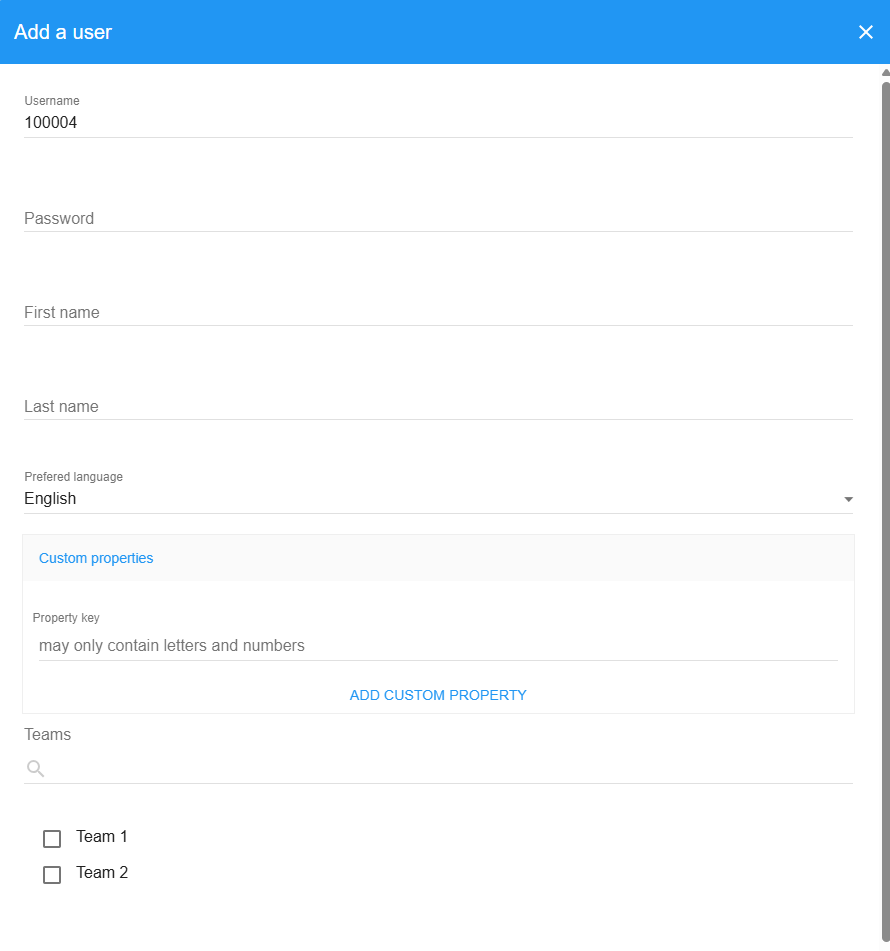
The Add User modal contains:
User Account Details:
- Username (auto-generated for temp users or manually entered by authorized admins)
- Password
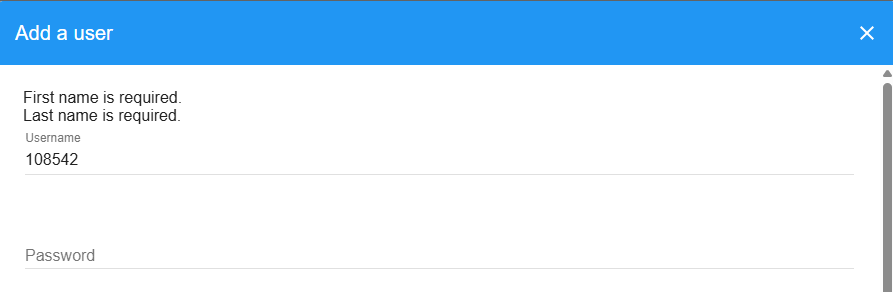
- First Name, Last Name
- Language selection
Team Assignment:
- Select one or more teams to assign
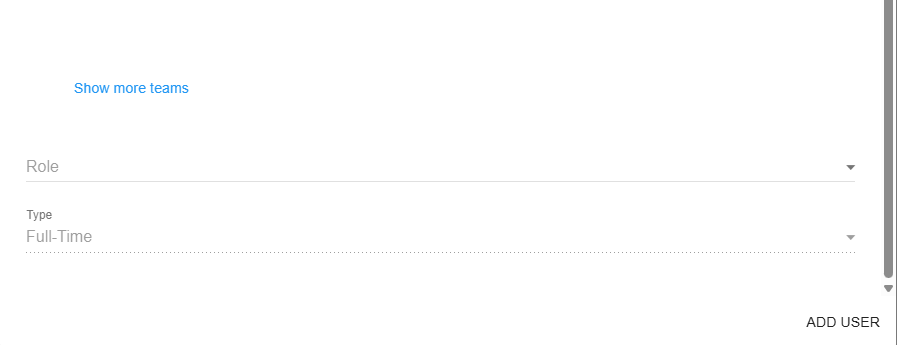
Role Assignment:
- Choose a role from the allowed roles list (cannot exceed your own permission level)
User Type:
- Full-Time or Temp User
Actions:
- Cancel or Add User
βοΈ User Editing Interfaceβ
The Edit User modal includes:
Security Settings:
- Optional password reset
Profile Information:
- First Name, Last Name, Language
Team Assignments:
- Add/remove teams for this user
Role Management:
- View and update the userβs role within your permission limits
User Type:
- Full-Time or Temp User
Actions:
- Cancel or Update User
π Advanced Search & Filter Interfaceβ
Provides full-text search and per-column filters:
Search:
- Global text search across common user fields with clear (X) control
Column Filters:
- Username, First Name, Last Name, Team, Role
Controls:
- Reset All Filters button
π₯ Bulk Team Assignment Interfaceβ
Allows assigning a team to multiple selected users at once:
Selected Users:
- Shows the list of currently selected users
Choose Team:
- Pick a target team or no team
Actions:
- Cancel or Apply Team Assignment
π€ User Account Management Componentβ
The User Account Management section provides comprehensive tools for creating and maintaining user accounts with profile information and credentials.
β User Account Creation Featuresβ
- Automatic Username Generation: System-generated usernames for temp users (00001-99999)
- Manual Username Entry: Custom usernames for full-time users (super admin only)
- Password Management: Secure password creation and validation
- Profile Information: First name, last name, and preferred language settings
- User Type Classification: Full-time vs temporary user designation
- Custom Properties: Extensible profile fields for organizational requirements
π User Credential Managementβ
- Password Creation: Initial password setup during user creation
- Password Updates: Administrative password reset capabilities
- Password Validation: Strength requirements and security compliance
- Account Security: Username uniqueness validation and conflict prevention
- Language Preferences: Multi-language support with user language selection
π User Profile Managementβ
- Basic Information: Name, username, and contact details
- Language Settings: Preferred language for interface localization
- Custom Fields: Organization-specific profile extensions
- Type Classification: Full-time employee vs temporary user designation
- Account Status: Active, deleted, and restoration status tracking
π Role & Permission System Componentβ
The Role & Permission System provides sophisticated hierarchical access control with role assignment and permission validation.
β System Role Managementβ
- π΄ Super Admin: Complete system access and administrative control
- π Admin: Comprehensive administrative capabilities within scope
- π‘ Team Admin: Team-focused administrative responsibilities
- π’ User Admin: User account management without role elevation
π Permission Hierarchy & Validationβ
- Role Elevation Prevention: Users cannot grant higher permissions than they possess
- Self-Protection Mechanisms: Users cannot modify their own role assignments
- Permission Inheritance: Role-based permission cascading and validation
- Administrative Oversight: Super admin capabilities for role management
π― Role Assignment Workflowβ
- Permission Validation: Verify assigner has authority for target role
- Role Compatibility: Ensure role alignment with user type and team
- Assignment Execution: Apply role with appropriate scope and limitations
- Audit Trail: Log role changes for security and compliance tracking
- Access Activation: Immediate permission activation upon role assignment
π₯ Team Assignment Componentβ
The Team Assignment Component provides comprehensive team membership management and organizational structure integration.
β Team Management Featuresβ
- Multi-Team Assignment: Users can belong to multiple teams simultaneously
- Team Selection Interface: Checkbox-based team selection for easy management
- Bulk Team Operations: Assign teams to multiple users simultaneously
- Team Visibility Control: Team access based on user permissions and assignments
- Team Integration: Seamless integration with project registration workflows
π Team Assignment Operationsβ
- Individual Assignment: Assign teams during user creation or editing
- Bulk Assignment: Select multiple users and assign team simultaneously
- Team Removal: Remove users from teams while preserving other assignments
- Team Transfer: Move users between teams with workflow validation
- Assignment Validation: Ensure team assignments align with organizational structure
π Team Assignment Interfaceβ
- Team Selection Lists: Checkbox interfaces for multi-team selection
- Current Assignment Display: Visual indicators for existing team memberships
- Bulk Operation Support: Select multiple users for simultaneous team assignment
- Team Search: Filter and search teams for large organizational structures
- Assignment Confirmation: Validation and confirmation for team changes
π Advanced Search & Filtering Componentβ
The Advanced Search & Filtering Component provides sophisticated search capabilities with multiple filter criteria and real-time results.
β Search Capabilitiesβ
- Full-Text Search: Global search across all user fields with debounced input
- Column-Specific Filters: Individual filters for username, names, team, and role
- Real-Time Updates: Instant filtering with dynamic result updates
- Combined Filtering: Multiple filter criteria applied simultaneously
- Search State Management: Maintain search and filter state during session
ποΈ Filter Types & Optionsβ
- Username Filter: Partial and exact username matching
- Name Filters: First name and last name search with partial matching
- Team Filter: Team name search with organizational structure awareness
- Role Filter: Role-based filtering with permission level awareness
- Status Filters: Active vs deleted user status filtering
π Search Optimizationβ
- Debounced Input: Optimized search with input delay to reduce server load
- Indexed Queries: Database optimizations for fast search results
- Pagination Integration: Search results work seamlessly with pagination
- Export Capabilities: Generate filtered user lists for reporting
- Reset Functionality: Clear individual filters or reset all search criteria
ποΈ User Lifecycle Control Componentβ
The User Lifecycle Control Component manages user account status with soft-delete and restoration capabilities.
β User Status Managementβ
- π’ Active Users: Currently operational users with full system access
- ποΈ Deleted Users: Soft-deleted users preserved for potential restoration
- π Restoration Process: Restore deleted users with complete data integrity
- π Status Tracking: Monitor user activity and account status changes
π Soft-Delete Systemβ
- Safe Deletion: Users marked as deleted rather than permanently removed
- Data Preservation: User assignments and history preserved during deletion
- Restoration Capability: Restore users to active status with complete functionality
- Impact Assessment: Evaluate effects of user status changes on projects and teams
- Cleanup Scheduling: Automated cleanup of long-term deleted users (if configured)
β‘ Lifecycle Operationsβ
- User Deletion: Mark user as deleted while preserving assignments and history
- User Restoration: Reactivate deleted user with full functionality
- Status Validation: Ensure user operations respect current status
- Dependency Checking: Validate impact of status changes on active projects
β Core Users System Featuresβ
π Security & Access Controlβ
- Role-Based Operations: Different permissions for user creation, editing, and deletion
- Hierarchical Validation: Prevent unauthorized role elevation and permission granting
- Team-Based Access: Users may have limited visibility based on team assignments
- Administrative Oversight: System administrators have comprehensive user management access
π User Data Managementβ
- Comprehensive Profiles: Complete user information with extensible custom fields
- Audit Trail: Track user creation, modification, role changes, and status updates
- Data Integrity: Ensure user references remain valid across system operations
- Performance Optimization: Efficient user queries and relationship lookups
π Advanced User Operationsβ
- Bulk Team Assignment: Efficiently manage team memberships for multiple users
- Multi-Criteria Search: Combine multiple search and filter criteria for precise results
- Pagination Support: Handle large user datasets efficiently
- Export Capabilities: Generate user reports and filtered lists
π Users Page Usage Guideβ
π Getting Started with User Managementβ
- Navigate to Users page via main navigation menu
- Review User Permissions: Verify your access level for planned operations
- Explore Current Users: Browse existing user accounts and organizational structure
- Plan User Organization: Design user structure and team assignments
- Monitor User Activity: Track user login activity and account status
β Creating New Usersβ
-
Access User Creation:
β Click "Add User" button in main interface
π User creation modal opens
π·οΈ Username field available (auto-generated for temp users)
π Password and profile fields displayed -
Configure User Account:
π€ Enter or verify username (auto-generated for temp users)
π Set initial password for user account
π Enter first name, last name, and preferred language
π·οΈ Select user type (Full-Time or Temp User) -
Assign Teams and Roles:
π₯ Select appropriate teams using checkbox interface
π Choose role from available options (within your permission level)
β οΈ System validates role assignment permissions
πΎ Complete user creation with "Add User" button
βοΈ Managing Existing Usersβ
-
User Profile Editing:
βοΈ Click edit button for target user
π User update modal opens with current information
π Update password (optional field)
π Modify profile information as needed -
Team Assignment Updates:
π₯ Use checkbox interface to modify team assignments
π Add or remove team memberships
πΎ Save changes to update team assignments
π Verify team changes in user list -
Role Management:
π Select new role from available options
β οΈ System validates permission level for role assignment
π« Cannot assign roles higher than your own level
πΎ Apply role changes with validation confirmation
π₯ Bulk Team Assignment Operationsβ
-
Select Multiple Users:
β Use checkboxes to select multiple users
π Selection count displayed in toolbar
π₯ "Set Team" button becomes available
π― Click to open team assignment dialog -
Assign Team to Selected Users:
π― Choose target team from available options
β Select "No Team" to remove team assignments
π Review selected users before applying
β Confirm team assignment operation
π Using Search and Filter Featuresβ
-
Full-Text Search:
π Click "Search" to open search interface
π Enter search terms in global search field
π Results update automatically with debounced input
β Clear search to return to full user list -
Column-Specific Filtering:
ποΈ Click "Filters" to expand filter row
π Enter filter terms in specific column fields
π Multiple filters applied simultaneously
π Reset individual filters or clear all -
Deleted Users Management:
ποΈ Click "Show Deleted" to view inactive users
π Deleted users display with restore options only
π Use restore button to reactivate users
π Click "Hide Deleted" to return to active view
π Understanding User Interface Elementsβ
- Username: Unique identifier for user authentication
- Full Name: User's first and last name for identification
- Team List: Comma-separated list of assigned teams
- User Role: Current system role and permission level
- Last Login: Most recent authentication activity
- Action Buttons: Edit βοΈ, Delete ποΈ, Restore π operations
- Selection Checkboxes: Multi-select for bulk operations
- Status Indicators: Visual feedback for user status and operations
β οΈ Users Page Troubleshootingβ
π« Common User Management Issuesβ
β "Username already exists" Error
- β Uniqueness Check: Verify username is unique across system
- β Temp User Format: For temp users, use format 00001-99999
- β Character Validation: Ensure username follows system requirements
- β Case Sensitivity: Check for case-sensitive username conflicts
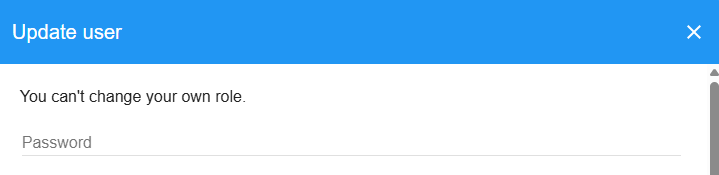
β "You can't change your own role" Error
- β Self-Protection: System prevents users from modifying their own roles
- β Alternative User: Have another administrator modify your role
- β Administrative Request: Contact system administrator for role changes
- β Permission Verification: Ensure you have appropriate role modification rights
β "Not allowed to advance permissions" Error
- β Permission Hierarchy: Cannot grant permissions higher than your own
- β Role Limitation: Check your current role allows target role assignment
- β Administrative Escalation: Request permission elevation from higher role
- β Role Mapping: Verify target role is appropriate for user needs
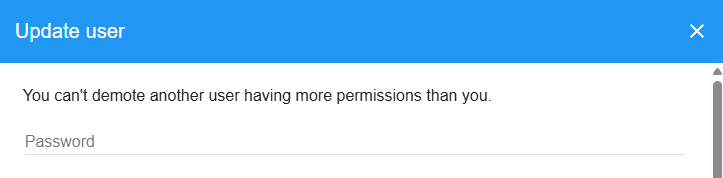
β "Not allowed to demote user" Error
- β Permission Level: Target user has higher permissions than you
- β Administrative Rights: Need higher role to demote privileged users
- β System Protection: Super admins may have additional protections
- β Escalation Path: Contact higher-level administrator for assistance
β "Failed to fetch available username" Error
- β System Availability: Verify username generation service is operational
- β Temp User Limit: Check if temp user number range is exhausted
- β Database Connection: Ensure database connectivity for username lookup
- β Retry Operation: Attempt user creation again after brief delay
π± Mobile User Managementβ
- Touch-Friendly Interface: All user controls optimized for mobile interaction
- Responsive Design: User interface adapts to mobile screen sizes
- Modal Optimization: User creation and editing forms optimized for mobile
- Search Accessibility: Search and filter controls accessible on mobile devices
π User Management Performanceβ
- Search Optimization: Use specific search terms for faster results
- Filter Usage: Apply filters to reduce displayed user count
- Pagination Navigation: Use pagination for large user datasets efficiently
- Session Management: Maintain search and filter states during active sessions
π οΈ Users System Technical Detailsβ
ποΈ User System Architectureβ
// User Management System Structure
{
userManagement: {
accountCreation: "comprehensive_profile_system",
roleAssignment: "hierarchical_permission_validation",
teamManagement: "multi_team_assignment",
searchFiltering: "advanced_multi_criteria"
},
userInterface: {
listView: "paginated_sortable_table",
bulkOperations: "multi_select_actions",
searchSystem: "debounced_full_text",
modalForms: "responsive_user_dialogs"
},
dataOperations: {
softDelete: true,
roleValidation: true,
teamIntegration: true,
auditTrail: true
}
}
π€ User Record Structureβ
// User Database Record
{
_id: "user123",
username: "john.doe",
profile: {
firstName: "John",
lastName: "Doe",
preferedLanguage: "en",
forceChange: false,
misc: {
department: "Operations",
employeeId: "EMP001",
startDate: "2024-01-15"
}
},
emails: [
{
address: "john.doe@company.com",
verified: true
}
],
type: "full", // "full" or "temp"
teamIds: ["team456", "team789"],
deleted: false,
lastLogIn: new Date(),
createdAt: new Date(),
services: {
password: {
bcrypt: "$2b$10$..." // hashed password
}
},
// RBAC fields
roles: ["system.team-admin"],
teamRoles: {
"team456": ["team-manager"]
}
}
π Role Validation Logicβ
// Role Assignment Validation
const validateRoleAssignment = (assignerId, targetUserId, newRole) => {
const assignerRoles = getRolesForUser(assignerId);
const targetRoles = getRolesForUser(targetUserId);
const newRolePermissions = rolePermissions[newRole];
// Check if assigner can grant the new role
const canAdvance = newRolePermissions
.filter(permission => !Object.values(roles.system).includes(permission))
.every(permission => assignerRoles.includes(permission));
// Check if assigner can remove current permissions
const canDemote = targetRoles.every(
permission => assignerRoles.includes(permission)
);
// Prevent self-modification
if (assignerId === targetUserId) {
throw new Error('not-allowed-change-yourself');
}
if (!canAdvance) {
throw new Error('not-allowed-advance');
}
if (!canDemote) {
throw new Error('not-allowed-demote');
}
return true;
};
π User Search Implementationβ
// Advanced User Search and Filtering
const buildUserQuery = (filters, userId, permissions) => {
const query = { deleted: filters.deleted || false };
// Full-text search across multiple fields
if (filters.fullSearch) {
const searchRegex = { $regex: filters.fullSearch, $options: 'i' };
query.$or = [
{ username: searchRegex },
{ 'profile.firstName': searchRegex },
{ 'profile.lastName': searchRegex }
];
}
// Individual field filters
['username', 'profile.firstName', 'profile.lastName', 'role'].forEach(field => {
if (filters[field] && filters[field] !== '') {
if (field.includes('.')) {
const [parent, child] = field.split('.');
query[`${parent}.${child}`] = {
$regex: filters[field],
$options: 'i'
};
} else {
query[field] = {
$regex: filters[field],
$options: 'i'
};
}
}
});
// Team-based filtering
if (filters.teamName) {
const matchingTeams = Teams.find({
name: { $regex: filters.teamName, $options: 'i' }
}, { fields: { _id: 1 } }).map(team => team._id);
query.teamIds = { $in: matchingTeams };
}
// Permission-based access control
if (!permissions.viewAll) {
const userTeams = getTeamsForUser(userId);
query.teamIds = { $in: userTeams };
}
return query;
};
π₯ Team Assignment Operationsβ
// Bulk Team Assignment System
const bulkTeamAssignment = {
setTeamForUsers: (userIds, teamId) => {
const updateOperation = teamId ?
{ $addToSet: { teamIds: teamId } } :
{ $unset: { teamIds: 1 } };
return Meteor.users.update(
{ _id: { $in: userIds } },
updateOperation,
{ multi: true }
);
},
validateTeamAssignment: (userId, teamId) => {
// Check if user has permission to assign team
const canAssignTeam = checkRoles([permissions.users.update], userId);
// Check if team exists and is active
const team = Teams.findOne({ _id: teamId, deleted: false });
return canAssignTeam && team;
},
getTeamDisplayList: (teamIds) => {
const teams = Teams.find(
{ _id: { $in: teamIds }, deleted: false },
{ fields: { name: 1 } }
).fetch();
return teams.map(team => team.name).join(', ');
}
};
π Username Generation Systemβ
// Automatic Username Generation for Temp Users
const usernameGeneration = {
generateTempUsername: async () => {
const existingUsernames = Meteor.users.find(
{ type: 'temp' },
{ fields: { username: 1 } }
).map(user => parseInt(user.username, 10));
for (let i = 1; i <= 99999; i++) {
const paddedNumber = i.toString().padStart(5, '0');
if (!existingUsernames.includes(i)) {
return paddedNumber;
}
}
throw new Error('failed-to-fetch-available-username');
},
validateUsername: (username, type) => {
if (type === 'temp') {
// Temp users: 5 digits, 00001-99999, not 00000
return username.length === 5 &&
/^\d+$/.test(username) &&
username !== '00000';
}
// Full users: custom username validation
return username && username.length >= 3;
}
};
π Password Managementβ
// User Password Operations
const passwordManagement = {
setInitialPassword: (userId, password) => {
if (password && password.digest && password.algorithm) {
// Hashed password from client
Accounts.setPassword(userId, password);
} else if (typeof password === 'string') {
// Plain text password (development only)
Accounts.setPassword(userId, password);
}
},
resetPassword: (userId, newPassword) => {
checkRoles([permissions.users.update], Meteor.userId());
if (userId === Meteor.userId()) {
throw new Error('not-allowed-change-yourself');
}
Accounts.setPassword(userId, newPassword);
},
validatePasswordStrength: (password) => {
const requirements = {
minLength: password.length >= 8,
hasUppercase: /[A-Z]/.test(password),
hasLowercase: /[a-z]/.test(password),
hasNumbers: /\d/.test(password),
hasSpecialChars: /[!@#$%^&*(),.?":{}|<>]/.test(password)
};
return Object.values(requirements).every(req => req);
}
};
π Security Featuresβ
- Role-Based Access Control: Comprehensive RBAC integration with hierarchical validation
- Permission Elevation Prevention: Users cannot grant higher permissions than they possess
- Self-Protection Mechanisms: Prevent users from modifying their own critical settings
- Input Validation: Comprehensive validation for usernames, passwords, and profile data
- Audit Trail: Complete logging of user modifications, role changes, and status updates
π Performance Optimizationsβ
- Indexed Queries: Optimized database indexes for user searches and filters
- Paginated Loading: Efficient handling of large user datasets
- Debounced Search: Client-side search optimization to reduce server load
- Lazy Loading: Progressive loading of user details and team information
- Cached Permissions: Client-side permission caching for responsive UI
π Integration Pointsβ
- Team Management: Direct integration with team assignment and organizational structure
- Project Registration: User accounts integrate with project role assignments
- RBAC System: Seamless integration with role-based access control
- Notification System: User-based notification routing and delivery
- Audit System: Comprehensive logging of user activities and changes
π User Analyticsβ
// User Activity and Analytics
{
type: "userAnalytics",
data: {
userId: "user123",
metrics: {
lastLogin: new Date(),
loginFrequency: "daily",
teamCount: 2,
projectCount: 3,
roleLevel: "team-admin"
}
},
tracking: {
loginActivity: "authentication_frequency",
roleProgression: "permission_advancement_history",
teamParticipation: "cross_team_collaboration",
systemUsage: "feature_utilization_metrics"
}
}
This documentation covers the comprehensive Users system with account management, role assignment, team integration, and advanced search capabilities. The system provides sophisticated user lifecycle management with role-based access control and seamless integration with organizational structure. For advanced user configuration, complex permission setup, or troubleshooting user management issues, consult with your system administrator.