Teams

🎯 Overview

The Teams Page serves as the central management interface for organizational team structure and user group administration. This comprehensive system provides complete team lifecycle management, from creation and naming through member assignment and operational control. The teams system enables efficient organizational structure management with role-based access control, user assignment capabilities, and hierarchical team organization for streamlined project collaboration.

The Teams Module operates with integrated components for complete team management:

  • 👥 Team Creation & Management: Create, edit, and organize teams with descriptive naming
  • 🗑️ Team Lifecycle Control: Soft-delete and restore functionality for team reorganization
  • 🔍 Advanced Filtering: Search and filter capabilities for large team datasets
  • 📊 Team Assignment System: Integration with user registration and role assignment workflows

🔐 Access Requirements

👥 Required Roles & Permissions

  • View Teams: teams.view permission (basic team visibility)
  • Create Teams: teams.insert permission (team creation capabilities)
  • Update Teams: teams.update permission (team modification and renaming)
  • Delete Teams: teams.remove permission (team soft-deletion)
  • Restore Teams: teams.restore permission (team restoration from deleted state)
  • View All Teams: teams.viewAll permission (system-wide team visibility)

🌐 Permission Scope

  • System-Level Access: Team management operates at system level across projects
  • Role-Based Operations: Different permissions for different organizational roles
  • Team Membership: Users can view teams they belong to by default
  • Administrative Control: Full team management requires administrative permissions

🎯 Team Assignment Integration

  • User Registration: Teams integrate with user registration and role assignment
  • Project Scope: Team membership affects project access and role inheritance
  • Manager Hierarchy: Team managers can manage team members and assignments
  • Cross-Team Visibility: Administrative roles can manage multiple teams

💻 Teams Page Interface Layout

👥 Main Team Management Interface

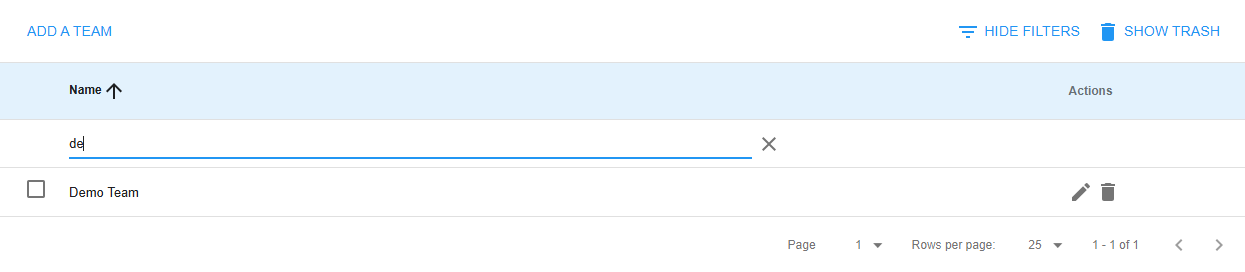
The main interface displays the team management area with the following components:

Header:

  • Page title: "Teams"
  • Action buttons: Add Team, Filters, Show Deleted toggle

Team List Table:

  • Column headers: Name and Actions
  • Team rows showing:
    • Operations Team
    • Quality Assurance Team
    • Warehouse Management Team
    • Customer Service Team
    • IT Support Team
    • Training Team
  • Action buttons for each team: Edit and Delete

Pagination Footer:

  • Page navigation: Current page and total pages
  • Items per page display
  • Total teams count

➕ Team Creation Interface

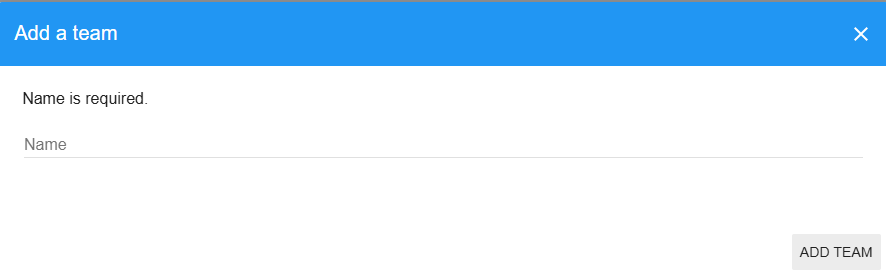
The team creation modal provides a simple interface for adding new teams:

Modal Header:

  • Title: "Add New Team"

Team Details Section:

  • Team Name input field
  • Example text showing naming conventions: "Operations Team", "QA Team"

Action Buttons:

  • Cancel button to close without saving
  • Add Team button to create the new team

✏️ Team Editing Interface

The team editing modal allows modification of existing team names:

Modal Header:

  • Title: "Update Team"

Team Details Section:

  • Team Name input field pre-filled with current team name
  • Helper text indicating the field is for editing the current name

Action Buttons:

  • Cancel button to close without saving changes
  • Update Team button to save the modified team name

🔍 Team Filters Interface

The filter panel provides search and filtering capabilities:

Filter Panel:

  • Title: "Team Filters"

Search Field:

  • Team Name search input with placeholder text "Search team names..."
  • Clear button (X) to remove search text

Reset Controls:

  • Reset Filters button to clear all applied filters and return to default view

🗑️ Deleted Teams View

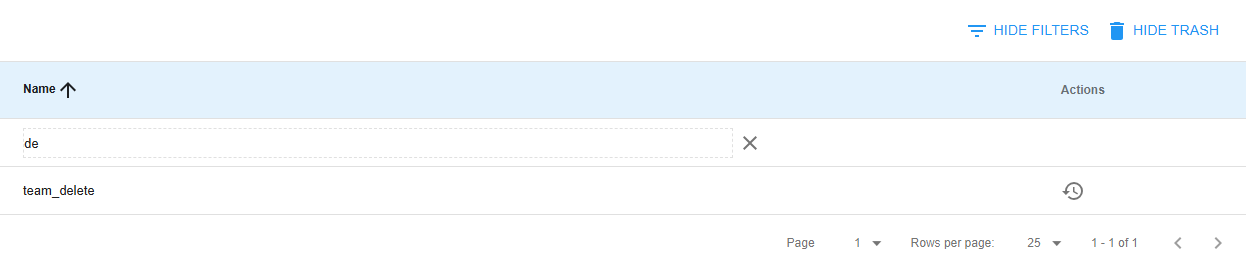
The deleted teams view displays soft-deleted teams with restoration options:

View Header:

  • Title: "Deleted Teams"

Deleted Teams Table:

  • Column headers: Name and Actions
  • Deleted team rows showing:
    • Former Marketing Team (with delete indicator)
    • Discontinued Project Team (with delete indicator)
    • Legacy Support Team (with delete indicator)
  • Restore button for each deleted team

View Controls:

  • Hide Deleted Teams button to return to the active teams view

👥 Team Creation & Management Component

The Team Creation & Management section provides comprehensive tools for establishing and maintaining organizational team structure.

⭐ Team Management Features

  • Simple Team Creation: Create teams with descriptive names and organizational purpose
  • Team Renaming: Update team names to reflect organizational changes
  • Team Organization: Organize teams by department, function, or project focus
  • Validation System: Ensure team names meet organizational naming standards
  • Duplicate Prevention: Validate unique team names within organizational scope

🏷️ Team Naming Conventions

  • Descriptive Names: Clear, meaningful team names reflecting purpose or function
  • Consistency Standards: Follow organizational naming conventions and patterns
  • Department Alignment: Align team names with department or functional areas
  • Project Association: Include project or initiative names when applicable
  • Scalability Planning: Design naming structure for future organizational growth

🔄 Team Lifecycle Management

  1. Team Creation: Add new teams with appropriate naming and purpose
  2. Team Evolution: Update team names and structure as organization changes
  3. Team Deactivation: Soft-delete teams that are no longer active
  4. Team Restoration: Restore previously deleted teams when needed
  5. Team Reorganization: Restructure teams based on operational requirements

🗑️ Team Lifecycle Control Component

The Team Lifecycle Control section manages team status and provides safe deletion and restoration capabilities.

⭐ Team Status Management

  • 🟢 Active Teams: Currently operational teams with active member assignments
  • 🗑️ Deleted Teams: Soft-deleted teams preserved for potential restoration
  • 🔄 Restoration Capability: Restore deleted teams with preserved historical data
  • 📊 Status Tracking: Monitor team activity and member assignment status

🔄 Soft-Delete System

  1. Safe Deletion: Teams marked as deleted rather than permanently removed
  2. Data Preservation: Team assignments and history preserved during deletion
  3. Restoration Process: Restore teams to active status with complete data integrity
  4. Cleanup Scheduling: Automated cleanup of long-term deleted teams (if configured)

⚡ Team Status Operations

  • Delete Team: Mark team as deleted while preserving member assignments
  • Restore Team: Reactivate deleted team with full functionality
  • Status Validation: Ensure team operations respect current status
  • Impact Assessment: Evaluate effects of team status changes on users and projects

🔍 Advanced Filtering Component

The Advanced Filtering section provides sophisticated search and filtering capabilities for efficient team management.

⭐ Filter Capabilities

  • Name-Based Search: Search teams by partial or complete name matching
  • Real-Time Filtering: Instant results with dynamic search functionality
  • Case-Insensitive Search: Flexible search regardless of capitalization
  • Reset Functionality: Clear filters to display all teams

📊 Filter Integration

  • Active/Deleted Toggle: Switch between active and deleted team views
  • Combined Filtering: Combine name search with status filtering
  • Filter State Persistence: Maintain filter settings during session
  • Count Indicators: Display filtered results count and total teams

🔍 Search Optimization

  • Partial Matching: Find teams using partial name fragments
  • Special Character Handling: Handle punctuation and special characters in search
  • Performance Optimization: Efficient search for large team datasets
  • Export Capabilities: Generate filtered team lists for reporting

📊 Team Assignment System Component

The Team Assignment System provides integration with user management and role assignment workflows.

⭐ Team Membership Features

  • User Assignment: Assign users to teams during registration or role management
  • Team Visibility: Users can view teams they belong to automatically
  • Cross-Team Management: Administrative users can manage multiple teams
  • Role Integration: Team membership affects project access and role inheritance

🎭 Team-Based Permissions

  • Team Manager Role: Assign team management responsibilities to users
  • Team Member Access: Define team member permissions and capabilities
  • Project Integration: Team membership influences project role assignments
  • Hierarchical Access: Team structure supports organizational hierarchy

🔄 Team Assignment Workflow

  1. Team Creation: Create teams for organizational structure
  2. User Assignment: Assign users to appropriate teams during registration
  3. Role Mapping: Map team membership to project and system roles
  4. Access Control: Use team membership for permission and access decisions
  5. Team Evolution: Update team assignments as organization changes

⭐ Core Teams System Features

🔐 Permission Integration

  • Role-Based Operations: Different permissions for team creation, editing, and deletion
  • Administrative Control: System-level permissions for comprehensive team management
  • Team Scope Access: Team members can view their assigned teams
  • Cross-Team Visibility: Administrative roles can view and manage all teams

📊 Team Data Management

  • Simple Schema: Focused team structure with name and status fields
  • Audit Trail: Track team creation, modification, and deletion events
  • Data Integrity: Ensure team references remain valid across system operations
  • Performance Optimization: Efficient team queries and member lookups

🔍 Team Search and Organization

  • Name-Based Search: Full-text search capabilities across team names
  • Alphabetical Sorting: Organized team listings for easy navigation
  • Pagination Support: Handle large numbers of teams efficiently
  • Filter Combinations: Multiple filter criteria for precise team selection

📘 Teams Page Usage Guide

🚀 Getting Started with Team Management

  1. Navigate to Teams page via main navigation menu
  2. Review Existing Teams: Check current organizational team structure
  3. Verify Permissions: Confirm your access level for planned operations
  4. Plan Team Structure: Design team organization before creating new teams
  5. Monitor Team Usage: Track team assignments and utilization

➕ Creating New Teams

  1. Access Team Creation:

    ➕ Click "Add Team" button in main interface
    📝 Team creation modal opens
    🏷️ Team name input field available
    📋 Validation rules applied automatically
  2. Configure Team Details:

    📝 Enter descriptive team name
    ✅ Follow organizational naming conventions
    🔍 Verify name doesn't conflict with existing teams
    💾 Confirm team creation with "Add Team" button
  3. Verify Team Creation:

    📋 New team appears in main team list
    🔍 Search for team to confirm creation
    📊 Monitor team for member assignments
    ✅ Validate team availability for user registration

✏️ Managing Existing Teams

  1. Team Editing:

    ✏️ Click edit button for target team
    📝 Team update modal opens
    🏷️ Modify team name as needed
    💾 Save changes with "Update Team" button
  2. Team Deletion:

    🗑️ Click delete button for target team
    ⚠️ Confirm deletion in dialog
    📊 Team moves to deleted status (soft-delete)
    🔍 Team no longer visible in main list
  3. Team Restoration:

    🗑️ Enable "Show Deleted" view
    🔄 Click restore button for deleted team
    ⚠️ Confirm restoration in dialog
    ✅ Team returns to active status
  1. Apply Name Filters:

    🔍 Click "Filters" to expand filter panel
    📝 Enter partial or complete team name
    🔄 Results update automatically
    ❌ Clear filter to show all teams
  2. Toggle Deleted Teams View:

    🗑️ Click "Show Deleted" to view inactive teams
    📊 Deleted teams display with restore options
    🔙 Click "Hide Deleted" to return to active view
    📈 Monitor deleted team count in interface

📊 Understanding Team Interface Elements

  • Team Name: Primary identifier for team recognition and selection
  • Edit Button: ✏️ Modify team name and details
  • Delete Button: 🗑️ Soft-delete team from active status
  • Restore Button: 🔄 Reactivate previously deleted team
  • Filter Controls: 🔍 Search and filter team listings
  • Status Indicators: Visual feedback for team status and operations
  • Pagination: Navigate through large team datasets efficiently

👥 Team Assignment Integration

  1. User Registration Process:

    📋 Teams available in user registration workflow
    👥 Assign users to appropriate teams during setup
    🎭 Team membership affects role assignments
    📊 Monitor team member counts and assignments
  2. Project Role Integration:

    🎯 Team membership influences project access
    🔐 Team roles map to project permissions
    👥 Team managers gain additional capabilities
    📈 Track team-based project participation

⚠️ Teams Page Troubleshooting

🚫 Common Team Management Issues

❌ "Missing team" Error

  • Team Existence: Verify team exists and is not deleted
  • Permission Check: Ensure you have appropriate team access permissions
  • Team Assignment: Confirm you're assigned to team or have viewAll permission
  • Data Refresh: Refresh page to reload team data

❌ "Name is required" Validation Error

  • Name Input: Ensure team name field is not empty
  • Character Validation: Use valid characters in team name
  • Length Requirements: Check team name meets minimum length requirements
  • Special Characters: Avoid problematic characters in team names

❌ "Permission denied" for Team Operations

  • Role Verification: Check user role includes required team permissions
  • Administrative Access: Contact administrator for permission elevation
  • Team Scope: Verify operation is within your team management scope
  • Session Refresh: Logout and login to refresh permissions

❌ "Team deletion failed" Error

  • Active Members: Ensure no active user assignments prevent deletion
  • Project Dependencies: Check for active project associations
  • Permission Level: Verify delete permissions for target team
  • System Status: Confirm system is available for modification operations

❌ "Team restoration failed" Error

  • Deleted Status: Verify team is actually in deleted state
  • Restore Permissions: Check restore permission for team operations
  • Name Conflicts: Ensure restored team name doesn't conflict with existing teams
  • Data Integrity: Verify team data is intact for restoration

📱 Mobile Team Management

  • Touch-Friendly Interface: All team controls optimized for mobile interaction
  • Responsive Design: Team interface adapts to mobile screen sizes
  • Modal Optimization: Team creation and editing forms optimized for mobile
  • Filter Accessibility: Filter controls accessible on mobile devices

🔄 Team Performance Optimization

  • Pagination Usage: Navigate large team lists efficiently using pagination
  • Filter Application: Use filters to reduce displayed team count
  • Search Optimization: Use specific search terms for faster results
  • Session Management: Maintain filter states during active sessions

🛠️ Teams System Technical Details

🏗️ Team Architecture

// Team System Structure
{
teamManagement: {
creation: "simple_name_based",
modification: "direct_editing",
deletion: "soft_delete_system",
restoration: "full_data_recovery"
},
userInterface: {
listView: "paginated_table",
filterSystem: "real_time_search",
modalForms: "responsive_dialogs",
statusToggle: "active_deleted_view"
},
dataOperations: {
softDelete: true,
nameValidation: true,
searchOptimized: true,
memberIntegration: true
}
}

👥 Team Record Structure

// Team Database Record
{
_id: "team123",
name: "Operations Team",
deleted: false,
created_at: new Date(),
updated_at: new Date(),
// Additional fields populated by system
memberCount: 12, // calculated field
activeProjects: 3, // calculated field
teamManager: "user456", // assigned manager
description: "Main operations team", // optional
metadata: {
department: "Operations",
location: "Warehouse A",
established: "2024-01-15"
}
}

🔍 Team Query Logic

// Team Search and Filter Implementation
const buildTeamQuery = (filters, userId, permissions) => {
const query = { deleted: filters.deleted || false };

// Name-based filtering
if (filters.name && filters.name !== '') {
query.name = {
$regex: filters.name,
$options: 'i'
};
}

// Permission-based access control
if (!permissions.viewAll) {
const userTeams = getTeamsForUser(userId);
query._id = { $in: userTeams };
}

return query;
};

// Team member lookup
const getTeamsForUser = (userId) => {
const user = Meteor.users.findOne(
{ _id: userId, deleted: false },
{ fields: { teamIds: 1 } }
);
return user?.teamIds || [];
};

🔄 Team Lifecycle Operations

// Team Management Methods
const teamOperations = {
create: (name) => {
return Teams.insert({
name: name.trim(),
deleted: false,
created_at: new Date(),
updated_at: new Date()
});
},

update: (teamId, name) => {
return Teams.update(teamId, {
$set: {
name: name.trim(),
updated_at: new Date()
}
});
},

softDelete: (teamId) => {
return Teams.update(teamId, {
$set: {
deleted: true,
deleted_at: new Date()
}
});
},

restore: (teamId) => {
return Teams.update(teamId, {
$set: { deleted: false },
$unset: { deleted_at: 1 }
});
}
};

🎭 Permission Validation

// Team Permission Checking
const teamPermissions = {
canView: (userId) => {
return checkRoles([permissions.teams.view], userId, null);
},

canCreate: (userId) => {
return checkRoles([permissions.teams.insert], userId, null);
},

canUpdate: (userId) => {
return checkRoles([permissions.teams.update], userId, null);
},

canDelete: (userId) => {
return checkRoles([permissions.teams.remove], userId, null);
},

canRestore: (userId) => {
return checkRoles([permissions.teams.restore], userId, null);
},

canViewAll: (userId) => {
return userIsInRole(userId, [permissions.teams.viewAll]);
}
};

📊 Team Integration System

// Team-User Integration
const teamIntegration = {
assignUser: (userId, teamId) => {
return Meteor.users.update(userId, {
$addToSet: { teamIds: teamId }
});
},

removeUser: (userId, teamId) => {
return Meteor.users.update(userId, {
$pull: { teamIds: teamId }
});
},

getTeamMembers: (teamId) => {
return Meteor.users.find(
{ teamIds: teamId, deleted: false },
{ fields: { username: 1, profile: 1 } }
).fetch();
},

getTeamManagers: (teamId) => {
return Meteor.users.find({
teamIds: teamId,
deleted: false,
roles: { $in: ['team-manager'] }
}).fetch();
}
};

🔐 Security Features

  • Role-Based Access Control: Comprehensive permission system for team operations
  • Team Scope Isolation: Users limited to assigned teams unless explicitly granted broader access
  • Input Validation: Team name validation to prevent malicious input
  • Soft-Delete Protection: Preserve team data integrity during deletion operations
  • Audit Trail: Complete logging of team modifications and member changes

📈 Performance Optimizations

  • Indexed Queries: Optimized database indexes for team name searches
  • Paginated Loading: Efficient handling of large team datasets
  • Lazy Member Loading: Progressive loading of team member information
  • Client-Side Filtering: Real-time filter updates without server round-trips
  • Cached Permissions: Client-side permission caching for responsive UI

🔄 Integration Points

  • User Registration: Direct integration with user registration workflows
  • Role Assignment: Team membership influences role and permission assignment
  • Project Management: Team assignments affect project access and capabilities
  • Notification System: Team-based notification routing and delivery
  • Reporting System: Team-based analytics and performance reporting

📊 Team Analytics

// Team Usage Analytics
{
type: "teamAnalytics",
data: {
teamId: "team123",
metrics: {
memberCount: 12,
activeMembers: 10,
projectAssignments: 3,
lastActivity: new Date()
}
},
reporting: {
teamEffectiveness: "member_activity_tracking",
projectParticipation: "cross_team_collaboration",
utilizationMetrics: "team_capacity_analysis"
}
}

This documentation covers the comprehensive Teams system with creation, management, lifecycle control, and user integration capabilities. The system provides efficient organizational structure management with role-based access control and seamless integration with user registration and project assignment workflows. For advanced team configuration, complex permission setup, or troubleshooting organizational structure issues, consult with your system administrator.