Branches

🎯 Overview

The Branches Page serves as the comprehensive branch management interface for organizational location and subsidiary administration. This sophisticated system provides complete branch lifecycle management, from creation and configuration through client association and operational control. The branches system enables efficient organizational structure management with client-specific branch organization, hierarchical relationships, and integrated project management capabilities for streamlined multi-location operations.

The Branches Module operates with integrated components for complete branch management:

  • 🏢 Branch Creation & Management: Create, edit, and organize branches with client associations and location codes
  • 🔗 Client Integration: Seamless integration with client management for organizational hierarchy
  • 🗑️ Branch Lifecycle Control: Soft-delete and restore functionality for branch reorganization
  • 🔍 Advanced Filtering: Search and filter capabilities for multi-client branch datasets
  • 📊 Project Navigation: Direct integration with project management for branch-specific operations

🔐 Access Requirements

👥 Required Roles & Permissions

  • View Branches: branches.view permission (basic branch visibility)
  • Create Branches: branches.insert permission (branch creation capabilities)
  • Update Branches: branches.update permission (branch modification and renaming)
  • Delete Branches: branches.remove permission (branch soft-deletion)
  • Restore Branches: branches.restore permission (branch restoration from deleted state)

🌐 Permission Scope

  • System-Level Access: Branch management operates at system level across organization
  • Client Association: Branches must be associated with valid client organizations
  • Hierarchical Control: Branch operations respect client-branch-project hierarchy
  • Administrative Requirements: Branch management requires system-level administrative permissions

🎯 Organizational Hierarchy

  • Client Level: Top-level organizational entities (companies, corporations)
  • Branch Level: Regional, divisional, or subsidiary organizational units
  • Project Level: Specific operational projects within branch scope
  • Integration Flow: Client → Branch → Project hierarchical structure

💻 Branches Page Interface Layout

🏢 Main Branch Management Interface

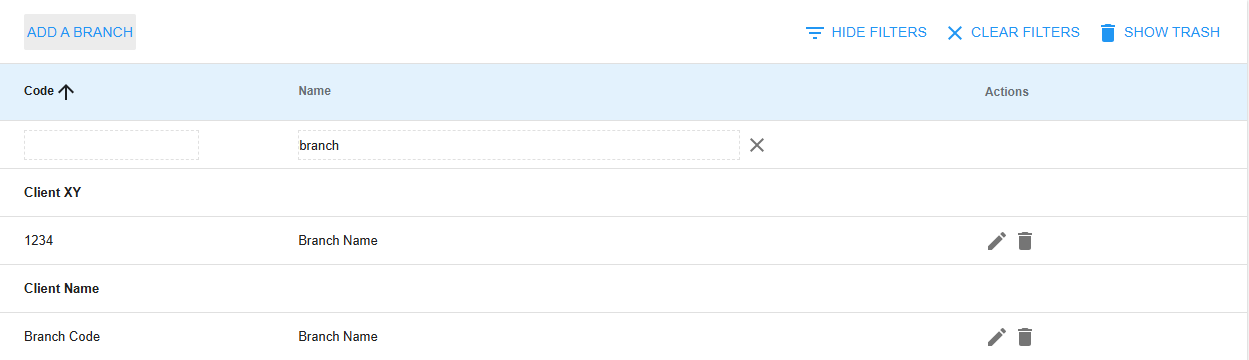
The main interface shows branches grouped by client with controls and a table of branches.

Header & Controls:

  • Add Branch button
  • Filters panel
  • Show Deleted toggle
  • Current filter context (e.g., ACME Corporation) with a Clear Filter control

Branch Table Columns:

  • Code, Name, Actions (Edit, Delete)
  • Rows grouped by client name (e.g., ACME CORPORATION, GLOBEX INDUSTRIES)

Pagination:

  • Current page, items per page, total branches

➕ Branch Creation Interface

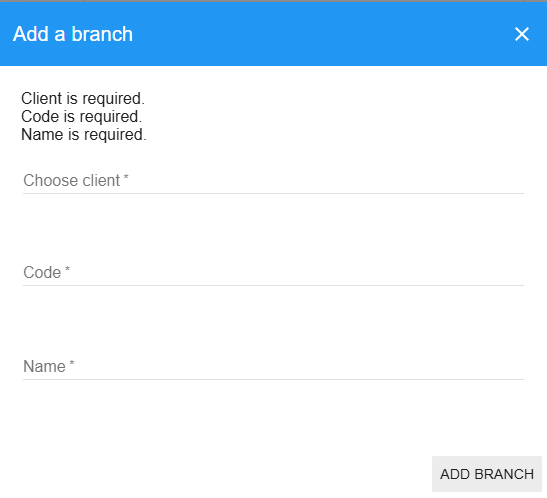
The Add Branch modal includes required fields and actions:

Branch Details:

  • Client: searchable dropdown to select the client organization (required)
  • Branch Code: unique location identifier (required)
  • Branch Name: descriptive branch name (required)

Actions:

  • Cancel or Add Branch

✏️ Branch Editing Interface

The Edit Branch modal allows updating basic branch information:

Branch Information:

  • Branch Code (read-only or editable depending on policy)
  • Branch Name (editable)
  • Note: Client association typically cannot be changed after creation

Actions:

  • Cancel or Update Branch

🔍 Branch Filters Interface

The filters panel enables narrowing the branch list:

Fields:

  • Branch Code search
  • Branch Name search

Controls:

  • Clear field buttons (X)
  • Reset All Filters button

🗑️ Deleted Branches View

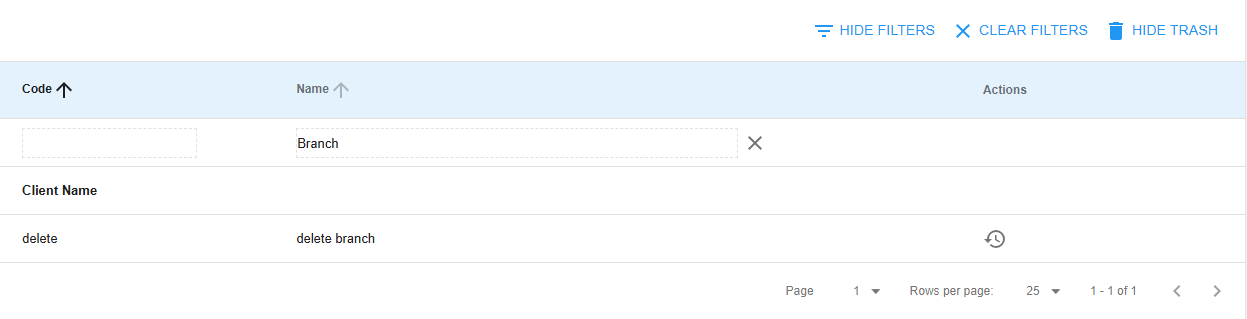
The Deleted Branches view lists soft-deleted branches and lets you restore them:

Table Columns:

  • Code, Name, Actions (Restore)
  • Grouped by client where applicable

Controls:

  • Hide Deleted Branches button to return to the active list

🏢 Branch Creation & Management Component

The Branch Creation & Management section provides comprehensive tools for establishing and maintaining organizational branch structure with client associations.

⭐ Branch Management Features

  • Client Association: Required client selection during branch creation with autocomplete search
  • Branch Identification: Unique branch codes and descriptive names for location identification
  • Hierarchical Structure: Proper client-branch relationship establishment and maintenance
  • Validation System: Ensure branch codes and names meet organizational standards
  • Client Integration: Seamless integration with client management for organizational hierarchy

🏷️ Branch Identification System

  • Branch Codes: Short, unique identifiers for easy reference (e.g., NY01, CA02, LON01)
  • Branch Names: Descriptive names for clear identification and communication
  • Client Grouping: Branches organized under parent client organizations
  • Location Designation: Geographic or functional branch identification
  • Consistency Standards: Follow organizational naming conventions and patterns

🔄 Branch Lifecycle Management

  1. Client Selection: Choose parent client organization for new branch
  2. Branch Configuration: Set branch code, name, and organizational details
  3. Hierarchy Establishment: Create proper client-branch relationships
  4. Branch Operations: Enable project creation and operational activities
  5. Branch Evolution: Update branch information as organizational needs change

🔗 Client Integration Component

The Client Integration Component provides seamless connection between client organizations and their branch structures.

⭐ Client-Branch Relationship Features

  • Client Autocomplete: Search and select client organizations during branch creation
  • Hierarchical Display: Branches grouped by client organization in listings
  • Association Immutability: Client association cannot be changed after branch creation
  • Client Filtering: Filter branches by specific client organizations
  • Navigation Integration: Direct navigation from client to branch to project levels

📊 Organizational Hierarchy Management

  • Client Level: Top-level organizational entities with multiple branches
  • Branch Level: Regional or divisional units within client organizations
  • Project Scope: Projects operate within specific branch contexts
  • Cross-Branch Operations: Support for multi-branch client operations
  • Hierarchy Navigation: Seamless navigation through organizational levels

🔄 Client Association Workflow

  1. Client Search: Use autocomplete to find and select client organization
  2. Association Creation: Establish permanent client-branch relationship
  3. Hierarchy Display: Branches automatically grouped under client headers
  4. Navigation Flow: Enable direct navigation to branch-specific projects
  5. Relationship Integrity: Maintain referential integrity across organizational levels

🗑️ Branch Lifecycle Control Component

The Branch Lifecycle Control Component manages branch status with soft-delete and restoration capabilities while respecting organizational hierarchy.

⭐ Branch Status Management

  • 🟢 Active Branches: Currently operational branches with active project capabilities
  • 🗑️ Deleted Branches: Soft-deleted branches preserved for potential restoration
  • 🔄 Restoration Process: Restore deleted branches with complete organizational integrity
  • 📊 Status Tracking: Monitor branch activity and operational status

🔄 Soft-Delete System

  1. Safe Deletion: Branches marked as deleted rather than permanently removed
  2. Project Preservation: Associated projects and historical data preserved
  3. Hierarchy Maintenance: Client-branch relationships preserved during deletion
  4. Restoration Capability: Restore branches to active status with full functionality
  5. Impact Assessment: Evaluate effects of branch status changes on projects and operations

⚡ Branch Lifecycle Operations

  • Branch Deletion: Mark branch as deleted while preserving associated data
  • Branch Restoration: Reactivate deleted branch with complete operational capability
  • Status Validation: Ensure branch operations respect current organizational status
  • Dependency Management: Handle project dependencies during branch lifecycle changes

🔍 Advanced Filtering Component

The Advanced Filtering Component provides sophisticated search and filtering capabilities for efficient branch management across multiple clients.

⭐ Filter Capabilities

  • Code-Based Search: Search branches by branch code with partial matching
  • Name-Based Search: Search branches by name with flexible text matching
  • Client Filtering: Filter branches by client organization association
  • Real-Time Updates: Instant filtering with dynamic result updates
  • Filter State Persistence: Maintain filter settings during session

📊 Client-Specific Filtering

  • Client Context: Display filter indication when viewing client-specific branches
  • Clear Filter Option: Easy removal of client-specific filtering
  • Cross-Client Search: Search across all clients or within specific client scope
  • Grouped Display: Maintain client grouping while applying filters
  • Navigation Context: Preserve filter context during branch navigation

🔍 Search Optimization

  • Partial Matching: Find branches using partial code or name fragments
  • Case-Insensitive Search: Flexible search regardless of capitalization
  • Performance Optimization: Efficient search for large branch datasets
  • Export Capabilities: Generate filtered branch lists for reporting
  • Reset Functionality: Clear individual filters or reset all search criteria

📊 Project Navigation Component

The Project Navigation Component provides direct integration with project management for branch-specific operational activities.

⭐ Navigation Features

  • Direct Project Access: Click branches to navigate to associated projects
  • Branch Context: Project listings filtered by selected branch
  • Hierarchy Navigation: Seamless movement through client-branch-project levels
  • Operational Integration: Direct access to branch-specific operational functions
  • Context Preservation: Maintain branch context during project operations

🔄 Branch-Project Integration

  • Project Filtering: Projects automatically filtered by branch association
  • Operational Context: Branch-specific project operations and management
  • Resource Allocation: Branch-level resource and team management
  • Performance Tracking: Branch-specific operational metrics and reporting
  • Cross-Branch Coordination: Support for multi-branch project coordination

🎯 Navigation Workflow

  1. Branch Selection: Click branch to access branch-specific operations
  2. Project Context: Navigate to projects within selected branch
  3. Operational Access: Access branch-specific tools and management functions
  4. Context Maintenance: Preserve branch context during operational activities
  5. Hierarchy Return: Easy navigation back to branch and client levels

⭐ Core Branches System Features

🔐 Permission Integration

  • Role-Based Operations: Different permissions for branch creation, editing, and deletion
  • Administrative Control: System-level permissions for comprehensive branch management
  • Client Integration: Respect client-branch hierarchical relationships
  • Project Dependencies: Consider project associations during branch operations

📊 Branch Data Management

  • Client Association: Permanent client-branch relationships with referential integrity
  • Branch Identification: Unique codes and descriptive names for clear identification
  • Hierarchical Display: Organized presentation by client groupings
  • Audit Trail: Track branch creation, modification, and status changes
  • Data Integrity: Ensure branch references remain valid across system operations
  • Client Grouping: Branches organized under client headers for clear hierarchy
  • Code-Based Organization: Alphabetical sorting by branch codes
  • Name-Based Search: Full-text search capabilities across branch names
  • Filter Combinations: Multiple filter criteria for precise branch selection
  • Pagination Support: Handle large numbers of branches efficiently

📘 Branches Page Usage Guide

🚀 Getting Started with Branch Management

  1. Navigate to Branches page via main navigation menu
  2. Review Organizational Structure: Check current client-branch hierarchy
  3. Verify Permissions: Confirm your access level for planned operations
  4. Plan Branch Structure: Design branch organization within client framework
  5. Monitor Branch Operations: Track branch activity and project associations

➕ Creating New Branches

  1. Access Branch Creation:

    ➕ Click "Add Branch" button in main interface
    📝 Branch creation modal opens
    🔍 Client selection autocomplete field available
    🏷️ Branch code and name input fields displayed
  2. Select Client Organization:

    🔍 Use autocomplete to search for client
    📋 Select appropriate client from dropdown
    ⚠️ Client association cannot be changed later
    ✅ Verify correct client selection
  3. Configure Branch Details:

    🏷️ Enter unique branch code (e.g., NY01, LON02)
    📝 Enter descriptive branch name
    ✅ Verify code uniqueness within client
    💾 Complete branch creation with "Add Branch" button

✏️ Managing Existing Branches

  1. Branch Information Updates:

    ✏️ Click edit button for target branch
    📝 Branch update modal opens with current information
    🏷️ Modify branch code as needed
    📝 Update branch name and description
  2. Branch Deletion:

    🗑️ Click delete button for target branch
    ⚠️ Confirm deletion in dialog
    📊 Branch moves to deleted status (soft-delete)
    🔍 Branch no longer visible in main list
  3. Branch Restoration:

    🗑️ Enable "Show Deleted" view
    🔄 Click restore button for deleted branch
    ⚠️ Confirm restoration in dialog
    ✅ Branch returns to active status
  1. Apply Search Filters:

    🎛️ Click "Filters" to expand filter row
    📝 Enter branch code in code filter field
    📝 Enter branch name in name filter field
    🔄 Results update automatically
  2. Client-Specific Filtering:

    📋 Client filter context displayed when active
    🔍 Branches filtered to specific client organization
    ❌ Click "Clear" link to remove client filter
    📊 Return to all branches view
  3. Toggle Deleted Branches View:

    🗑️ Click "Show Deleted" to view inactive branches
    📊 Deleted branches display with restore options only
    🔄 Use restore button to reactivate branches
    🔙 Click "Hide Deleted" to return to active view

📊 Understanding Branch Interface Elements

  • Client Headers: Bold client names grouping associated branches
  • Branch Code: Short identifier for quick branch reference
  • Branch Name: Full descriptive name for branch identification
  • Actions: Edit ✏️, Delete 🗑️, Restore 🔄 operations
  • Client Filter: Context indicator when viewing client-specific branches
  • Status Indicators: Visual feedback for branch status and operations
  • Navigation Links: Click branches to access associated projects

🎯 Branch-Project Navigation

  1. Access Branch Projects:

    🎯 Click on branch name or row (not action buttons)
    📊 Navigate to projects page filtered by branch
    🔍 Projects automatically scoped to selected branch
    📋 Branch context preserved during project operations
  2. Branch Context Management:

    🏢 Branch context maintained during project operations
    🔙 Use navigation breadcrumbs to return to branches
    📊 Branch-specific metrics and reporting available
    🎯 Cross-branch operations supported when needed

⚠️ Branches Page Troubleshooting

🚫 Common Branch Management Issues

❌ "Client is required" Error

  • Client Selection: Ensure client is selected from autocomplete dropdown
  • Client Existence: Verify client exists and is not deleted
  • Search Function: Use autocomplete search to find client organization
  • Client Permissions: Confirm you have access to associate with selected client

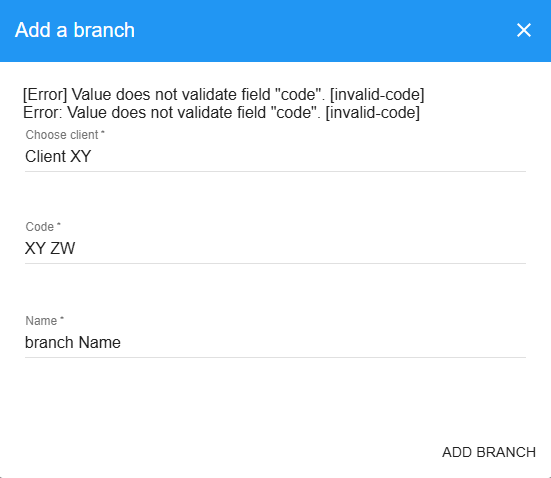
❌ "Code is required" Error

  • Code Input: Ensure branch code field is not empty
  • Code Format: Use appropriate branch code format (e.g., NY01, LON02)
  • Character Validation: Avoid special characters in branch codes
  • Uniqueness: Verify code is unique within client organization

❌ "Name is required" Error

  • Name Input: Ensure branch name field is not empty
  • Descriptive Names: Use clear, descriptive branch names
  • Length Requirements: Check branch name meets minimum length requirements
  • Character Validation: Use valid characters in branch names

❌ "Invalid client id" Error

  • Client Existence: Verify selected client exists in system
  • Client Status: Ensure client is not deleted or inactive
  • Selection Validation: Re-select client from autocomplete dropdown
  • Data Refresh: Refresh page to reload client data

❌ "Branch deletion failed" Error

  • Active Projects: Check for active projects associated with branch
  • Dependency Resolution: Complete or transfer projects before deletion
  • Permission Verification: Ensure you have branch deletion permissions
  • System Status: Confirm system is available for modification operations

📱 Mobile Branch Management

  • Touch-Friendly Interface: All branch controls optimized for mobile interaction
  • Responsive Design: Branch interface adapts to mobile screen sizes
  • Modal Optimization: Branch creation and editing forms optimized for mobile
  • Filter Accessibility: Filter controls accessible on mobile devices

🔄 Branch Performance Optimization

  • Client Grouping: Branches organized by client for efficient navigation
  • Search Optimization: Use specific search terms for faster results
  • Filter Application: Apply filters to reduce displayed branch count
  • Pagination Usage: Navigate large branch lists efficiently using pagination

🛠️ Branches System Technical Details

🏗️ Branch Architecture

// Branch Management System Structure
{
branchManagement: {
clientAssociation: "required_parent_relationship",
identification: "code_and_name_system",
hierarchy: "client_branch_project_structure",
lifecycle: "soft_delete_system"
},
userInterface: {
groupedDisplay: "client_organized_listing",
autocompleteSearch: "client_selection_system",
filterSystem: "multi_criteria_search",
modalForms: "responsive_branch_dialogs"
},
dataOperations: {
clientIntegration: true,
hierarchicalDisplay: true,
softDelete: true,
projectNavigation: true
}
}

🏢 Branch Record Structure

// Branch Database Record
{
_id: "branch123",
clientId: "client456", // Required parent reference
code: "NY01", // Unique within client
name: "New York Headquarters",
deleted: false,
created_at: new Date(),
updated_at: new Date(),
// Calculated fields
projectCount: 5, // Number of associated projects
activeProjects: 3, // Currently active projects
// Client relationship (populated via helper)
client: {
_id: "client456",
name: "ACME Corporation",
code: "ACME"
}
}

🔗 Client-Branch Integration

// Client-Branch Relationship Management
const clientBranchIntegration = {
validateClientAssociation: (clientId) => {
const client = Clients.findOne({ _id: clientId, deleted: false });
if (!client) {
throw new Error('invalid-client-id');
}
return client;
},

getBranchesGroupedByClient: (filters) => {
const branches = Branches.find(filters, { sort: { code: 1 } }).fetch();
const grouped = {};

branches.forEach(branch => {
const client = Clients.findOne(branch.clientId);
const clientName = client ? client.name : 'Unknown Client';

if (!grouped[clientName]) {
grouped[clientName] = [];
}

branch.client = client;
grouped[clientName].push(branch);
});

return grouped;
},

getClientAutocomplete: (searchText) => {
const query = {
deleted: false,
name: { $regex: searchText, $options: 'i' }
};

return Clients.find(query, {
sort: { name: 1 },
limit: 10
}).fetch();
}
};

🔍 Branch Query Implementation

// Branch Search and Filter System
const buildBranchQuery = (filters, clientId = null) => {
const query = { deleted: filters.deleted || false };

// Client-specific filtering
if (clientId) {
query.clientId = clientId;
}

// Code-based filtering
if (filters.code && filters.code !== '') {
query.code = {
$regex: filters.code,
$options: 'i'
};
}

// Name-based filtering
if (filters.name && filters.name !== '') {
query.name = {
$regex: filters.name,
$options: 'i'
};
}

return query;
};

// Branch listing with client grouping
const getBranchesWithGrouping = (filters, options) => {
const branches = Branches.find(filters, options).fetch();

// Populate client information
branches.forEach(branch => {
branch.client = Clients.findOne(branch.clientId);
});

// Group by client for hierarchical display
return branches.reduce((grouped, branch) => {
const clientName = branch.client ? branch.client.name : 'Unknown Client';
if (!grouped[clientName]) {
grouped[clientName] = [];
}
grouped[clientName].push(branch);
return grouped;
}, {});
};

🔄 Branch Lifecycle Operations

// Branch Management Methods
const branchOperations = {
create: (clientId, code, name) => {
// Validate client exists
const client = Clients.findOne({ _id: clientId, deleted: false });
if (!client) {
throw new Error('invalid-client-id');
}

return Branches.insert({
clientId,
code: code.trim(),
name: name.trim(),
deleted: false,
created_at: new Date(),
updated_at: new Date()
});
},

update: (branchId, code, name) => {
return Branches.update(branchId, {
$set: {
code: code ? code.trim() : undefined,
name: name.trim(),
updated_at: new Date()
}
});
},

softDelete: (branchId) => {
return Branches.update(branchId, {
$set: {
deleted: true,
deleted_at: new Date()
}
});
},

restore: (branchId) => {
return Branches.update(branchId, {
$set: { deleted: false },
$unset: { deleted_at: 1 }
});
}
};

📊 Branch Navigation System

// Branch-Project Navigation Integration
const branchNavigation = {
navigateToProjects: (branchId) => {
// Navigate to projects page with branch filter
$state.go('projects', {
branchId: branchId,
clientContext: true
});
},

maintainContext: (branchId) => {
// Preserve branch context during navigation
const branch = Branches.findOne(branchId);
const client = Clients.findOne(branch.clientId);

return {
branchId: branchId,
branchName: branch.name,
branchCode: branch.code,
clientId: client._id,
clientName: client.name
};
},

getBranchProjects: (branchId) => {
// Get projects associated with branch
return Projects.find({
branchId: branchId,
deleted: false
}, {
sort: { name: 1 }
}).fetch();
}
};

🎛️ URL State Management

// Branch Page State Synchronization
const urlStateManagement = {
syncToUrl: (controller) => {
const params = {
queryOrder: controller.queryOrder,
queryLimit: controller.queryLimit,
queryPage: controller.queryPage,
trashView: controller.trashView,
code: controller.filter.code,
name: controller.filter.name
};

// Remove empty parameters
Object.keys(params).forEach(key => {
if (!params[key] || params[key] === '') {
delete params[key];
}
});

controller.$state.go('.', params, {
location: 'replace',
notify: false
});
},

loadFromUrl: (controller, $stateParams) => {
controller.queryOrder = $stateParams.queryOrder || 'code';
controller.queryLimit = parseInt($stateParams.queryLimit, 10) || 25;
controller.queryPage = parseInt($stateParams.queryPage, 10) || 1;
controller.trashView = $stateParams.trashView === 'true' || false;
controller.filter = {
code: $stateParams.code || '',
name: $stateParams.name || ''
};
}
};

🔐 Security Features

  • Permission-Based Access: Role-based access control for all branch operations
  • Client Association Validation: Ensure valid client relationships
  • Hierarchical Integrity: Maintain proper organizational structure
  • Input Validation: Comprehensive validation for codes, names, and associations
  • Audit Trail: Complete logging of branch modifications and status changes

📈 Performance Optimizations

  • Indexed Queries: Optimized database indexes for client and branch lookups
  • Grouped Display: Efficient client-grouped branch presentation
  • Pagination Support: Handle large branch datasets efficiently
  • Autocomplete Optimization: Efficient client search with limited results
  • State Management: URL synchronization for bookmark and navigation support

🔄 Integration Points

  • Client Management: Direct integration with client organization structure
  • Project Management: Seamless branch-project relationship and navigation
  • User Management: Branch-based user assignment and team organization
  • Reporting System: Branch-specific analytics and performance reporting
  • Settings Management: Branch-level configuration and customization

📊 Branch Analytics

// Branch Performance and Analytics
{
type: "branchAnalytics",
data: {
branchId: "branch123",
metrics: {
projectCount: 5,
activeProjects: 3,
userCount: 25,
lastActivity: new Date()
}
},
reporting: {
branchPerformance: "project_completion_rates",
resourceUtilization: "branch_capacity_analysis",
operationalEfficiency: "cross_branch_comparison",
hierarchicalMetrics: "client_branch_rollup"
}
}

This documentation covers the comprehensive Branches system with client integration, hierarchical organization, lifecycle management, and project navigation capabilities. The system provides efficient multi-location organizational structure management with role-based access control and seamless integration with client and project management. For advanced branch configuration, complex organizational setup, or troubleshooting branch management issues, consult with your system administrator.