Einstellungen
Die Einstellungsseite ist das zentrale Konfigurationshub für das Stripes-System. Einstellungen steuern das Verhalten der gesamten Anwendung, von Prüfungsanforderungen über E-Mail-Benachrichtigungen, Scanverarbeitung und Qualitätsmanagement auf allen Organisationsebenen.
Übersicht
Einstellungen können auf vier Ebenen konfiguriert werden, wobei jede Ebene die darüber liegenden überschreibt.
- Standard (System) - Globale Einstellungen, die überall gelten, sofern nicht überschrieben
- Kunde - Einstellungen für einen bestimmten Kunden, die Standardeinstellungen überschreiben
- Niederlassung - Einstellungen für eine bestimmte Niederlassung, die Kunden-/Standardeinstellungen überschreiben
- Projekt - Einstellungen für ein bestimmtes Projekt, die alle anderen Ebenen überschreiben
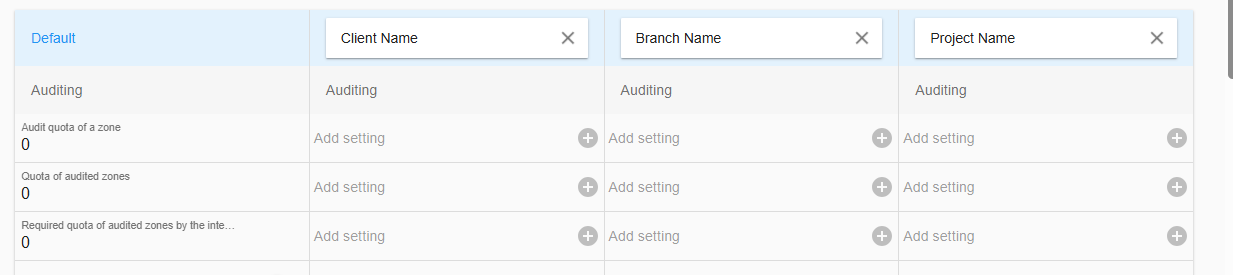
Verwendung der Hierarchie
Immer prüfen, welche Ebene bearbeitet wird (oben auf der Einstellungsseite angezeigt), da jede Ebene die darüber liegenden überschreibt.
Einstellung hinzufügen oder entfernen
Eine Einstellung ohne Werte ist an der hellgrauen Schriftfarbe erkennbar. In der Standardspalte wird auch der Einstellungsname angezeigt. In allen anderen Ebenen wird Einstellung hinzufügen angezeigt, wenn auf dieser Ebene keine Einstellung verfügbar ist.
Um eine Einstellung hinzuzufügen, klicken Sie in den Einstellungsrahmen oder auf  Durch das Hinzufügen einer Einstellung zu einer Ebene wird die Einstellung von der nächsten verfügbaren Ebene darüber hinzugefügt und zur Bearbeitung bereitgestellt. Es gibt einige Ausnahmen, die bei der jeweiligen Einstellungsbeschreibung erläutert werden.
Um eine Einstellung von einer Ebene zu entfernen, klicken Sie auf  und bestätigen Sie das Popup.
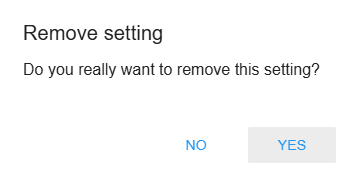
Benutzerdefinierter Code-Editor
Wenn die Einstellung benutzerdefinierten Code enthält, erhält die Einstellung das Code-Symbol 
Durch Klicken auf die Einstellung öffnet sich der interne Code-Editor. Der Code-Editor unterstützt den Code-Vollbildmodus und Code-Validierungen basierend auf einem internen Code-Schema.
Der benutzerdefinierte Code kann nicht gespeichert werden, wenn kritische Code-Fehler festgestellt werden. Warnungen werden angezeigt, aber der Code kann trotzdem gespeichert werden.
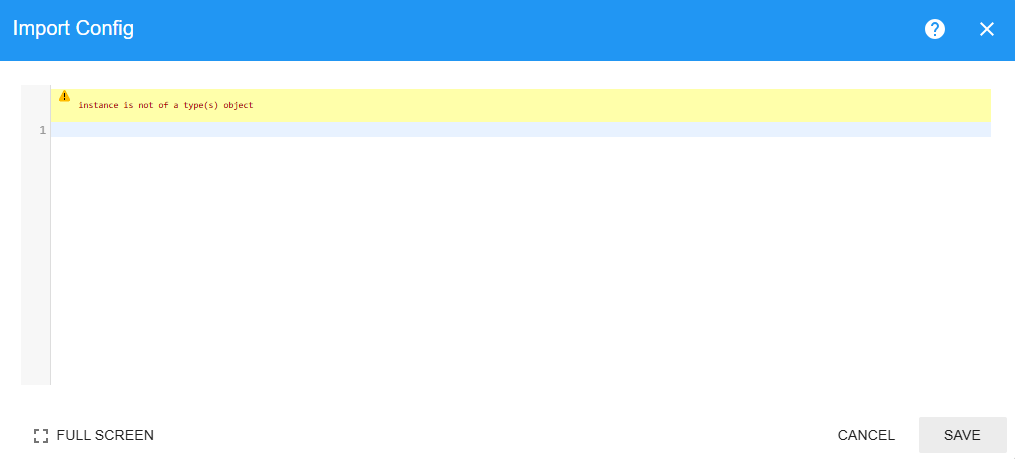
Das  öffnet eine Anleitung für alle Einstellungen mit Code-Funktionalität.
Kategorien
Prüfung
Einstellungen zur Steuerung von Prüfungsquoten und Verifizierungsanforderungen.
Prüfungsquota
Mindeststichprobenprozentsatz der Scans, der während der Verifizierung verifiziert werden muss.
- Typ: Zahl (0–100)
- Standard: 0
- Bezeichnung: „Prüfungsquota einer Zone"
- Beschreibung: Der Prozentsatz der Scans in einer Zone, der während des Prüfungsprozesses verifiziert werden muss.
- Beispiel: Wenn auf 10 % eingestellt und eine Zone 100 Scans hat, müssen mindestens 10 Scans verifiziert werden.
- Anwendungsfall: Qualitätskontrolle sicherstellen, ohne 100 % Verifizierung aller Scans zu erfordern.
- Auswirkung:
- Benutzer können eine Verifizierungssitzung erst schließen, wenn diese Quote erfüllt ist
- Wird in der Verifizierungsoberfläche angezeigt, zeigt aktuelle vs. erforderliche Quote
- Auf 0 setzen, um die Quotaanforderung zu deaktivieren
Zonenprüfungsquota
Prozentsatz der Zonen, die bei Projektabschluss verifiziert werden müssen.
- Typ: Zahl (0–100)
- Standard: 0
- Bezeichnung: „Quote der geprüften Zonen"
- Beschreibung: Der Prozentsatz der Zonen in einem Projekt, der vor dem Projektabschluss geprüft (verifiziert) werden muss.
- Beispiel: Wenn auf 10 % eingestellt und ein Projekt 500 Zonen hat, müssen mindestens 50 Zonen verifiziert werden.
- Anwendungsfall: Statistische Stichprobenziehung von Zonen im gesamten Projekt sicherstellen.
- Auswirkung:
- Projekt kann erst geschlossen werden, wenn diese Quote erfüllt ist
- Fehlermeldung zeigt, wie viele weitere Zonen verifiziert werden müssen
- Kritisch für die Projektabschlussvalidierung
Qualitätssicherungsquota
Prozentsatz der Zonen, die bei Projektabschluss vom Qualitätssicherungsmanager verifiziert werden müssen
- Typ: Zahl (0–100)
- Standard: 0
- Bezeichnung: „Erforderliche Quote der vom Qualitätssicherungsmanager geprüften Zonen"
- Beschreibung: Der Prozentsatz der Zonen, der von einem Qualitätssicherungsmanager verifiziert werden muss.
- Beispiel: Wenn auf 5 % eingestellt, muss der QS-Manager 5 % aller Zonen unabhängig verifizieren.
- Anwendungsfall: Unabhängige Qualitätskontrolle durch einen dedizierten Prüfer sicherstellen.
- Auswirkung:
- Projekt kann erst geschlossen werden, wenn der QS-Manager seine Quote erfüllt hat
- Nur Benutzer mit der Rolle „Qualitätssicherungsmanager" zählen für diese Quote
- Getrennt von der allgemeinen Zonenquota-Anforderung
Alle erforderlichen Scans prüfen
Steuern, ob alle Pflichtscans bei der Einreichung der Verifizierungssitzung verifiziert werden müssen
- Typ: Boolean (wahr/falsch)
- Standard: falsch
- Bezeichnung: „Alle markierten Scans müssen geprüft werden"
- Beschreibung: Wenn aktiviert, müssen ALLE mit „needsVerification" markierten Scans verifiziert werden.
- Anwendungsfall: Pflichtverifizierung bestimmter Scans unabhängig von der Prüfungsquota durchsetzen.
- Auswirkung:
- Überschreibt Prüfungsquota für markierte Scans
- Verifizierungssitzung kann erst geschlossen werden, wenn alle markierten Scans geprüft sind
- Wird für kritische Artikel verwendet, die eine 100 % Verifizierung erfordern
Erforderliche Scans beim Abschluss prüfen
Steuern, ob alle Pflichtscans beim Projektabschluss verifiziert werden müssen
- Typ: Boolean (wahr/falsch)
- Standard: falsch
- Bezeichnung: „Alle markierten Scans müssen beim Projektabschluss geprüft werden"
- Beschreibung: Ähnlich wie Alle erforderlichen Scans prüfen, aber nur beim Projektabschluss durchgesetzt.
- Anwendungsfall: Flexibilität während des Projekts ermöglichen, aber vollständige Verifizierung beim Abschluss erzwingen.
- Auswirkung:
- Projekt kann nicht geschlossen werden, wenn markierte Scans unverifiziert bleiben
- Weniger streng als Alle erforderlichen Scans prüfen während normaler Operationen
Aktion erforderlich nach offener Änderungsanforderung
Control if further actions than reviewing the change request are allowed after a not auto merged change request was submitted
- Typ: Boolean (wahr/falsch)
- Standard: falsch
- Bezeichnung: "Aktion erforderlich nach offener Änderungsanforderung"
- Beschreibung: Für alle Änderungsanforderungen, die Änderungen der Mengen beinhalten, ist eine Überprüfung erforderlich, bevor weitere Zonensitzungen zugelassen werden. Zudem wird beim Projektabschluss geprüft, ob alle Änderungsanforderungen überprüft wurden.
- Anwendungsfall: Erfordert die Überprüfung jeder einzelnen Änderungsanforderung, die Mengenänderungen beinhaltet.
- Auswirkung: Das Projekt kann nicht geschlossen werden, wenn Änderungsanforderungen mit Mengenänderungen noch nicht geprüft wurden.
Externer Prüfer
Prüfungsquota
Mindeststichprobenprozentsatz der Scans, der während der Verifizierung eines externen Prüfers verifiziert werden muss.
- Typ: Zahl (0–100)
- Standard: 0
- Bezeichnung: „Prüfungsquota einer Zone"
- Beschreibung: Der Prozentsatz der Scans in einer Zone, der während des Prüfungsprozesses des externen Prüfers verifiziert werden muss.
- Beispiel: Wenn auf 10 % eingestellt und eine Zone 100 Scans hat, müssen mindestens 10 Scans verifiziert werden.
- Anwendungsfall: Qualitätskontrolle sicherstellen, ohne 100 % Verifizierung aller Scans zu erfordern.
- Auswirkung:
- Benutzer können eine Änderungsanforderungssitzung erst schließen, wenn diese Quote erfüllt ist
- Wird in der Verifizierungsoberfläche angezeigt, zeigt aktuelle vs. erforderliche Quote
- Auf 0 setzen, um die Quotaanforderung zu deaktivieren
Alle erforderlichen Scans prüfen
Steuern, ob alle Pflichtscans bei der Einreichung der Änderungsanforderungssitzung verifiziert werden müssen
- Typ: Boolean (wahr/falsch)
- Standard: falsch
- Bezeichnung: „Alle markierten Scans müssen geprüft werden"
- Beschreibung: Wenn aktiviert, müssen ALLE mit „needsVerification" markierten Scans verifiziert werden.
- Anwendungsfall: Pflichtverifizierung bestimmter Scans unabhängig von der Prüfungsquota durchsetzen.
- Auswirkung:
- Überschreibt Prüfungsquota für markierte Scans
- Verifizierungssitzung kann erst geschlossen werden, wenn alle markierten Scans geprüft sind
- Wird für kritische Artikel verwendet, die eine 100 % Verifizierung erfordern
Prüfungsprozess
Einstellungen, die definieren, wie die Prüfung durchgeführt wird.
Verifizierfunktion
Die Verifizierfunktion ist eine Funktion zur Berechnung von Schwellenwerten und zur Markierung von Positionen als Pflichtverifizierungen während des Verifizierungsprozesses
- Typ: JavaScript-Code (mehrzeilig)
- Bezeichnung: „Verifizierfunktion"
- Beschreibung: JavaScript-Code, der ausgeführt wird, um zu bestimmen, welche Zonen/Scans verifiziert werden müssen.
- Verfügbare Funktionen:
- Technische Dokumentation → Verifizierfunktion
- Anwendungsfälle:
- Zonen zur Verifizierung markieren
- Verifizierung basierend auf Zähldiskrepanzen auslösen
- Benutzerdefinierte Geschäftslogik
- Auswirkung:
- Läuft, wenn sich der Zonenstatus ändert
- Bestimmt, welche Scans in der Verifizierungsoberfläche angezeigt werden
- Kritisch für die Prüfungsworkflow-Automatisierung
Verifizierungsgründe
Die Verifizierungsgründe bieten eine Auswahl von Gründen, für die eine Verifizierung/Änderung durchgeführt wurde. Der Benutzer muss einen Grund aus dieser Liste auswählen, wenn während des Verifizierungsprozesses eine Änderung vorgenommen wird.
- Typ: Zeichenfolge (durch Semikolon getrennt)
- Bezeichnung: „Verifizierungsgründe"
- Beschreibung: Vordefinierte Gründe, die Benutzer bei der Verifizierung von Scans auswählen können.
- Format: Mehrere Gründe mit Semikolons (;) trennen
- Beispiel: „Zähldiskrepanz;Falscher Standort;Beschädigter Artikel;Fehlender Barcode"
- Anwendungsfall: Verifizierungshinweise für Berichterstattung und Analyse standardisieren.
- Auswirkung:
- Erscheint als Dropdown in der Verifizierungsoberfläche
- Hilft bei der Kategorisierung von Verifizierungsbefunden
- Verbessert die Qualität des Prüfprotokolls
Scans transformieren
Die Scan-Transformationsfunktion ist eine Funktion zur Durchführung benutzerdefinierter Berechnungen für Positionspreis- und Stückzahlwerte, die für die Live-Statistikwerte verwendet werden
- Typ: JavaScript-Code (mehrzeilig)
- Bezeichnung: „Scans transformieren"
- Beschreibung: JavaScript-Code, der Scandaten automatisch modifiziert.
- Verfügbare Funktionen: Technische Dokumentation → Scans transformieren
- Anwendungsfälle:
- Abgeleitete Werte berechnen
- Datennormalisierung
- Auswirkung:
- Läuft, wenn sich der Zonenstatus ändert
- Kann die Scan-Preis- und Scan-Stückzahl-Eigenschaft modifizieren
- Sorgfältig verwenden, um Datenbeschädigung zu vermeiden
Stichprobenmodus
Der Stichprobenmodus ist eine Funktion, die in der Android-App verwendet wird, um während einer Inventur nach einem beliebigen Artikel in den Projektdatensätzen zu suchen und zu scannen. Siehe auch Stichprobenmodus
- Typ: YAML-Konfiguration
- Bezeichnung: „Stichprobenmodus"
- Beschreibung: Konfiguration für stichprobenbasierte Prüfungsmodi.
- Verfügbare Funktionen: Schema-Dokumentation
- Anwendungsfall: Verschiedene Prüfungsstichprobenstrategien konfigurieren.
- Auswirkung: Beeinflusst die Felder, nach denen Scans gesucht werden können, und welche Details im Stichprobenmodus angezeigt werden.
Feldvalidierung
Die Feldvalidierung ist eine Hilfsfunktion für die Erstellung von Kunden, Niederlassungen und Projekten. Eine RegEx-Validierung kann für jedes Feld der genannten Kategorien definiert werden.
- Typ: YAML-Konfiguration
- Bezeichnung: „Feldvalidierung"
- Beschreibung: Konfiguration für die Validierung von Kunden-, Niederlassungs- und Projektnamen.
- Verfügbare Funktionen: Schema-Dokumentation
- Anwendungsfall: Verschiedene Validierungen für die Erstellung von Kunden, Niederlassungen und Projekten konfigurieren.
- Auswirkung: Betrifft die Erstellung von Kunden, Niederlassungen und Projekten mit allen verfügbaren Feldern. Dies gilt auch für den Projektimport.
Weitere Informationen zu RegEx-Mustern und -Tests unter Learn RegEx
Kommunikation
Einstellungen für E-Mail-Benachrichtigungen und Exporte.
Export an E-Mail-Adresse
Eine E-Mail-Adresse definieren, an die jede generierte Exportdatei gesendet wird
- Typ: Zeichenfolge (E-Mail-Adresse)
- Standard: „" (leer)
- Bezeichnung: „Export-E-Mail-Adresse"
- Beschreibung: Primäre E-Mail-Adresse zum Senden von Exportdateien.
- Format: Gültige E-Mail-Adresse
- Beispiel: „inventur@unternehmen.de"
- Anwendungsfall: Projektexporte automatisch an Stakeholder senden.
Export an E-Mail-Adresse (CC)
Eine E-Mail-Adresse definieren, an die jede generierte Exportdatei in CC gesendet wird.
- Typ: Zeichenfolge (E-Mail-Adresse)
- Standard: „" (leer)
- Bezeichnung: „Export-E-Mail-Adresse CC"
- Beschreibung: CC-E-Mail-Adresse für Exportbenachrichtigungen.
- Format: Gültige E-Mail-Adresse
- Beispiel: „manager@unternehmen.de"
- Anwendungsfall: Weitere Stakeholder informiert halten.
E-Mail senden, wenn Projekt geschlossen, aber nicht veröffentlicht wird
Die E-Mail-Sendefunktion für Projekte aktivieren/deaktivieren, die geschlossen, aber nicht innerhalb der Auslösezeit in den veröffentlichten Status verschoben werden. Nur Projekte, die nach der Aktivierung dieser Funktion geschlossen werden, werden für den E-Mail-Auslöser berücksichtigt.
- Typ: Boolean (wahr/falsch)
- Standard: falsch
- Bezeichnung: „E-Mail senden"
- Beschreibung: Benachrichtigungs-E-Mail senden, wenn ein Projekt geschlossen, aber nach der definierten Auslösezeit nicht veröffentlicht wurde.
- Anwendungsfall: Team darauf aufmerksam machen, dass das Projekt den letzten Veröffentlichungsschritt erwartet.
Zu sendende E-Mail
Die Vorlage für die zu sendende E-Mail definieren
- Typ: E-Mail-Vorlage (Kopfzeile, Hauptteil, Signatur)
- Standard: Drei leere Zeichenfolgen [„", „", „"]
- Bezeichnung: „E-Mail für Export-Benachrichtigungstimeout"
- Beschreibung: E-Mail-Vorlage, die gesendet wird, wenn der Export länger als erwartet dauert.
- Format: Array aus drei Zeichenfolgen:
- Kopfzeile/Betreff
- Haupttext
- Signatur
- Beispiel:
- Kopfzeile: „Export verzögert – Projekt {projectName}"
- Hauptteil: „Der Export für Projekt {projectName} dauert länger als erwartet..."
- Signatur: „Stripes Inventursystem"
- Verfügbare Platzhalter:
\{projectName\}- Projektname{\{projectCode\}}- Projektcode\{client\}- Kundenname\{branch\}- Niederlassungsname
E-Mail senden von
Die Absender-E-Mail-Adresse definieren
- Typ: Zeichenfolge
- Standard: „stripes <no-reply@stripesapp.net>"
- Bezeichnung: „Standard-Absender"
- Beschreibung: Die „Von"-Adresse für System-E-Mails.
- Format: „Anzeigename <email@adresse.de>"
- Beispiel: „Inventursystem <noreply@unternehmen.de>"
E-Mail-Empfänger
Die Liste der E-Mail-Empfänger definieren
- Typ: Zeichenfolge (kommagetrennte E-Mails)
- Standard: undefiniert
- Bezeichnung: „Empfänger"
- Beschreibung: Zusätzliche Empfänger für Systembenachrichtigungen.
- Format: Kommagetrennte E-Mail-Adressen
- Beispiel: „adminATunternehmen.de, managerATunternehmen.de"
- Speicherverhalten: Speichert nur beim Navigieren weg (saveOnExit: true)
Auslösezeit
Die Zeit definieren, nach der die E-Mail gesendet wird, wenn das Projekt nach dem Schließen nicht den Status „Veröffentlicht" hat.
- Typ: Zahl (Minuten)
- Standard: 10
- Min: 1
- Bezeichnung: „Auslösezeit (Min.)"
- Beschreibung: Minuten vor dem Senden der Export-Timeout-Benachrichtigung.
- Beispiel: 30 bedeutet, E-Mail senden, wenn der Export länger als 30 Minuten dauert.
Konfigurationen
Komplexe YAML/JSON-Konfigurationen für erweiterte Funktionen.
Importkonfiguration
Die Importkonfiguration definiert die Importmuster und Dateivalidierungen, die auf der Importseite verfügbar sind
- Typ: YAML-Konfiguration (mehrzeilig)
- Bezeichnung: „Import-Konfig"
- Beschreibung: Konfiguration für Dateiimportregeln und -validierung.
- Format: YAML
- Verfügbare Funktionen:
- Anwendungsfälle:
- Importdateimuster definieren
- Dateiformate validieren
- Spalten auf Felder abbilden
- Importregeln festlegen
- Auswirkung: Steuert, welche Dateien importiert werden können und wie sie verarbeitet werden
Das Hinzufügen einer Konfiguration auf einer untergeordneten Ebene ist standardmäßig „leer". Was unter „Import" verfügbar ist, ist eine Kombination aller Ebenen. Eine Konfiguration wird nur überschrieben, wenn dieselbe ID verwendet wird.
Exportkonfiguration
Die Exportkonfiguration definiert die Exportdateien, die auf der Exportseite verfügbar sind
- Typ: YAML-Konfiguration (mehrzeilig)
- Bezeichnung: „Export-Konfig"
- Beschreibung: Konfiguration für Exportformate und -ziele.
- Format: YAML
- Verfügbare Funktionen:
- Anwendungsfälle:
- Exportdateiformate definieren
- Exportziele konfigurieren
- Exportfilter festlegen
- Exportspalten anpassen
Das Hinzufügen einer Konfiguration auf einer untergeordneten Ebene ist standardmäßig „leer". Was unter Berichte/Exporte verfügbar ist, ist eine Kombination aller Ebenen. Ein Export wird nur überschrieben, wenn derselbe Schlüssel verwendet wird.
Scan-Flow-Konfiguration
Die Scan-Flow-Konfiguration definiert die Scan-Oberfläche und das Verhalten auf dem mobilen Gerät sowie jeden Ablauf zum Hinzufügen von Scans.
- Typ: YAML-Konfiguration (mehrzeilig)
- Bezeichnung: „Scan-Flow-Konfig"
- Beschreibung: KRITISCHE Konfiguration, die die gesamte Scan-Oberfläche und das Verhalten definiert.
- Format: YAML
- Verfügbare Funktionen: Schema-Dokumentation
- Auswirkung: Steuert den gesamten Scan- und Verifizierungsprozess und die Benutzererfahrung
- Siehe auch Scan-Bildschirm
Positionsverifizierungskonfiguration
Einstellung zum Aktivieren/Deaktivieren des Verifizierungsmodus „Positionsverifizierung", der die Scanliste für die Verifizierung enthält
- Typ: YAML-Konfiguration (mehrzeilig)
- Bezeichnung: „Positionsverifizierungs-Konfig"
- Beschreibung: Regeln zur Verifizierung einzelner Scanpositionen.
- Format: YAML
- Verfügbare Funktionen: Schema-Dokumentation
- Auswirkung: Aktiviert/deaktiviert den Verifizierungsmodus „Positionsverifizierung"
- Siehe Positionszählung
Zonenverifizierungskonfiguration
Verhalten des Zonenverifizierungsmodus „Zonenzählung" steuern
- Typ: YAML-Konfiguration (mehrzeilig)
- Bezeichnung: „Zonenzählungs-Verifizierungs-Konfig"
- Beschreibung: Regeln zur Verifizierung von Zonen-Gesamtzählungen.
- Format: YAML
- Verfügbare Funktionen: Schema-Dokumentation
- Anwendungsfälle:
- Gesamtzonenzählungen validieren
- Mit erwarteten Zählungen vergleichen
- Toleranzschwellenwerte festlegen
- Siehe Zonenzählung
Konfiguration für unsichtbare Zählung
Einstellung zum Aktivieren/Deaktivieren des Verifizierungsmodus „Unsichtbare Zählungsverifizierung", der die Scanliste für die Verifizierung enthält Dieser Verifizierungsmodus ähnelt der Positionsverifizierung, zeigt jedoch nicht den ursprünglichen Zählwert.
Der Benutzer hat zwei Versuche, die korrekte Anzahl dieses Produkts einzugeben. Nach dem zweiten Versuch werden alle Vorkommen dieses Produkts mit der Zählung angezeigt. Der Benutzer kann wählen, ob die Änderung beibehalten oder auf den ursprünglichen Zählwert zurückgesetzt werden soll.
Siehe auch Unsichtbare Zählung
- Typ: YAML-Konfiguration (mehrzeilig)
- Bezeichnung: „Unsichtbare Zählungs-Verifizierungs-Konfig"
- Beschreibung: Konfiguration für die Behandlung von Artikeln, die nicht physisch gezählt, aber in der Datenbank vorhanden sind.
- Format: YAML
- Verfügbare Funktionen: Schema-Dokumentation
- Auswirkung: Aktiviert/deaktiviert den Verifizierungsmodus „Unsichtbare Zählungsverifizierung"
Zonenverknüpfungskonfiguration
Verhalten des Zonenverifizierungsmodus „Zonenzählung" steuern. Der Prozess ist nur für die mobile App verfügbar.
- Typ: YAML-Konfiguration (mehrzeilig)
- Bezeichnung: „Zonenverknüpfungs-Konfig"
- Beschreibung: Konfiguration zum Hinzufügen benutzerdefinierter Eigenschaften zu verknüpften Zonen.
- Format: YAML
- Verfügbare Funktionen: Schema-Dokumentation
- Anwendungsfälle:
- Eltern-Kind-Zonenbeziehungen definieren
- Zonen für Berichte gruppieren
- Auswirkung: Steuert den gesamten Zonenverknüpfungsprozess und die Benutzererfahrung
- Siehe Zonenverknüpfung
Zonecode-Konfiguration
Verhalten des Scanners während der Zonenanmeldung beim Scannen oder Verifizieren steuern.
- Typ: YAML-Konfiguration (mehrzeilig)
- Bezeichnung: „Zonecode-Konfig"
- Beschreibung: KRITISCHE Konfiguration, die das Zonecode-Format und Generierungsregeln definiert.
- Format: YAML
- Verfügbare Funktionen: Schema-Dokumentation
- Anwendungsfälle:
- Zonennamenskonventionen definieren
- Zonencodes validieren
- Zonenbereiche automatisch generieren
- Scanner zwingen, auf Servervalidierungen zu warten
- Auswirkung: Erforderlich für die Zonenerstellung auf der Zonenseite oder während der Zonenverknüpfung
- Siehe auch Zonen und Zonenverknüpfung
Zonenlisten-Konfiguration
Filter und Übersetzungen für die Planungsseite und das Projekt-Dashboard steuern
- Typ: YAML-Konfiguration (mehrzeilig)
- Bezeichnung: „Zonenlisten-Konfig"
- Beschreibung: Konfiguration für Zonenlistenansichten und -filterung.
- Format: YAML
- Anwendungsfall: Anpassen, wie Zonen aufgelistet und organisiert werden
Sandbox-Variablen
Sandbox-Variablen sind eine Reihe von Schlüssel-Wert-Paaren, die definiert und in jedem Sandbox-JavaScript-Code verwendet werden können.
- Typ: Schlüssel-Wert-Paare
- Bezeichnung: „Sandbox-Variablen"
- Beschreibung: Benutzerdefinierte Variablen, die in der Verifizierfunktion, Scan-Transformation und Export-Code verfügbar sind.
- Format: JSON-Objekt mit Schlüssel-Wert-Paaren
- Anwendungsfall: Wiederverwendbare Werte für benutzerdefinierte Skripte speichern
- Zugang: Variablen als
sandbox.variableNameverfügbar
Registrierungskonfiguration
Die Registrierungskonfiguration definiert, wie Registrierungsimporte behandelt werden. Der Registrierungsimport ist auf der Importseite verfügbar. Er behandelt sowohl Vollzeit- als auch Zeitarbeiter-Registrierungen.
- Typ: YAML-Konfiguration (mehrzeilig)
- Bezeichnung: „Registrierungs-Konfig"
- Beschreibung: Konfiguration für Benutzerregistrierungsvorlagen und -regeln.
- Format: YAML
- Anwendungsfälle:
- Registrierungsvorlagen definieren
- Standardrollen festlegen
- Registrierungsvalidierung konfigurieren
Fingerscanner-Konfiguration
Die Fingerscanner-Einstellungen stellen jeden Typ von Zeichenfolge bereit, die als QR-Code während des Kopplungsprozesses des Fingerscanners angezeigt wird, um Einstellungen für den Fingerscanner vorzuladen.
- Typ: Zeichenfolge
- Standard: undefiniert
- Bezeichnung: „Fingerscanner-Konfig"
- Beschreibung: Konfiguration für die Fingerabdruckscanner-Integration.
- Format: Zeichenfolge (Format hängt vom Scannertyp ab)
- Anwendungsfall: Biometrische Authentifizierung für Scanner integrieren
- Auswirkung: Siehe Fingerscanner
Bildbibliothek
Die Bildbibliothek ist eine Reihe von Schlüssel-Wert-Paaren, die definiert und in jedem Sandbox-Code verwendet werden können.
- Typ: Schlüssel-Wert-Paare
- Bezeichnung: „Bildbibliothek"
- Beschreibung: Benutzerdefinierte Bilddateien, die im Export-Code verfügbar sind
- Format: PNG-Dateien erlaubt
- Anwendungsfall: Wiederverwendbare Bilder für benutzerdefinierte Skripte speichern
- Zugang: Variablen mit der Hilfsfunktion
findAssets()verfügbar
QM-Modul
Konfiguration des Qualitätsmanagementmoduls.
QM-Modul
Verfügbarkeit aus der Benutzeroberfläche steuern und Ausführung der Schwellenwertberechnungen des QM-Moduls aktivieren/deaktivieren.
- Typ: Boolean (wahr/falsch)
- Standard: falsch
- Bezeichnung: „QM-Modul"
- Beschreibung: QM-Modul aktivieren/deaktivieren
- Anwendungsfall: Einige Schwellenwertverifizierungen unabhängig vom Hauptverifizierungsprozess durchführen
Scan-QM-Konfiguration
Schwellenwertberechnungen für Scanwerte definieren, die im QM-Modul zur Genehmigung erscheinen und unabhängig von allen anderen Verifizierungen arbeiten.
- Typ: YAML-Konfiguration (mehrzeilig)
- Bezeichnung: „Scan-Konfiguration"
- Beschreibung: Konfiguration für Genehmigungsschwellenwerte und -regeln auf QM-Scanebene.
- Format: YAML
- Verfügbare Funktionen:
- Anwendungsfälle:
- Definieren, wann Scans QM-Genehmigung benötigen
- Differenzschwellenwerte festlegen
- Benachrichtigungsstufen konfigurieren (Info, Warnung, Benachrichtigung)
- Auswirkung: Bestimmt, welche Scans im QM-Modul zur Genehmigung erscheinen
Zonen-QM-Konfiguration
Schwellenwertberechnungen für Zonenwerte definieren, die im QM-Modul zur Genehmigung erscheinen und unabhängig von allen anderen Verifizierungen arbeiten.
- Typ: YAML-Konfiguration (mehrzeilig)
- Bezeichnung: „Zonen-Konfiguration"
- Beschreibung: Konfiguration für Genehmigungsschwellenwerte und -regeln auf QM-Zonenebene.
- Format: YAML
- Verfügbare Funktionen:
- Anwendungsfälle:
- Definieren, wann ganze Zonen QM-Genehmigung benötigen
- Schwellenwerte auf Zonenebene festlegen
- Zonenverifizierungsregeln konfigurieren
- Auswirkung: Bestimmt, welche Zonen im QM-Modul zur Genehmigung erscheinen
Match-Daten
Die Match-Datenbank ist die SQLite-Datenbankdatei, die die importierten Match-Daten enthält, und wird zur Validierung gescannter Barcodes auf dem Android-Gerät und zum Hinzufügen von Eigenschaften wie Beschreibung, Preis usw. verwendet. Siehe auch die Ausführungsseite Datenbank
Match-Datenbankname
Den Match-Datenbanknamen, der von den Projekten verwendet wird, vordefinieren.
- Typ: Zeichenfolge mit Variablen
- Standard: „" (leer)
- Bezeichnung: „Match-Datenbankname"
- Validierung: Regex-Muster für gültigen Pfad
- Beschreibung: Vorlage für den Match-Datenbankdateinamen.
- Format: Kann Variablen wie
$\{project.code\},${client.name}enthalten - Beispiel:
match_$\{project.code\} - Anwendungsfall: Dynamische Datenbankbenennung basierend auf Projekteigenschaften
- Auswirkung: Steuert die Datenbankdateibenennung für Geräte-Downloads
Match-Datenbank-Gerätepfad
Gerätespezifische Datenbankpfade konfigurieren
- Typ: Zeichenfolge mit Pfadvariablen
- Standard: „" (leer)
- Bezeichnung: „Match-Datenbank-Gerätepfad"
- Validierung: Regex-Muster für gültigen Pfad
- Beschreibung: Pfad auf dem Gerät, wo die Match-Datenbank gespeichert ist.
- Format: Kann Variablen wie
$\{device.code\}enthalten - Beispiel:
/storage/$\{device.code\}/databases/ - Anwendungsfall: Gerätespezifische Datenbankpfade konfigurieren
- Auswirkung: Wird von Geräten verwendet, um Match-Daten zu finden
Der Pfad ist relativ zum Android-Download-Ordner.
Beispiel: /storage/databases/ → erwartet die Match-Datenbankdatei auf dem Android-Gerät unter /Download/storage/databases/
Match-Daten verifizieren
E-Mail-Benachrichtigung für nicht hochgeladene Match-Daten für einen definierten Zeitraum vor dem Projektstart steuern.
- Typ: Boolean (wahr/falsch)
- Standard: falsch
- Bezeichnung: „Match-Daten verifizieren"
- Beschreibung: Benachrichtigungs-E-Mail senden, wenn das Projekt keine oder veraltete Match-Daten zum definierten Zeitpunkt vor dem Projektstartdatum hat Auslösezeit.
- Anwendungsfall: Team darauf aufmerksam machen, dass das Projekt Match-Daten-Upload erwartet.
Match-Daten-Verifizierungs-E-Mail-Format
Die E-Mail-Vorlage definieren, die gesendet wird, wenn Match-Daten nicht verfügbar sind
- Typ: E-Mail-Vorlage (Kopfzeile, Hauptteil, Signatur)
- Standard: Drei leere Zeichenfolgen [„", „", „"]
- Bezeichnung: „E-Mail für Export-Benachrichtigungstimeout"
- Beschreibung: E-Mail-Vorlage, die gesendet wird, wenn Match-Daten nicht die eingestellte Zeit vor dem Projektstart hochgeladen werden.
- Format: Array aus drei Zeichenfolgen:
- Kopfzeile/Betreff
- Haupttext
- Signatur
- Beispiel:
- Kopfzeile: „Match-Daten nicht hochgeladen – Projekt {projectName}"
- Hauptteil: „Die Match-Daten für Projekt {projectName} wurden nicht hochgeladen"
- Signatur: „Stripes Inventursystem"
- Verfügbare Platzhalter:
\{projectName\}- Projektname{\{projectCode\}}- Projektcode\{client\}- Kundenname\{branch\}- Niederlassungsname
Empfänger der zu sendenden E-Mail
Eine Liste von Empfängern der E-Mail definieren
- Typ: Zeichenfolge (kommagetrennte E-Mails)
- Standard: undefiniert
- Bezeichnung: „Empfänger"
- Beschreibung: Zusätzliche Empfänger für Systembenachrichtigungen.
- Format: Kommagetrennte E-Mail-Adressen
- Beispiel: „adminATunternehmen.de, managerATunternehmen.de"
- Speicherverhalten: Speichert nur beim Navigieren weg (saveOnExit: true)
Auslösezeit
Die Auslösezeit definieren, bevor das System anfängt, E-Mails für fehlende Match-Daten zu senden.
- Typ: Zahl (Stunden)
- Standard: 1
- Min: 1
- Bezeichnung: „Auslösezeit (Std.)"
- Beschreibung: Stunden vor dem Projektstart, um die E-Mail für fehlende Match-Daten zu senden.
- Beispiel: 1 bedeutet, E-Mail senden, wenn Match-Daten 1 Stunde vor dem Projektstart nicht aktualisiert wurden.
Hauptprozess
Mögliche Lagercodes
Die möglichen Lagercodes für die Zonenerstellung auf der Projektvorbereitsungsseite Zonen definieren
- Typ: Zeichenfolge (durch Semikolon getrennt)
- Standard: „" (leer)
- Bezeichnung: „Mögliche Lagercodes"
- Beschreibung: Liste der gültigen Lagercodes für die Validierung.
- Format: Durch Semikolon getrennt
- Beispiel: „LG01;LG02;LG03"
- Anwendungsfall: Lagercodes bei der Dateneingabe validieren
- Auswirkung: Wird bei der Scan-Validierung und Zonenerstellung verwendet
Mögliche Zonenpräfixe
Die möglichen Zonenpräfixe für die Zonenerstellung auf der Projektvorbereitungsseite Zonen definieren
- Typ: Zeichenfolge (durch Semikolon getrennt)
- Standard: „" (leer)
- Bezeichnung: „Mögliche Zonenpräfixe"
- Beschreibung: Liste der gültigen Zonenpräfixe.
- Format: Durch Semikolon getrennt
- Beispiel: „A;B;C;D"
- Anwendungsfall: Zonennamensgebung auf vordefinierte Präfixe beschränken
- Auswirkung: Wird bei der Zonecode-Validierung verwendet
Mögliche Abteilungen
Die möglichen Zonenabteilungen für die Zonenerstellung auf der Projektvorbereitungsseite Zonen definieren
- Typ: Zeichenfolge (durch Semikolon getrennt)
- Standard: „" (leer)
- Bezeichnung: „Mögliche Abteilungen"
- Beschreibung: Liste der gültigen Abteilungscodes für Handheld-Scanner.
- Format: Durch Semikolon getrennt
- Beispiel: „ABT1;ABT2;ABT3"
- Anwendungsfall: Abteilungseingabe auf Scannergeräten einschränken
- Auswirkung: Wird bei der Zonengenerierung und -validierung verwendet
Zusätzliche Zonen-Flags
Die möglichen Zonen-Flags für die Zonenerstellung auf der Projektausführungsseite Planung definieren
- Typ: YAML-Konfiguration (mehrzeilig)
- Bezeichnung: „Zusätzliche Zonen-Flags"
- Beschreibung: Benutzerdefinierte Flags, die auf Zonen gesetzt werden können, um besondere Bedingungen zu markieren.
- Format: YAML-Array von Flag-Definitionen
- Verfügbare Funktionen:
- Anwendungsfälle:
- Zonen mit besonderer Behandlung markieren
- Visuelle Indikatoren in der Planungsansicht
- Zonen nach benutzerdefinierten Kriterien filtern
- Auswirkung: Fügt benutzerdefinierte Flags zur Zonenoberfläche hinzu
Checklistencode
Das PDF-Design für die Checklistengenerierung definieren. Der Checklistendownload ist über Ausführung → Planung oder über die Exportkonfiguration und Ausführung → Berichte/Export verfügbar
- Typ: JavaScript-Code (mehrzeilig)
- Standard: „" (leer)
- Bezeichnung: „Code zur Generierung von Checklisten"
- Beschreibung: Benutzerdefiniertes JavaScript für die PDF-Checklistengenerierung.
- Format: JavaScript
- Verfügbare Funktionen:
- Anwendungsfälle:
- Benutzerdefiniertes PDF-Layout
- Berechnete Felder hinzufügen
- Checklistendaten formatieren
- Bestimmte Informationen einschließen/ausschließen
- Auswirkung: Passt die Zonen-Checklisten-PDF-Ausgabe an
Projekt wiedereröffnen
Steuert, ob und wann Projekte wiedereröffnet werden können. Diese Einstellung kann vom Super-Admin übersprungen werden. Siehe auch Projekt schließen/wiedereröffnen/wiederherstellen
- Typ: Option (Dropdown)
- Optionen:
- „always_allow" - Jedes Projekt kann jederzeit wiedereröffnet werden
- „allow_closed" - Nur geschlossene (nicht veröffentlichte) Projekte können wiedereröffnet werden
- „do_not_allow" - Projekte können nach dem Schließen nicht wiedereröffnet werden
- Standard: „do_not_allow"
- Bezeichnung: „Projekt wiedereröffnen"
- Beschreibung: Steuert, ob und wann Projekte wiedereröffnet werden können.
- Anwendungsfälle:
- Strenge Prüfungsspur: do_not_allow
- Flexibilität für Korrekturen: allow_closed
- Volle Flexibilität: always_allow
- Auswirkung: Kritisch für das Projektlebenszyklusmanagement und die Prüfungs-Compliance
Zeitarbeiter in Live-Statistiken einbeziehen
Zeitarbeiter aus der Gesamten Stripes-Zeit in den Live-Statistiken einschließen/ausschließen.
- Typ: Boolean (wahr/falsch)
- Standard: falsch
- Bezeichnung: „Zeitarbeiter in Live-Statistiken einbeziehen"
- Beschreibung: Ob temporäre Benutzer in Live-Projektstatistiken erscheinen.
- Anwendungsfall: Zeitarbeiter aus der
Gesamten Stripes-Zeitin den Live-Statistiken einschließen/ausschließen - Auswirkung: Betrifft Live-Statistikberechnungen von
Gesamte Stripes-Zeit,Artikel pro StundeundGeschätzte Artikel pro Stunde
Scanprozess
Anmeldung bei Zone mit Funktionstaste
Steuern, ob die Zonenanmeldung durch Auswahl einer Zone aus der vorgeschlagenen Zonenliste erlaubt ist.
- Typ: Boolean (wahr/falsch)
- Standard: falsch
- Bezeichnung: „Bei Zone mit Funktionstaste anmelden"
- Beschreibung: Schnelle Zonenanmeldung über die Scanner-Funktionstaste aktivieren.
- Anwendungsfall: Scanner-Workflow für erfahrene Benutzer optimieren
- Auswirkung: Ändert das Zonenanmeldungsverhalten
- Siehe auch Zone einchecken
Fehlerbehebung
Bei Problemen mit Einstellungen:
- Syntax validieren: Online YAML/JSON-Validatoren verwenden
- Hierarchie überprüfen: Sicherstellen, dass die korrekte Ebene bearbeitet wird
- Konfiguration testen: Zuerst am Testprojekt ausprobieren
- Vor Änderungen sichern: Aktuelle Einstellungen vor größeren Änderungen exportieren
- Administrator kontaktieren: Spezifische Fehlermeldungen und Änderungen angeben
Häufige Probleme
Einstellungen werden nicht wirksam
- Falsche Hierarchieebene ausgewählt
- Einstellung auf niedrigerer Ebene überschrieben
Benutzerdefiniertes JavaScript funktioniert nicht
- Syntaxfehler
- Falsche Funktionsnamen
- Probleme mit dem Variablenbereich
Auch Technische Dokumentation prüfen
Projekt kann nicht geschlossen werden
- Quotas nicht erfüllt (Prüfungsquota, Zonenquota, Qualitätssicherungsquota)
- Gleicher Benutzer hat Zonen gescannt und verifiziert
- Verstöße gegen „Alle erforderlichen Scans prüfen"
- QM-Benachrichtigungen ausstehend
Scan-Oberfläche defekt
- Ungültige ScanFlowConfig
Fehler „Ungültiges JSON" oder „Ungültiges YAML"
- Syntaxfehler in YAML/JSON
- Fehlende Anführungszeichen oder Kommas
- Falsche Einrückung