Zum Hauptinhalt springen

Clients Management

Organizational Structure

Your centralized system for managing client organizations and customer relationships.

What is the Clients Module?​

The Clients module is your centralized system for managing client organizations and customer information. It serves as the foundational level in your organizational hierarchy:

Organizational Hierarchy:
Clients β†’ Branches β†’ Projects

🏒 Customer Database: Think of it as your customer database that connects all project work back to the organizations you serve. Every project ultimately belongs to a client, making this module crucial for organizing work, tracking relationships, and maintaining clear accountability.

πŸ–₯️ Main Interface Overview​

πŸŽ›οΈ Top Action Bar - Your Management Control Center​

Permission-Based Interface

The interface adapts to show only the tools you have permission to use.

ControlPurposeVisibilityFunction
βž• Add New ClientCreate new client organizationsClient creation permissionsOpens streamlined creation form
πŸ” Filter ToggleShow/hide search filtersAll usersControls data table filter visibility
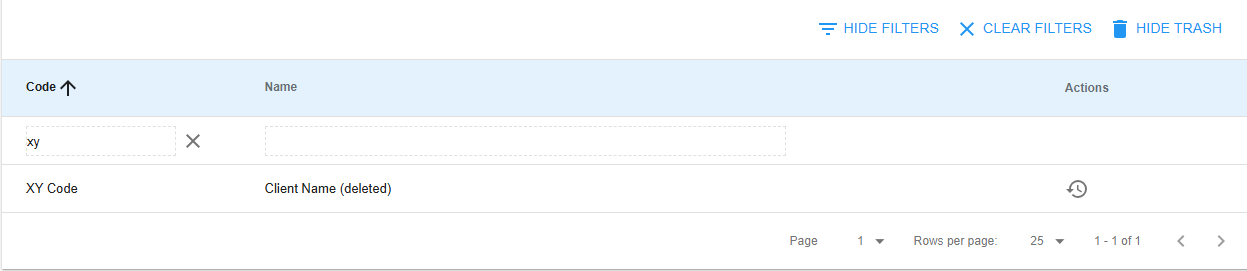
πŸ—‘οΈ Trash View ToggleView deleted/archived clientsDelete/restore permissionsSwitches between active and archived

Key Features:​

Interface Controls:
β”œβ”€β”€ βž• Add New Client Button
β”‚ β”œβ”€β”€ Prominently displayed (left side)
β”‚ β”œβ”€β”€ Permission-controlled visibility
β”‚ └── Streamlined form access
β”œβ”€β”€ πŸ” Filter Toggle Button
β”‚ β”œβ”€β”€ Shows/hides advanced filtering
β”‚ β”œβ”€β”€ Current state indicator
β”‚ └── Keeps interface clean
└── πŸ—‘οΈ Trash View Toggle
β”œβ”€β”€ Active ↔ Deleted client switching
β”œβ”€β”€ Shows deleted item count
└── Data integrity & recovery

πŸ“Š Smart Data Table System​

Clean & Focused Design

The clients table uses an optimized layout with three essential columns for maximum efficiency.

Column Structure​

ColumnPurposeUse Case
🏷️ Client CodeShort, unique identifierQuick reference and sorting
🏒 Client NameFull organization nameClear identification
βš™οΈ ActionsContext-sensitive buttonsIndividual client management

πŸ”„ Intelligent Sorting​

Smart Organization

Click any column header to sort - the system remembers your preferences!

Sorting Features:

  • πŸ“Š Visual indicators β†’ Current sort direction (⬆️ ascending/⬇️ descending)
  • πŸ’Ύ Preference memory β†’ Maintains sort as you navigate and filter
  • ⚑ Efficient organization β†’ Perfect for large client lists

πŸ” Advanced Filtering Capabilities​

Real-Time Search Power

When filters are enabled, input fields appear below each column header for instant searching.

Filter Types Available​

Filter TypeBest ForFeatures
🏷️ Client Code FilteringKnown abbreviations/referencesPartial matches, instant updates
🏒 Client Name FilteringOrganization name searchesFlexible partial matching

πŸŽ›οΈ Filter Management Features​

Real-Time Filtering System:
β”œβ”€β”€ ⚑ Instant Results
β”‚ └── Updates as you type
β”œβ”€β”€ 🎨 Visual Highlights
β”‚ └── Colored background when filters active
β”œβ”€β”€ πŸ”„ Individual Reset Buttons
β”‚ └── Clear specific filters independently
└── πŸ’Ύ State Persistence
└── Maintains filters during navigation
Filter States

Active filters are highlighted with colored backgrounds - easily see what's currently filtering your data!

πŸ” Permission-Based Action System​

Smart Security

The system intelligently shows different action buttons based on your role and the current view mode.

Action Buttons by View Mode​

View ModeAvailable ActionsButton IconsFunction
βœ… Normal ViewEdit, Delete✏️ πŸ—‘οΈModify or archive active clients
πŸ—‘οΈ Trash ViewRestoreβ†ΆRecover deleted clients

πŸ›‘οΈ Context-Sensitive Permissions​

Role-Based Interface
Permission System:
β”œβ”€β”€ πŸ‘€ Role Detection
β”‚ └── Shows only authorized actions
β”œβ”€β”€ πŸ”’ Security Layer
β”‚ └── Prevents unauthorized modifications
β”œβ”€β”€ πŸ‘₯ User-Specific Views
β”‚ └── Different options per user role
└── πŸ›‘οΈ Accident Prevention
└── No buttons = no accidental changes

πŸ’‘ Smart Design: If you don't see a button, you don't have permission for that action - contact your administrator for additional access.

🧭 Navigation and Workflow Integration​

πŸ”„ Seamless Navigation​

  • πŸ–±οΈ Click Navigation: Click any client row (except deleted) to navigate directly to their branches
  • πŸ—οΈ Hierarchy Integration: Integrates smoothly with the organizational hierarchy
  • πŸ“ Context Maintenance: Maintains context as you drill down through the system
  • πŸ‘οΈ Visual Distinction: Deleted clients are visually distinct and non-clickable

⚑ Data Loading and Performance​

  • πŸ“Š Smart Pagination: System loads data efficiently
  • ⏳ Loading Indicators: Clear feedback during data fetch operations
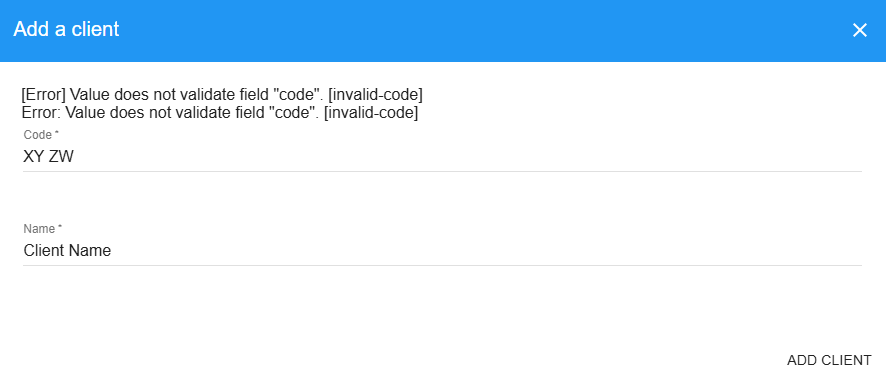
  • 🚨 Error Handling: User-friendly error messages
  • πŸš€ Optimized Performance: Handles large client databases efficiently

πŸ“„ Pagination and Data Management​

Flexible Controls

Located at the bottom of the table for easy data navigation.

πŸŽ›οΈ Pagination Controls​

ControlOptionsPurpose
πŸ“Š Items Per Page25, 50, or 100 clientsCustomize view density
πŸ”„ Page NavigationPrevious/Next pagesBrowse through client data
πŸ“ˆ Total Count DisplayCurrent position & totalContext awareness
βš™οΈ Intelligent DefaultsStarts with 25 itemsOptimal performance

πŸ—οΈ Client Creation and Management​

βž• Adding New Clients​

Streamlined Process

Simple, guided workflow for quick client creation.

Creation Workflow​

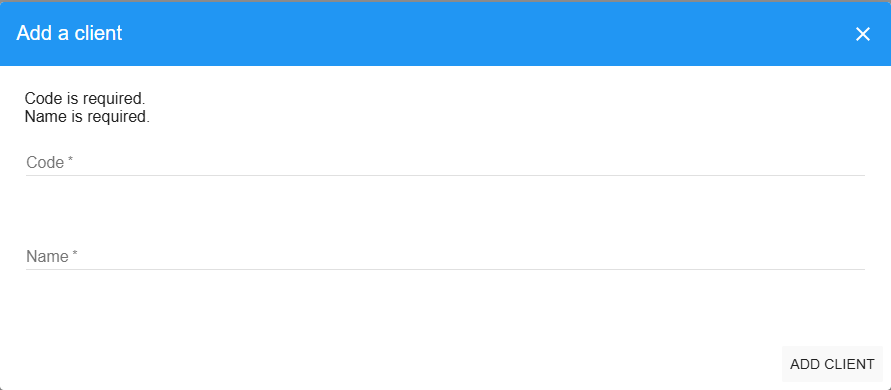
StepFieldRequirementPurpose
1️⃣Click "Add Client"Button accessOpens creation dialog
2️⃣Client CodeRequired βœ…Short, unique identifier
3️⃣Client NameRequired βœ…Full organization name
4️⃣SaveOne-clickImmediate feedback
Field Guidelines

Client Code: Should be memorable and meaningful to your organization (used for quick reference and system integration) Client Name: Primary display name throughout the entire system

Quality Features:

  • βœ… Real-time validation β†’ Clear error messages
  • ⚑ Instant feedback β†’ Immediate save confirmation

✏️ Editing Existing Clients​

Quick Modifications

Efficient workflow for updating client information.

Modification Process:

  1. πŸ–±οΈ Click edit icon (pencil) next to any client
  2. πŸ“‹ Pre-populated form β†’ All current information loaded
  3. βœ… Same validation rules β†’ Consistent experience
  4. ⚑ Instant updates β†’ Changes reflect system-wide immediately
  5. πŸ“Š Change tracking β†’ Full audit trail maintained

πŸ—ƒοΈ Client Archival and Recovery​

πŸ›‘οΈ Safe Deletion Process​

Soft Delete Protection

Clients are archived, not permanently removed - ensuring data safety and recovery options.

  • πŸ—ƒοΈ Soft Delete: Clients are archived, not permanently removed
  • πŸ”— Relationship Preservation: Associated branches and projects remain intact
  • β†Ά Quick Recovery: Easily restore clients if deleted accidentally
  • πŸ” Administrative Control: Only authorized users can delete or restore

πŸ—‘οΈ Trash Management​

  • πŸ‘οΈ Separate View: Toggle to trash view to see archived clients
  • 🎨 Visual Distinction: Deleted clients are clearly marked and non-interactive
  • πŸ“¦ Bulk Operations: Efficient management of multiple archived items
  • πŸ›‘οΈ Data Integrity: Ensures no accidental data loss

🌐 Integration with Organizational Hierarchy​

πŸ”— Relationship Management​

πŸ“‹ Downstream Connections​

  • πŸ›οΈ Multiple Branches: Each client can have multiple branches (regional offices, divisions, etc.)
  • πŸ“Š Project Organization: Branches contain projects that belong to the client organization
  • πŸ—οΈ Clear Structure: Hierarchical structure maintains data organization
  • 🧭 Easy Navigation: Navigate up and down the organizational tree seamlessly

🌍 System-Wide Impact​

  • πŸ“’ Global Presence: Client information appears throughout the system
  • πŸ”„ Automatic Updates: Changes to client names update across all related records
  • πŸ” Smart Filtering: Filtering and reporting respect client relationships
  • πŸ“Š Dashboard Organization: Dashboard views can be organized by client

πŸ”„ Workflow Integration​

πŸ“Š Daily Usage Patterns​

  • πŸ‘¨β€πŸ’Ό Project Managers: Use client list to organize work by customer
  • πŸ”§ Administrators: Manage client relationships and organizational structure
  • πŸ“ˆ Reports and Analytics: Client data provides key grouping and filtering options
  • πŸ’° Billing and Tracking: Essential foundation for financial and time tracking

🎯 Strategic Value​

  • 🀝 Customer Relationship Management: Central repository of client information
  • πŸ—οΈ Organizational Clarity: Clear structure for complex multi-client operations
  • πŸ“ˆ Scalability: System grows efficiently as client base expands
  • πŸ”„ Data Consistency: Single source of truth for client information across all modules

Foundational Excellence

The Clients module serves as the foundational layer that makes the entire project management system organized, scalable, and easy to navigate, ensuring that every piece of work can be clearly traced back to the client organization it serves.

πŸš€ Ready to Manage Your Clients?​

Next Steps: Start by creating your primary clients, then add their branches and begin organizing projects within this structured hierarchy!